
The DeepWave Manual
DeepWave is the Simple8 music editor for the PC Engine and the SuperGrafx. It is a tracker: music is written in rows and columns, one column per channel of the console's sound. What you hear while composing is the console's emulated sound, frame for frame, with the player that will play the music in the game.
The PC Engine's sound
The PC Engine's processor, the HuC6280, has its own sound generator, the PSG:
- 6 channels, each plays a waveform of 32 five-bit values that you draw yourself;
- channels 4 and 5 can also play noise: drums, wind, explosions;
- every channel can play a sample, a recorded sound in 5 bits (DDA mode); the DeepWave player mixes several at once, driven by a timer;
- every channel has its volume (0 to 31) and its left and right panning.
The SuperGrafx has exactly the same sound: a DeepWave song is the same on both.
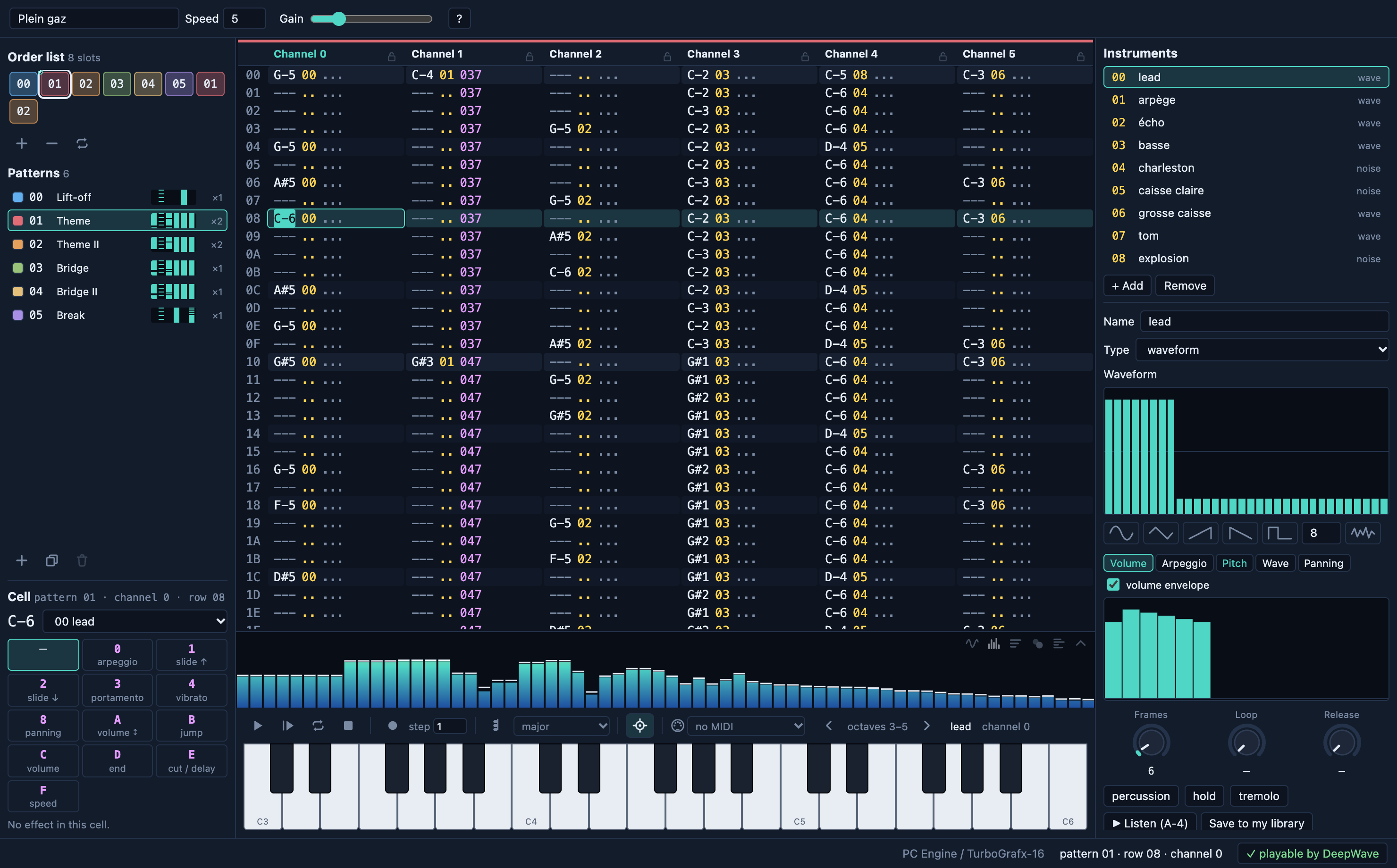
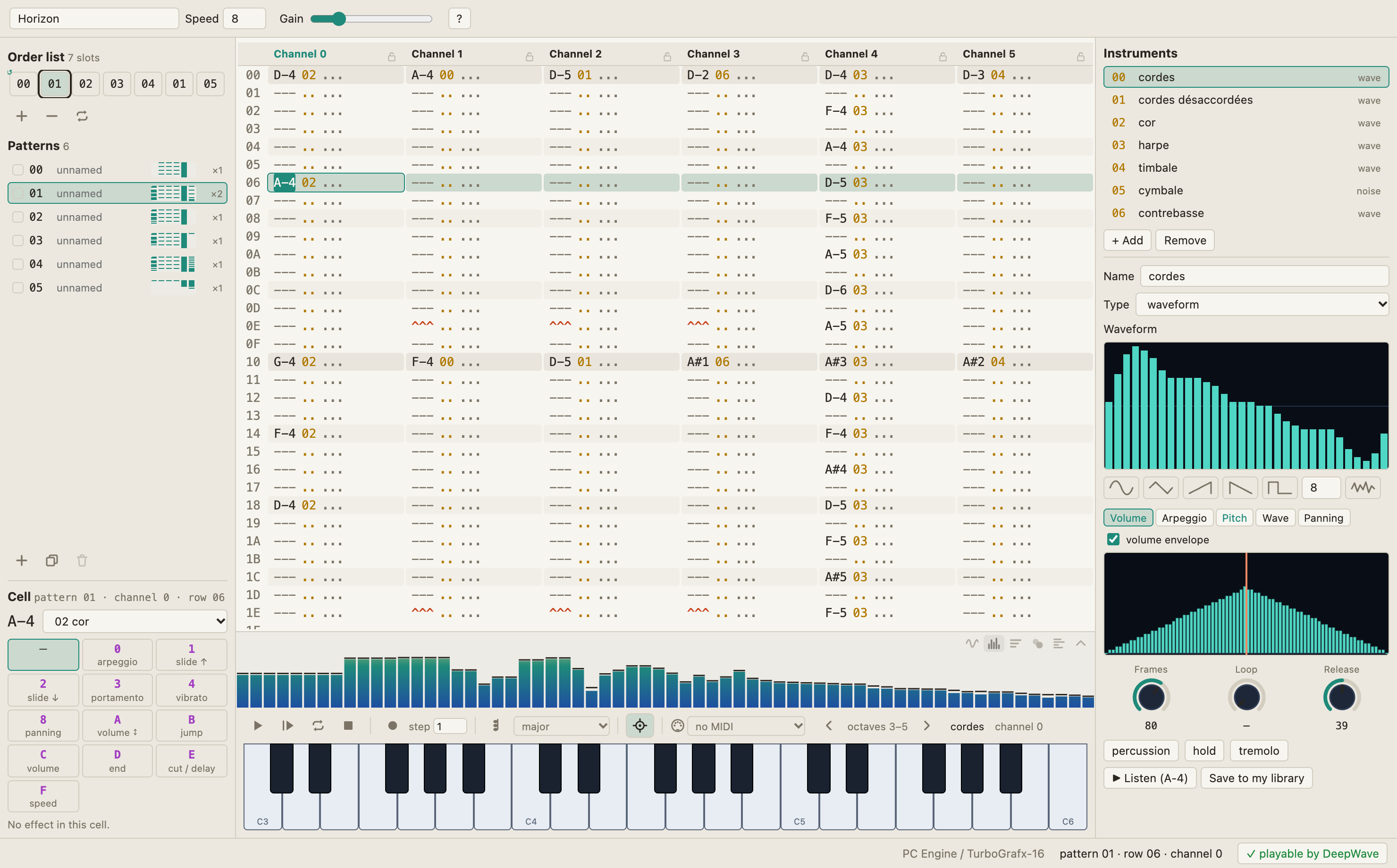
The window
| Area | What it is for |
|---|---|
| Toolbar | the title, the speed (frames per row), the listening volume, help ? |
| Order list (top left) | the order of the patterns; clicking a slot chooses the pattern it plays |
| Patterns | the list of patterns: create, duplicate, delete, rename, color |
| Cell / Selection (bottom left) | the effect of the cursor's cell; the tools of a selection; during playback, the six channels |
| The pattern (center) | the notes, one column per channel |
| Visualization | the scope, the spectrum, the spectrogram, a plasma, the six PSG channels |
| Transport and keyboard | play, loop, stop, record (REC), the step, chords, the MIDI keyboard; the piano |
| Instruments (right) | the list of instruments and the chosen one: waveform, envelopes, listening |
| Status bar | messages, the target machine, the cursor position, what the player cannot play |
The menu bar
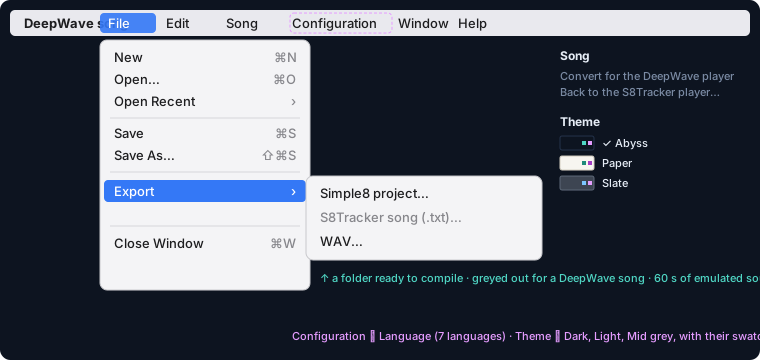
Files, exports, the language and the theme are in the macOS menu bar. The Edit menu acts on the pattern; in a text field (the title, a name) it acts on the text.
The visualization
The strip between the pattern and the piano shows the sound coming out. The icons on its right choose the view: the scope, the spectrum, the spectrogram, a plasma that follows the energy and the bass, the six channels of the PSG; the last one folds it away.



Problems
The button at the bottom right says whether the song can be played by its player (“✓ playable by DeepWave”). Otherwise it counts the problems; a click lists them: a note too low, an effect S8Tracker does not know, a song too big for an 8 KB bank…
A first song
- File ▸ New: choose the machine, PC Engine or SuperGrafx, then Create.
- Song ▸ Convert for the DeepWave player: to get effects, envelopes and several samples.
- Choose an instrument on the right; Listen plays it.
- Turn on REC (the dot, red when on, or ⌘E). Without REC you play without writing anything.
- Play a few notes on the computer keyboard. Each note is written, then the cursor moves down by the step.
- ⟳ (⌘L) loops the pattern. With REC on, what you play during the loop is written at the playing row: real-time recording.
- Change channel (Tab) and instrument for the bass, then the drums: a noise instrument moves the cursor to channel 4 by itself.
- File ▸ Save (⌘S): a
.dwpproject.
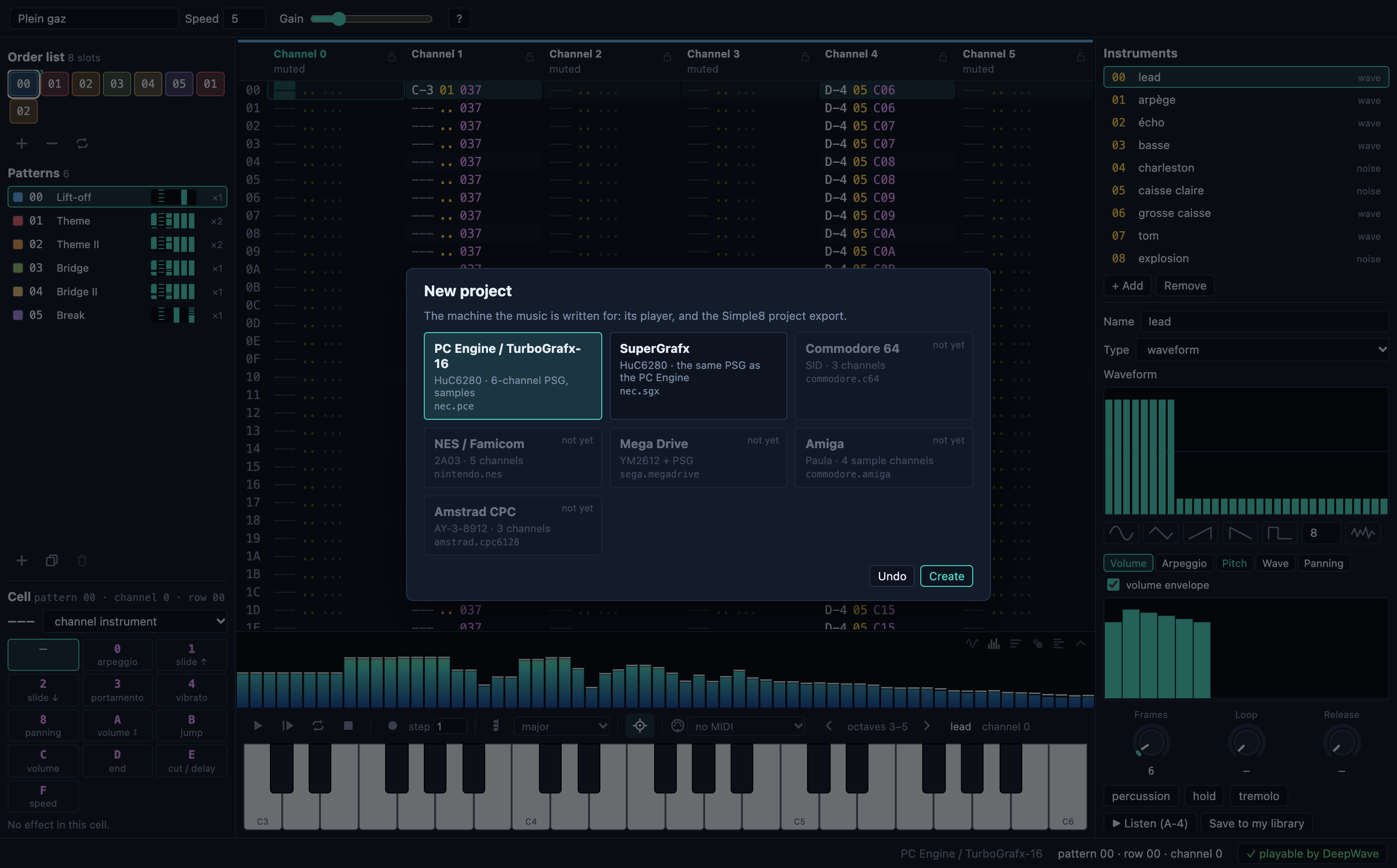
The greyed-out machines (Commodore 64, NES, Mega Drive, Amiga, Amstrad CPC) show where DeepWave may go: they have no player yet.
Playing and writing notes

The computer keyboard
It plays like a piano, by the position of the keys, the same gesture in QWERTY and AZERTY:
| Row | QWERTY | AZERTY | Notes |
|---|---|---|---|
| bottom | Z S X D C V G B H N J M | W S X D C V G B H N J , | one octave, C to B |
| top | Q 2 W 3 E R 5 T 6 Y 7 U I 9 O 0 P | A é Z " E R ( T - Y è U I ç O à P | the octave above |
[ and ], or the arrows above the piano, change the octave.
The piano, the mouse, the MIDI keyboard
- The on-screen piano: click to play, drag to chain notes.
- A MIDI keyboard is chosen in the list next to the MIDI socket. It is remembered, and reconnected as soon as it is plugged in. Middle C (MIDI 60) is DeepWave's
C-4.
Polyphony and chords
Each held note takes a free channel able to play the instrument, starting from the cursor's: several keys together make a chord, on several channels. When no channel is free, the oldest note gives up its own. Chords (⌘K) play 2 or 3 notes with a single key: major, minor, sus4, diminished, augmented, fifth, third, octave.
A cell, and the special notes
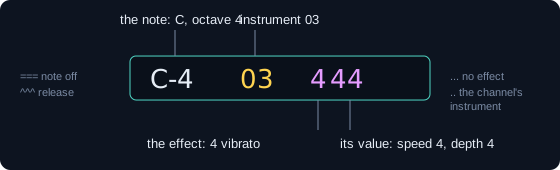
| Written | Key | Effect |
|---|---|---|
=== note off | 1 | cuts the note at once |
^^^ release | the key left of 1, or < | the instrument plays the end of its envelope and fades in its own way |
They are also in the right-click menu of a cell.
REC and the step
- REC off: you play without writing. The instrument and effect fields can still be typed, and right-click still works.
- REC on: notes are written at the cursor, or at the playing row during playback.
- The step, next to REC: the rows the cursor moves down after each note.
Patterns and the order list
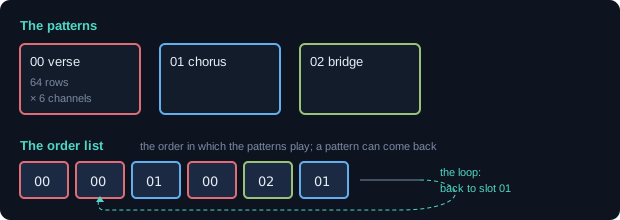
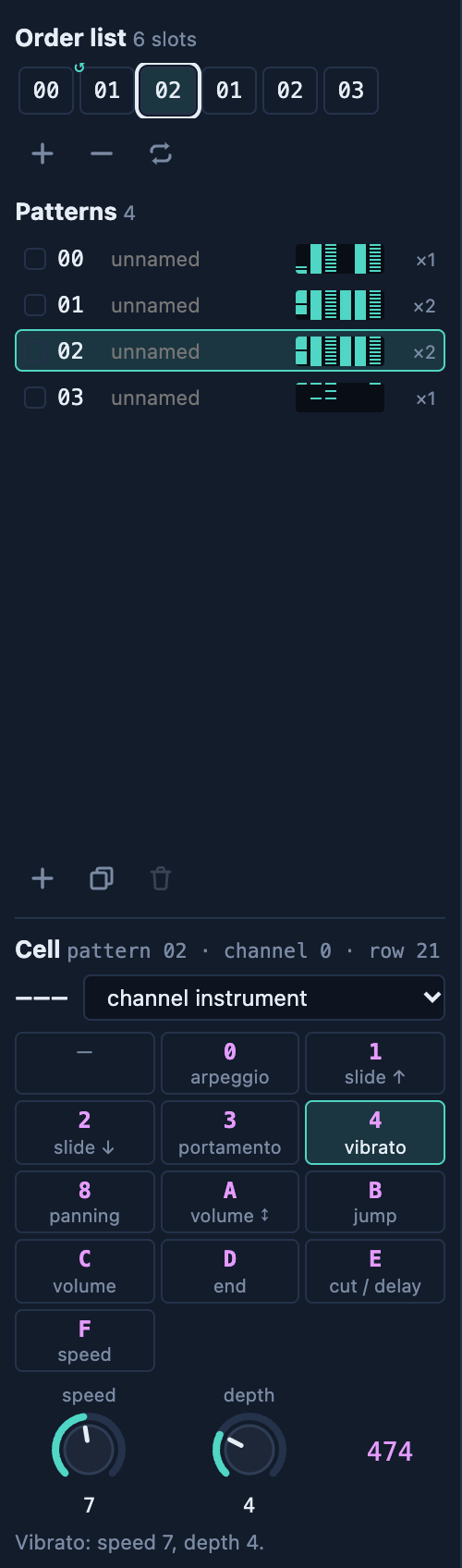
A pattern is a piece of music of 64 rows on the 6 channels: a verse, a chorus, a bridge. You can rename them and give them a color, shown in the order list. The order list is the sequence of patterns to play; a pattern can come back as often as you like.
- Clicking a slot of the order list opens the list of patterns: choose the one it plays.
- The icons add, remove or move slots.
- The loop (↺): when the song reaches the end, it starts again at this slot. The intro plays once, the rest repeats: what a game needs.
Instruments
| Type | What it plays |
|---|---|
| Waveform | a 32-value wave at the note's pitch; every channel |
| Noise | the PSG's noise, the note sets its color; channels 4 and 5 |
| Sample, fixed pitch | a recorded sound played at its rate (drums, voice) |
| Sample played at the note | the sound sped up or slowed down by the note (a bass) |
The waveform
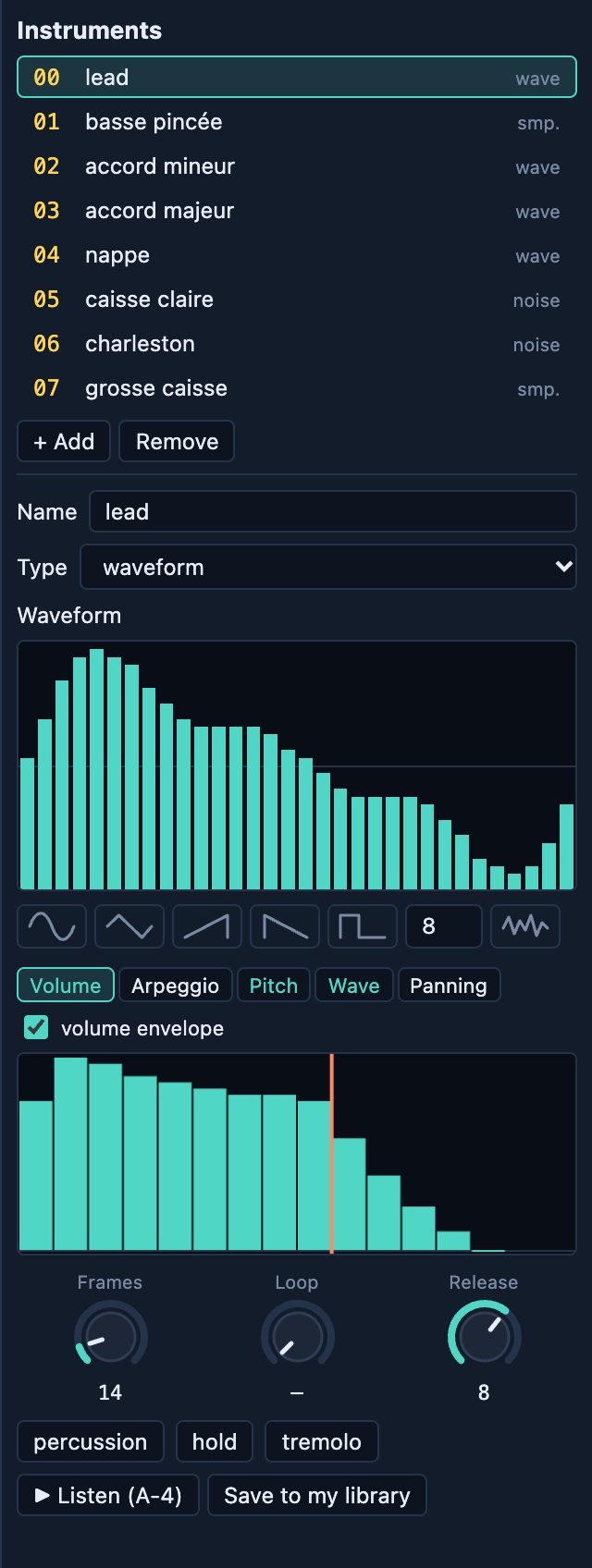
Draw it with the mouse, or start from a preset: sine, triangle, rising or falling saw, square (its width is adjustable), random.
Envelopes
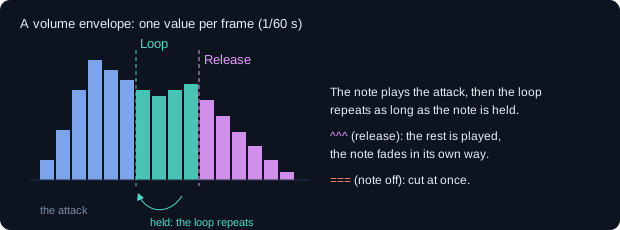
An envelope gives one value per frame (1/60 s) while the note plays. There are five: Volume, Arpeggio (semitones added), Pitch (vibrato, drop), Wave (changes the wave during the note) and Panning. Three knobs set them: Frames (the length), Loop and Release. Presets: percussion, hold, tremolo, arpeggios, vibrato, drop, ping-pong.
With the S8Tracker player, an instrument has three settings, drawn as a curve: volume, decay, sustain.
The library and the sample workshop
+ Add offers a new instrument, or one from the library: DeepWave's (about thirty, to copy) and yours (Save to my library). Every instrument can be heard before being taken. The sample workshop opens a sound (WAV, AIFF, MP3, AAC, FLAC, OGG…), cuts it, reverses it, adds fades, converts it to 5 bits, and warns when it is too big for the console.
Effects
The effects are those of the DeepWave player, with ProTracker's letters. An effect lasts one row only: a vibrato or a slide that lasts is written on every row.
| Code | Effect |
|---|---|
| 0xy | arpeggio: the note, +x, +y semitones, one frame each |
| 1xx / 2xx | slide up / down |
| 3xx | portamento to the cell's note |
| 4xy | vibrato: speed x, depth y |
| 8xy | panning: left x, right y |
| Axy | volume slide: +x/8 or −y/8 per frame |
| Bxx | after this row, slot xx of the order list |
| Cxx | channel volume (00 to 1F) |
| Dxx | after this row, the next slot, at row xx |
| ECx / EDx | note cut / delayed by x frames |
| Fxx | speed: frames per row |
Entering them
- With the keyboard: cursor on the effect column, type
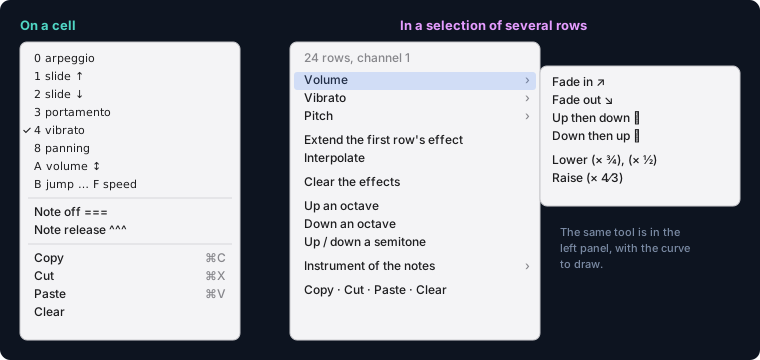
C20in one go. After the last digit, the cursor moves down and back to the letter. - With a right-click on a cell: the list of effects. The chosen effect gets a starting value, and the cursor goes to its value.
- In the left panel: the effects as buttons, their values on knobs, a sentence saying what the effect does.
Jumps
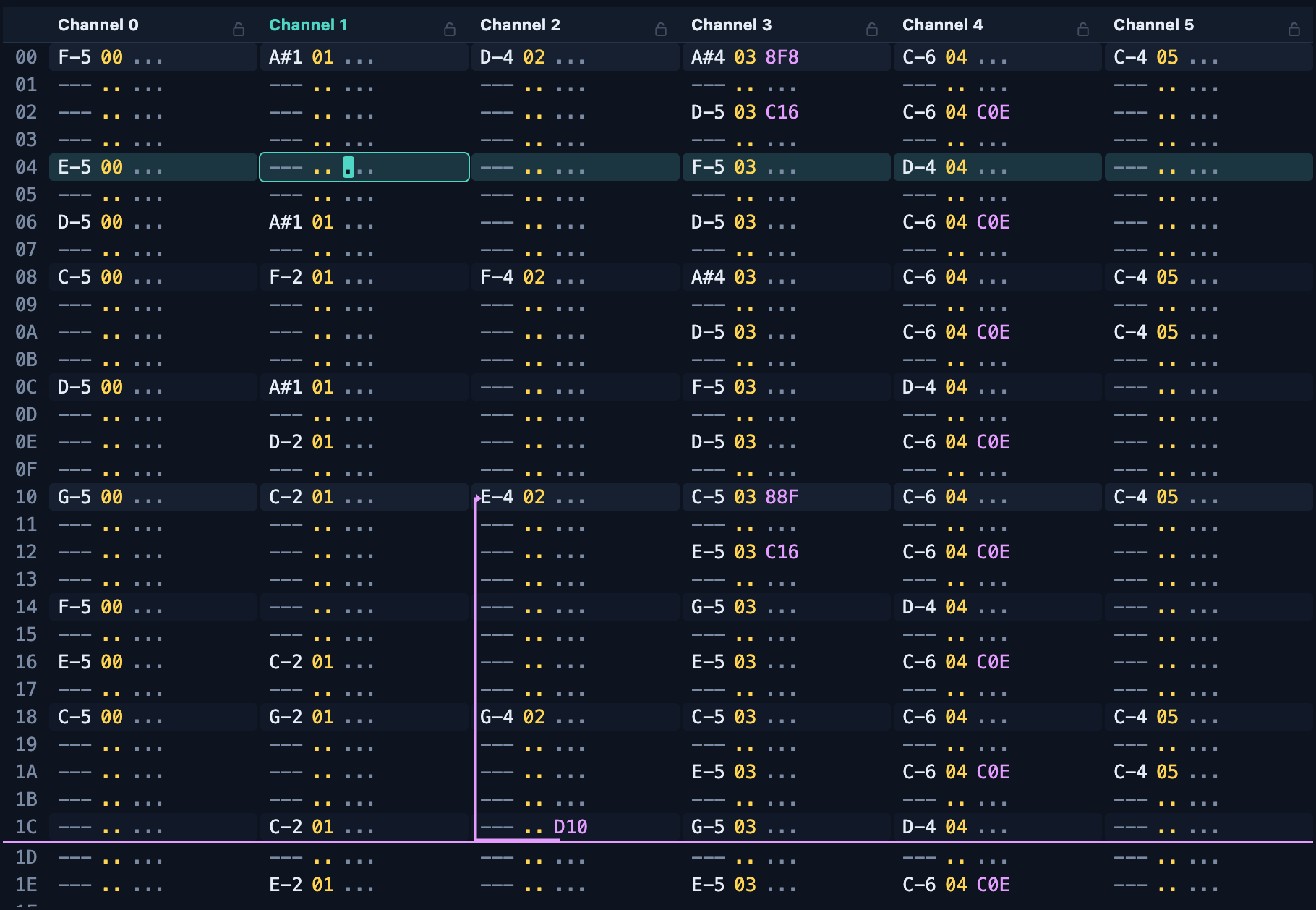
Bxx and Dxx change the path of playback: a line under the row marks the break. After a Bxx, the following rows are never played: they are faded.
Effects over several rows
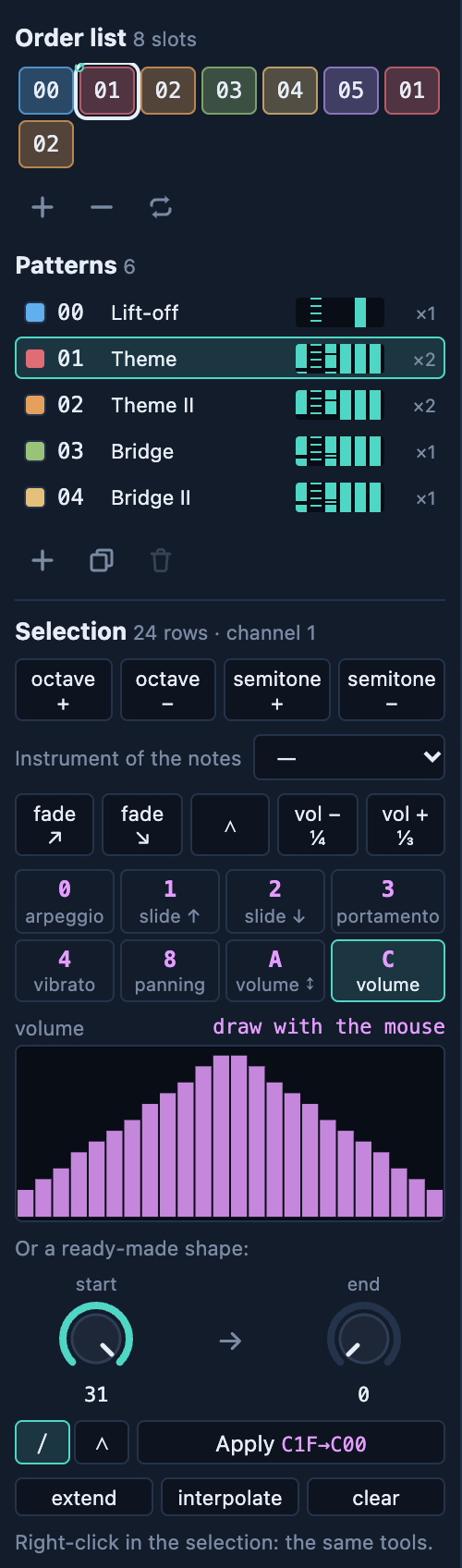
Selecting rows (drag with the mouse, or Shift + arrows) opens the selection tool, in the left panel and on right-click:
- Transpose by an octave or a semitone; change the instrument of the notes;
- Volume: fade in and out, up then down, lower or raise;
- Vibrato, slides, portamento over the whole period;
- Extend the first row's effect, interpolate from the first row to the last;
- a start and an end value, in a straight line or there and back;
- the curve: one bar per row, drawn with the mouse (volume, slides, portamento, vibrato depth, panning). It is written into the pattern as you draw; one ⌘Z undoes it.
During playback
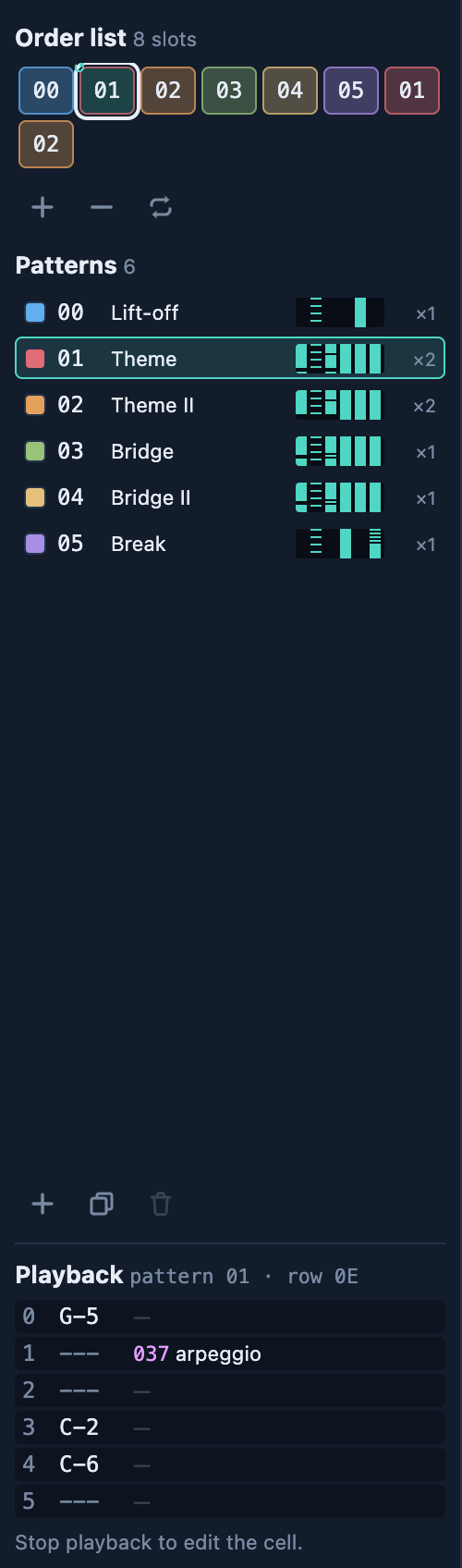
The left panel then shows the six channels: the note of the playing row and the last effect of each channel, lit when it is on the playing row. When stopped, the cell editor comes back.
Editing the pattern
| Gesture | Result |
|---|---|
| click, drag | the cursor; a selection (several rows, several channels) |
| channel header, row number | the whole channel, the whole row |
| ⌘C ⌘X ⌘V | copy, cut, paste at the cursor (also on right-click) |
| ⌘A | the whole pattern |
| Delete | clear the cell, the selection, or the cursor's field |
| ⌘↑ ⌘↓ (Shift) | transpose by a semitone (an octave) |
| ⌘Z ⇧⌘Z | undo, redo |
Locking a channel: the padlock in its header. A locked channel is hatched: nothing is written into it (notes, paste, effects) and the keyboard does not play on it. To record without touching the drums or the bass.
The three players
| Player | For | What it can do |
|---|---|---|
DeepWave (psg.tracker) | new games | effects, envelopes, several samples, 32 instruments |
| S8Tracker | existing S8Tracker projects | 9 instruments (volume, decay, sustain), one sample on channel 5, no effects |
| Forêt SGX | the music of Forêt SGX V2 | one channel per instrument (pad, flute, bell), the wind |
Song ▸ Convert for the DeepWave player keeps the notes and turns the instruments into envelopes. Song ▸ Back to the S8Tracker player loses the effects (DeepWave says so first). ⌘Z undoes a conversion.
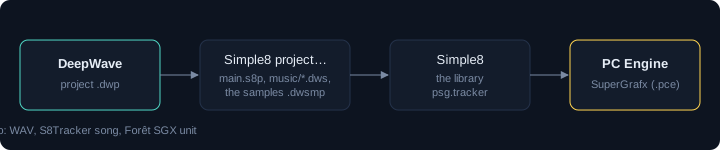
Exporting to Simple8
File ▸ Export ▸ Simple8 project… writes a folder ready to compile: main.s8p,
the song (music/<name>.dws), its samples and the DeepWave project. The program plays the
music with the psg.tracker library, for the project's machine:
architecture nec.pce;
addlib psg.tracker;

unit {
    const int id_song = addResource("music/plein_gaz.dws");

    initContext() {
        tracker.play(id_song);
    }

    main() {
        while (1) {
            // once per frame, outside the interrupt
            tracker.update();
        }
    }
}
java -jar LitleCompilator.jar main.s8p # then asm/main.pceThe exported program waits for the frame before each tracker.update(). The other exports:
S8Tracker song or Forêt SGX unit for those players, and WAV
(60 seconds of emulated sound).
Languages, themes, recent files
- Configuration ▸ Language: French, English, Italian, German, Spanish, Portuguese, Norwegian.
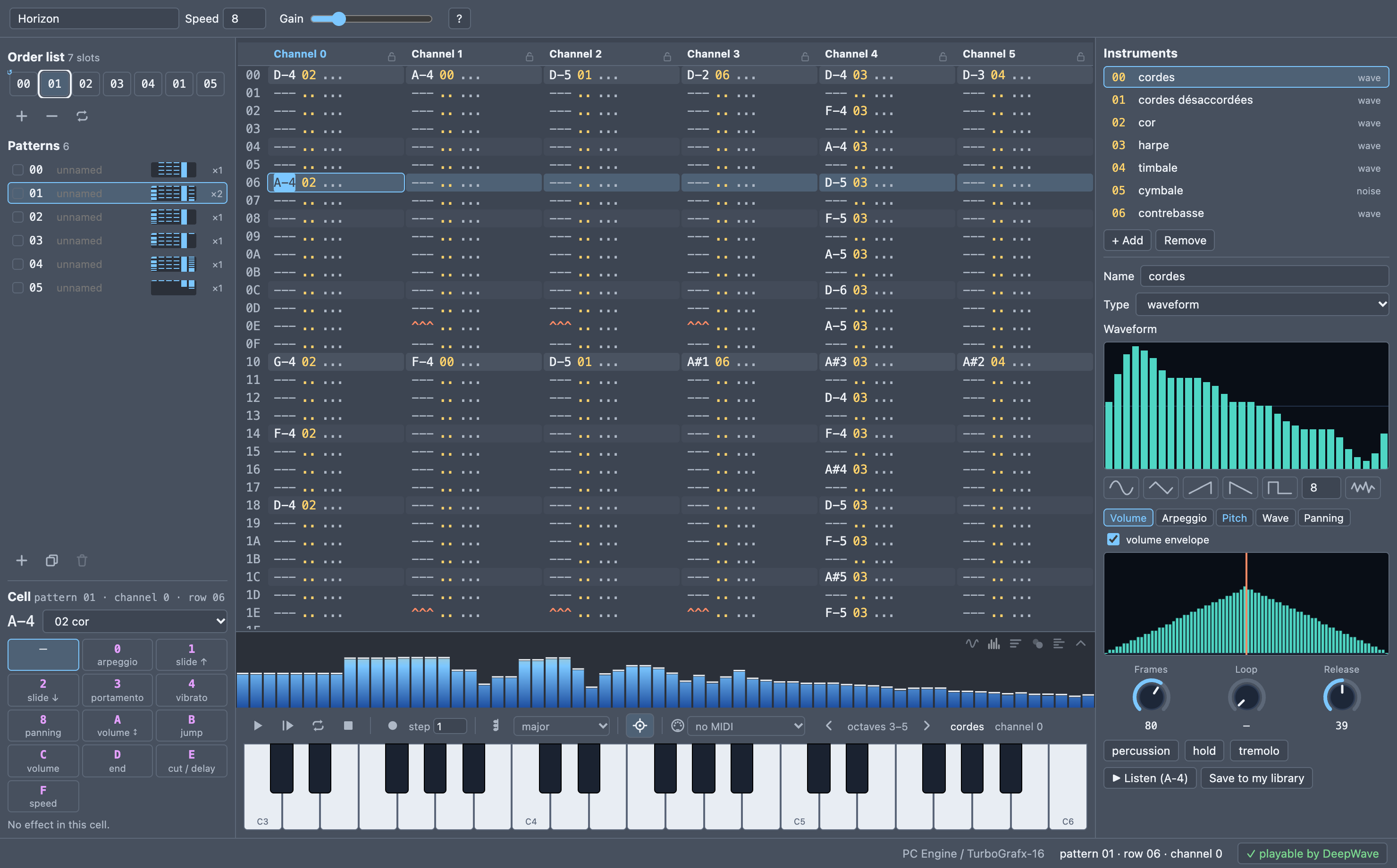
- Configuration ▸ Theme: 8 dark themes, 8 light, 8 mid grey, each with its swatch.
- File ▸ Open Recent: the last ten files.
The demos
The DeepWave/projets folder holds songs to open, listen to and take apart:
| File | Genre | What it shows |
|---|---|---|
plein_gaz.dwp | shoot'em up | chords as frame arpeggios (037), sixteenth-note bass, lead and its echo |
printemps_vivaldi.dwp | classical | Vivaldi's Spring, arranged: piano echo, thirds, birds in trills, storm |
prelude_bach.dwp | classical | Bach's Prelude in C: arpeggio, held notes, delayed echo |
riff_acier.dwp | rock | distorted fifths, muted notes, solo with portamento |
boule_facettes.dwp | disco | octave bass, open hi-hat, string stabs |
neons_froids.dwp | new wave | sequenced bass, detuned pads, toms |
horizon.dwp | film music | swelling strings, horn, harp, timpani |
vague_profonde.dwp | game | a sampled bass played at the note |
ether.dwp | electronic | sequence, pads, gliding lead, wind |
Shortcuts
| Key | Action |
|---|---|
| Space / Enter / Esc | play from the cursor / the song / stop |
| ⌘L · ⌘E · ⌘K | loop the pattern · REC · chords |
[ ] · - = | octave · previous / next instrument |
| Arrows, Tab, PgUp PgDn, Home, End | move; Shift + arrows: select |
| ⌘C ⌘X ⌘V ⌘A | copy, cut, paste, select all |
| ⌘↑ ⌘↓ (Shift) | transpose |
| ⌘Z ⇧⌘Z | undo, redo |
| ⌘N ⌘O ⌘S ⇧⌘S | new, open, save, save as |
Tips for a game
- CPU time:
tracker.update()takes 5 to 7 % of a frame on average. The sample timer costs what the samples cost: a few percent for drums, around 10 % for a sampled bass played continuously, nothing without samples. - Memory: a waveform is 32 bytes; one second of sample at 6991 Hz nearly 7,000. Prefer short sounds and loops.
- Channels: leave one channel free for the game's sound effects, often channel 5.
- The loop: after the intro, so the music repeats endlessly.
To go further: the psg.tracker library and the file format are described in the repository's
documentation (docs/cibles/pce/libs/psg/psg.tracker.md, docs/outils/DEEPWAVE_FORMAT.md).