
Control Structures
Until now, programs ran their instructions one after the other, from top to bottom. Control structures change that path: they let you choose what runs, and repeat instructions.
Conditions: if
If…
if runs a block only if a condition is true. The condition
is written in parentheses, most often with a comparison (chapter 3):
if (.vies == 0) {
    // this block only runs if vies is 0
    .partieFinie = 1;
}
… else
else adds a block that runs when the condition is false. One of the two
blocks runs, never both:
if (.vies == 0) {
    .partieFinie = 1;
} else {
    .vies--;
}
… else if
For more than two cases, you chain else ifs. The conditions are tested
in order, and only the first true one runs:
if (.score >= 2000) {
    .rang = 3;          // gold
} else if (.score >= 1000) {
    .rang = 2;          // silver: with 1500 points, this is the branch
} else {
    .rang = 1;          // bronze
}
A value as a condition
A condition can also be a plain value: 0 is false, any other value is true. This is handy for a flag that is 0 or 1:
if (.touche) {         // true if touche is not 0
    .tir = 1;
}==, not =. To compare, you write
==. if (.vies = 0) is rejected by the compiler: =
stores a value, it does not compare.
Combining conditions
Logical operators combine several conditions into one:
| Operator | Reads as | True when… | Example |
|---|---|---|---|
&& | and | both conditions are true | .x > 0 && .x < 320 |
|| | or | at least one is true | .vies == 0 || .temps == 0 |
! | not | the condition is false | !(.vies > 0) |
// the game ends if the player has no lives left, or no time left
if (.vies == 0 || .temps == 0) {
    .partieFinie = 1;
}

// the player is on the screen
if (.x >= 0 && .x < 320 && .y >= 0 && .y < 200) {
    .visible = 1;
}
Parentheses make the order clear when you mix && and
||: (.a == 1 || .b == 1) && .c == 1.
The second test can be skipped. As soon as the result is known, the
rest is not evaluated: in a && b, if a is false,
b is not computed; in a || b, if a is true,
it is not either. Putting the simplest test first saves time.
Choosing among several values: switch
When the same variable is compared with several values, switch is more
readable than a chain of else ifs:
switch (.direction) {
    case 1:
        .x--;           // left
        break;
    case 2:
        .x++;           // right
        break;
    case 3:
        .y--;           // up
        break;
    case 4:
        .y++;           // down
        break;
    default:
        // no direction: don't move
}- Each
casegives a value. The program jumps directly to the matchingcase. breakends theswitch.default, which is optional, runs when nocasematches.
Don't forget break. Without it, execution continues into
the next case. With .direction equal to 1, this code adds 1
then 10:
switch (.direction) {
    case 1: .total += 1;        // no break...
    case 2: .total += 10;       // ... so it continues here: total is 11
        break;
}
A case value must be known at compile time: a number, a
character ('A') or a constant. It is a good opportunity to give names to
values:
const ubyte GAUCHE = 1;
const ubyte DROITE = 2;

switch (.direction) {
    case .GAUCHE: .x--; break;
    case .DROITE: .x++; break;
}
A variable is not accepted: case c: not a constant declared before the
switch.
The for loop
for repeats a block a known number of times. Its first line has three
parts, separated by semicolons:
for (ubyte i = 1; i <= 10; i++) {
    .total = .total + i;        // 1 + 2 + ... + 10: total is 55
}| Part | Here | Role |
|---|---|---|
| the start | ubyte i = 1 | runs once, before the first pass: creates the counter |
| the condition | i <= 10 | tested before each pass: the loop continues as long as it is true |
| the step | i++ | runs after each pass: moves the counter forward |
The counter can also go down, with i--. Like any variable, it has a
type: a byte can become negative, a ubyte cannot.
The countdown trap. This loop never stops:
for (ubyte n = 7; n >= 0; n--) { ... }A ubyte is always greater than or equal to 0: after 0, it wraps back to 255
(the overflow from chapter 3), and the condition stays true. With
byte n, the loop does make its 8 passes, from 7 down to 0.
Loops inside loops
A loop can contain another one. For each pass of the outer loop, the inner loop makes all of its own: this is the natural way to go through rows and columns.
for (ubyte y = 0; y < 3; y++) {           // 3 rows
    for (ubyte x = 0; x < 4; x++) {       // of 4 columns each
        .cases++;                         // 3 × 4: cases is 12
    }
}
The while and do … while loops
while
while repeats a block as long as a condition is true,
without a counter. It is the right choice when you don't know in advance how many passes you will need:
uint n = 1;
while (n < 1000) {
    n = n * 2;          // 1, 2, 4, 8... the loop stops at 1024
}
The condition is tested before each pass: if it is false from the start, the block does not run at all.
do … while
The condition is tested after each pass: so the block runs at least once. Watch out for the final semicolon:
do {
    .touche = io.getButtons(0);     // read the joypad...
} while (.touche == 0);             // ... until a button is pressed
The endless loop
while (1) has a condition that is always true: the loop never stops.
This is the usual form of a game's main loop, which reads the joypad, moves
the characters and redraws the screen, again and again:
while (1) {
    // one game turn
}
Exiting or skipping a pass: break and continue
Inside a loop (for, while or do … while):
breakleaves the loop immediately;continuemoves on to the next pass, without finishing the current one.
// find the first multiple of 7 after 50
for (ubyte i = 51; i < 100; i++) {
    if (i % 7 == 0) {
        .trouve = i;    // 56
        break;          // found: no need to continue
    }
}

// count the odd numbers from 0 to 9
for (ubyte i = 0; i < 10; i++) {
    if (i % 2 == 0) {
        continue;       // even: move on to the next one
    }
    .impairs++;         // impairs is 5 at the end
}
In a switch placed inside a loop, break exits the
switch, not the loop.
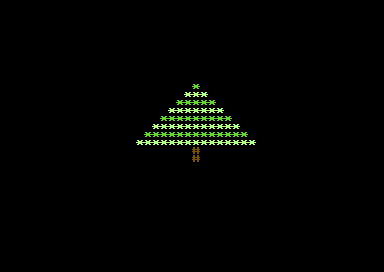
An example: the Christmas tree
This program draws a tree made of stars. Each row of the foliage has two more stars than the previous one, and every other row changes color.
// Control structures: a tree (Commodore 64)
architecture commodore.c64;

addlib vic.base;
addlib vic.screentext;

unit {
    const ubyte HAUTEUR = 8;            // the number of rows of foliage

    main() {
        ubyte t = 0;

        vic.setBorderColor(0);
        vic.setBackgroundColor(0);      // black background
        vic.initScreen();
        vic.clearScreen();

        // the foliage: one row per loop pass
        for (ubyte ligne = 0; ligne < .HAUTEUR; ligne++) {
            // every other row in light green
            if (ligne % 2 == 0) {
                vic.setFontColor(5);    // green
            } else {
                vic.setFontColor(13);   // light green
            }
            vic.setCursor((ubyte)(20 - ligne), (ubyte)(6 + ligne));
            // 1, 3, 5, 7... stars
            for (ubyte i = 0; i < ligne * 2 + 1; i++) {
                vic.putChar('*');
            }
        }

        // the trunk: two rows
        vic.setFontColor(9);            // brown
        while (t < 2) {
            vic.setCursor(20, (ubyte)(6 + .HAUTEUR + t));
            vic.putChar('#');
            t++;
        }
    }
}- The
ligne(row) loop draws the foliage, one row per pass. if (ligne % 2 == 0)is true for rows 0, 2, 4…: the colors alternate.- Each pass, the row starts further to the left (
20 - ligne): the tree stays centered. - The inner
iloop writesligne * 2 + 1stars: 1, 3, 5, 7… - The trunk uses a
while, with its countert.
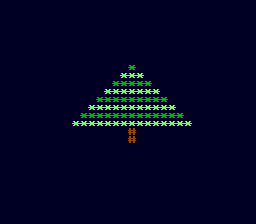
The PC Engine version
The loops and the condition are the same. Each text color has its own palette (0, 1 and 2), and the tree is centered on column 16, the middle of the screen's 32 columns.
// Control structures: a tree (PC Engine)
architecture nec.pce;

addlib sys.resource;
addlib vce.base;
addlib vdc.base;
addlib vdc.screentext;

unit {
    const int font = addResource("font.bin");
    const ubyte HAUTEUR = 8;            // the number of rows of foliage

    main() {
        ubyte t = 0;
        int source;
        int length;

        // the screen, the font and the colors, as in chapter 2
        vdc.setBATSize(vdc.BAT_32x32);
        vdc.initScreen();
        resource.mapToMPR2(.font);
        source = 0x4000 + resource.getOffset(.font);
        length = resource.getLength(.font);
        vdc.writeToVRAM(source, 0x1000, length);
        vce.setPalette(0, 0, RGB(0, 0, 1));     // the background, midnight blue
        vce.setPalette(0, 1, RGB(0, 5, 0));     // palette 0: green
        vce.setPalette(1, 1, RGB(3, 7, 3));     // palette 1: light green
        vce.setPalette(2, 1, RGB(4, 2, 0));     // palette 2: brown
        vdc.clearScreen();

        // the foliage: one row per loop pass
        for (ubyte ligne = 0; ligne < .HAUTEUR; ligne++) {
            // every other row in light green
            if (ligne % 2 == 0) {
                vdc.setFontColor(0);
            } else {
                vdc.setFontColor(1);
            }
            vdc.setCursor((ubyte)(16 - ligne), (ubyte)(8 + ligne));
            // 1, 3, 5, 7... stars
            for (ubyte i = 0; i < ligne * 2 + 1; i++) {
                vdc.putChar('*');
            }
        }

        // the trunk: two rows
        vdc.setFontColor(2);
        while (t < 2) {
            vdc.setCursor(16, (ubyte)(8 + .HAUTEUR + t));
            vdc.putChar('#');
            t++;
        }
    }
}
Key points
if,else ifandelsechoose a block based on a condition; 0 is false, any other value is true.&&(and),||(or) and!(not) combine conditions.switchcompares a value with constants; eachcaseends withbreak.forrepeats a known number of times,whileas long as a condition is true,do … whileat least once.breakleaves a loop,continuemoves on to the next pass.- Watch the counter's type: a
ubytenever goes below 0.
Your turn
- Change the height of the tree to 12 rows, by changing only one line of the
program.
Show solutionHide solution
The height of the tree is written in only one place: the
HAUTEUR(height) constant. All the loops and all the positions are computed from it. So you change just this one line:const ubyte HAUTEUR = 12; // the number of rows of foliageThe foliage loop then makes 12 passes, the widest row has 12 × 2 - 1 = 23 stars, and the trunk moves down on its own below the last row, since its position also uses
.HAUTEUR. That is the whole point of a constant: if the number 8 had been copied into every computation, you would have had to find them all.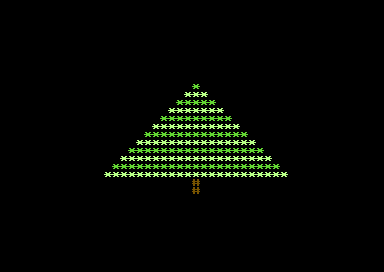
A 12-row tree on the Commodore 64. The tree still fits on the screen: on the C64, it starts at column 20 - 11 = 9 and ends at row 6 + 12 + 1 = 19; on the PC Engine, it goes from column 5 down to row 21, out of 28 visible rows. Beyond about twenty rows, it would go off the screen.
- Widen the trunk to three columns, with a
forloop inside thewhile.Show solutionHide solution
The trunk keeps its two rows, made by the
while. On each row, aforloop writes three#instead of one. SinceputCharmoves the cursor forward by one cell, you only need to place the cursor once, one column further left so that the trunk stays centered.On the Commodore 64
// the trunk: two rows of three columns
vic.setFontColor(9);            // brown
while (t < 2) {
    vic.setCursor(19, (ubyte)(6 + .HAUTEUR + t));    // one column further left
    for (ubyte c = 0; c < 3; c++) {
        vic.putChar('#');         // three characters side by side
    }
    t++;
}
On the PC Engine
// the trunk: two rows of three columns
vdc.setFontColor(2);
while (t < 2) {
    vdc.setCursor(15, (ubyte)(8 + .HAUTEUR + t));    // one column further left
    for (ubyte c = 0; c < 3; c++) {
        vdc.putChar('#');         // three characters side by side
    }
    t++;
}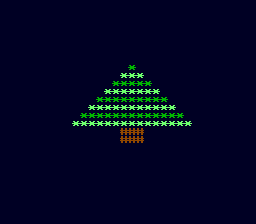
The widened trunk, on the PC Engine. The
forloop has its own counter,c, which starts again from 0 on each pass of thewhile. The two loops are nested: 2 rows of 3 characters, that is 6#. - Replace the
ifwith aswitchonligne % 3to alternate three colors.Show solutionHide solution
ligne % 3is the remainder of division by 3: it is 0, 1, 2, then again 0, 1, 2… Aswitchon this remainder chooses one color out of three. The first two cases end withbreak; the third is thedefault, which gets remainder 2.First store the remainder in a variable,
couleur(color), then do theswitchon it. The(ubyte)cast is needed, because the computation is done inint.On the Commodore 64
// the foliage: one row per loop pass
for (ubyte ligne = 0; ligne < .HAUTEUR; ligne++) {
    // three colors, one after the other: 0, 1, 2, 0, 1, 2...
    couleur = (ubyte)(ligne % 3);
    switch (couleur) {
        case 0:
            vic.setFontColor(5);    // green
            break;
        case 1:
            vic.setFontColor(13);   // light green
            break;
        default:
            vic.setFontColor(7);    // yellow: a garland
    }
    vic.setCursor((ubyte)(20 - ligne), (ubyte)(6 + ligne));
    // 1, 3, 5, 7... stars
    for (ubyte i = 0; i < ligne * 2 + 1; i++) {
        vic.putChar('*');
    }
}
You also need to declare
ubyte couleur;at the top ofmain(), next tot.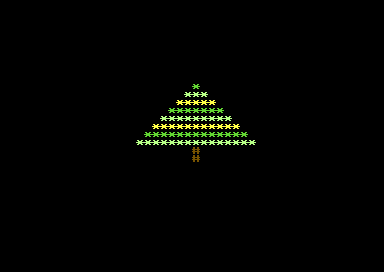
Three alternating colors: green, light green, yellow. On the PC Engine, each text color needs its own palette. Palettes 0, 1 and 2 are already used by the green, the light green and the trunk's brown: the third color goes into palette 3.
On the PC Engine
vce.setPalette(0, 0, RGB(0, 0, 1));     // the background, midnight blue
vce.setPalette(0, 1, RGB(0, 5, 0));     // palette 0: green
vce.setPalette(1, 1, RGB(3, 7, 3));     // palette 1: light green
vce.setPalette(2, 1, RGB(4, 2, 0));     // palette 2: brown
vce.setPalette(3, 1, RGB(7, 7, 0));     // palette 3: yellow
// the foliage: one row per loop pass for (ubyte ligne = 0; ligne < .HAUTEUR; ligne++) { // three colors, one after the other: 0, 1, 2, 0, 1, 2... couleur = (ubyte)(ligne % 3); switch (couleur) { case 0: vdc.setFontColor(0); // green break; case 1: vdc.setFontColor(1); // light green break; default: vdc.setFontColor(3); // yellow: a garland } vdc.setCursor((ubyte)(16 - ligne), (ubyte)(8 + ligne)); // 1, 3, 5, 7... stars for (ubyte i = 0; i < ligne * 2 + 1; i++) { vdc.putChar('*'); } }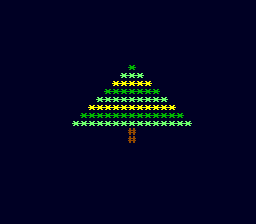
The same alternation on the PC Engine, with palette 3. Why go through the
couleurvariable? With the current version of the compiler,switch (ligne % 3)compiles without errors, but the remainder is not computed: the tree is displayed in yellow, or nearly (every row except the tip on the C64, every row on the PC Engine). Storing the computation in a variable before theswitchavoids the problem, and the code stays just as readable. - Draw the tree upside down, with a loop that counts down. What type
should the counter have?
Show solutionHide solution
To turn the tree upside down, first draw the trunk at the top, then the foliage from the widest row down to the tip. The
lignecounter starts atHAUTEUR - 1and goes down to 0 inclusive: the condition isligne >= 0. The loop's computations do not change (width, color, starting column): only the order changes, and the screen row is computed so that the widest row is at the top.// the trunk, at the top: two rows vic.setFontColor(9); // brown while (t < 2) { vic.setCursor(20, (ubyte)(6 + t)); vic.putChar('#'); t++; } // the foliage, from the widest row down to the tip: // the counter goes down from HAUTEUR - 1 to 0, so it must be a byte for (byte ligne = .HAUTEUR - 1; ligne >= 0; ligne--) { if (ligne % 2 == 0) { vic.setFontColor(5); // green } else { vic.setFontColor(13); // light green } vic.setCursor((ubyte)(20 - ligne), (ubyte)(6 + 2 + .HAUTEUR - 1 - ligne)); for (ubyte i = 0; i < ligne * 2 + 1; i++) { vic.putChar('*'); } }The counter must be a
byte, which is signed. With aubyte, the conditionligne >= 0is always true: after 0,ligne--gives 255, and the loop never stops. This is the countdown trap seen in this chapter. The compiler accepts it without any error or warning; when it runs on the C64, the program writes stars and random characters all over the screen: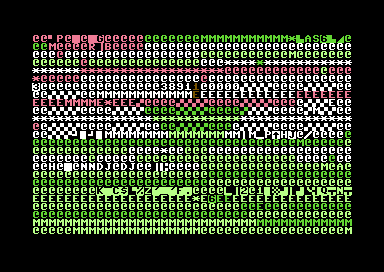
With a ubyte counter: the loop never stops. With
byte ligne, the loop does make its 8 passes, from 7 down to 0. On the PC Engine, the code is the same, withvdc., palettes 0, 1 and 2, column 16 and row 8:// the trunk, at the top: two rows vdc.setFontColor(2); while (t < 2) { vdc.setCursor(16, (ubyte)(8 + t)); vdc.putChar('#'); t++; } // the foliage, from the widest row down to the tip: // the counter goes down from HAUTEUR - 1 to 0, so it must be a byte for (byte ligne = .HAUTEUR - 1; ligne >= 0; ligne--) { if (ligne % 2 == 0) { vdc.setFontColor(0); } else { vdc.setFontColor(1); } vdc.setCursor((ubyte)(16 - ligne), (ubyte)(8 + 2 + .HAUTEUR - 1 - ligne)); for (ubyte i = 0; i < ligne * 2 + 1; i++) { vdc.putChar('*'); } }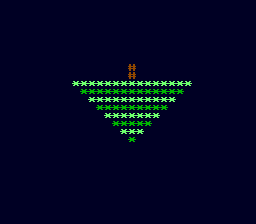
The tree upside down, on the PC Engine.