
Types and Variables
A program works with numbers: a score, a position, a number of lives. This chapter shows how to store them in variables, choose their type, compute with them, and convert from one type to another.
Types
Each variable has a type, which sets its size in memory and the values it can hold. Simple8 has six integer types:
| Type | Size | Values | For… |
|---|---|---|---|
ubyte | 8 bits (1 byte) | 0 to 255 | a counter, a color, a screen coordinate |
byte | 8 bits (1 byte) | -128 to 127 | a small speed, positive or negative |
uint | 16 bits (2 bytes) | 0 to 65,535 | a score, a memory address |
int | 16 bits (2 bytes) | -32,768 to 32,767 | a position that can go off-screen |
ulong | 32 bits (4 bytes) | 0 to 4,294,967,295 | a very large number |
long | 32 bits (4 bytes) | about ± 2 billion | a very large signed number |
There is no char and no bool: a character or a “true / false” value
is stored in a ubyte. There is also a string type for
character strings; arrays and strings have their own chapter,
chapter 6.
Eight, sixteen or thirty-two bits
The processors in retro machines compute eight bits at a time. A
ubyte is handled in a single operation; a uint takes two,
a ulong four. Here is what the same line, + 10, gives on three
variables of different types, in the assembly generated for the C64:
.petit = .petit + 10; ubyte: 4 instructions
LDA Main_petit
CLC
ADC #<10
STA Main_petit
.grand = .grand + 10; uint: 7 instructions
LDA Main_grand
CLC
ADC #<10
STA Main_grand
LDA Main_grand+1
ADC #>10
STA Main_grand+1
.enorme = .enorme + 10; ulong: 13 instructions
LDA Main_enorme
CLC
ADC #<10
STA Main_enorme
LDA Main_enorme+1
ADC #>10
STA Main_enorme+1
LDA Main_enorme+2
ADC #0
STA Main_enorme+2
LDA Main_enorme+3
ADC #0
STA Main_enorme+3
The golden rule: the smallest type that is big enough. A ubyte
whenever the value fits between 0 and 255, a uint or an
int beyond that, a long only when you really need it.
Signed or unsigned
The types without a u (byte, int, long) are
signed: they accept negative numbers, but only go half as high.
The u types (unsigned) only go from 0 upward.
Machine data (a byte of graphics, a color, an address) is never
negative: it is a ubyte or a uint. The compiler checks this, and
rejects a value that does not fit in the type:
byte x = 200; // error: a byte stops at 127Value out of range for x (-128..127) -> 200: use ubyte for 0..255Writing a number
| Form | Example | Value |
|---|---|---|
| Decimal | 250, -5 | 250, -5 |
| Hexadecimal | 0xD020 | 53,280 |
| Binary | 0b10100000 | 160 |
| Character | 'A', '0' | 65, 48 (its ASCII code) |
The assembler notation $D020 is only accepted inside an
_asm block. In Simple8 code, you write 0xD020.
Declaring a variable
A declaration gives the type, then the name, and optionally an initial value. It ends with a semicolon, and declares only one variable at a time:
ubyte vies = 3;      // a type, a name, an initial value
uint score;          // no value: it is 0 at startup
int vx;
int vy;              // int vx, vy; is not accepted
There are no global variables: a variable always belongs to a unit or to a function.
Unit variables
Declared at the top of the unit, before main(), they exist for the whole
program. Inside a function, you write them with a dot in front:
.score.
unit {
    uint score;                 // unit variable

    main() {
        .score = 100;           // the dot: the unit variable
    }
}
Without the dot, the compiler looks for a local variable with the same name, does not find it,
and stops: Variable 'score' not found !
Local variables
Declared inside a function, they belong to it alone and are written without a dot. No other function can read them.
main() {
    ubyte gemmes = 7;           // local to main()
    .score = .score + gemmes;
}
The initial value
In the previous chapter, boot.asm prepared the machine before calling
main(). It also takes care of the variables:
- a variable without an initial value is set to 0;
- a variable with an initial value receives it: the value is
stored in the program, and
boot.asmcopies it into RAM beforemain().
Constants
A value that never changes is declared const. It goes at the top of the
unit and is also written with a dot:
unit {
    const uint POINTS_PAR_GEMME = 250;
    const uint BONUS = POINTS_PAR_GEMME * 4;    // computed from another one: 1000

    main() {
        .score = .POINTS_PAR_GEMME * 7;
    }
}- A constant costs nothing: the compiler replaces
.POINTS_PAR_GEMME(points per gem) with 250 in the code, without reading it from memory. - It can be computed from other constants declared before it. In a constant's declaration, the dot is optional.
- It can only be declared at the top of a unit, not inside a function.
RGB(0, 0, 7), seen in chapter 2, is also a constant value: it is computed at compile time.
By convention, constants are written in uppercase, variables in lowercase.
Fast variables: fast
On 6502 processors (C64, NES, PC Engine), the first 256 bytes of memory,
zero page, can be accessed faster than the rest. The fast keyword puts
a unit variable there:
fast ubyte image; // read every frame: in zero pageThis area is small and shared: 206 bytes on 6502 machines, 127 on the Game Boy
(where fast uses high memory). The libraries take their share,
then the optimizer itself puts the local variables most used in
loops there.
Use fast sparingly. Every byte declared
fast is a byte the optimizer can no longer give to a loop
variable. When you are starting out, you can do without it: the compiler already makes the best choice.
If the area overflows, compilation stops with Zero page overflow.
Computing
An assignment, =, stores the result of a computation in a variable:
.score = .POINTS_PAR_GEMME * gemmes;Arithmetic operations
The four operations, plus the remainder of division. With a equal to 17 and
b equal to 5:
| Operator | Operation | Example | Result |
|---|---|---|---|
+ | addition | a + b | 22 |
- | subtraction | a - b | 12 |
* | multiplication | a * b | 85 |
/ | integer division: the whole part is kept | a / b | 3 |
% | remainder of integer division (called “modulo”) | a % b | 2 |
17 divided by 5 gives 3, with 2 left over: 3 × 5 + 2 = 17. The remainder is
often used to make a value cycle: .image % 4 goes through 0, 1, 2,
3, then back to 0.
Comparing
A comparison answers true or false:
| Operator | Reads as | Example, with a = 17 and b = 5 |
|---|---|---|
== | is equal to | a == b: false |
!= | is not equal to | a != b: true |
< | is less than | a < b: false |
> | is greater than | a > b: true |
<= | is less than or equal to | a <= 17: true |
>= | is greater than or equal to | b >= 6: false |
Be careful not to confuse ==, which compares, with =, which stores
a value. Comparisons are used to make decisions and to repeat
instructions; they will be covered in detail in the chapter on conditions and
loops, together with the logical operators && (and), || (or)
and ! (not), which combine them.
Bitwise operations
In memory, a number is a sequence of bits, 0s and 1s. A
ubyte has 8 of them. They are numbered from right to left: bit 0 on the right is worth 1,
bit 1 is worth 2, bit 2 is worth 4… up to bit 7, which is worth 128. The number is the sum
of the bits set to 1:
| bit | 7 | 6 | 5 | 4 | 3 | 2 | 1 | 0 |
|---|---|---|---|---|---|---|---|---|
| value | 128 | 64 | 32 | 16 | 8 | 4 | 2 | 1 |
| 12 | 0 | 0 | 0 | 0 | 1 | 1 | 0 | 0 |
12 is written 0b00001100: bits 2 and 3 are set to 1, and 4 + 8 = 12.
Bitwise operators work on each bit separately. They are mainly used to
control the hardware, whose registers store several settings in a single byte,
one per bit. With p = 12 and q = 10:
& and: 1 only if both bits are 1
p       0 0 0 0 1 1 0 0   12
q       0 0 0 0 1 0 1 0   10
p & q   0 0 0 0 1 0 0 0   8
| or: 1 if at least one of the two bits is 1
p       0 0 0 0 1 1 0 0   12
q       0 0 0 0 1 0 1 0   10
p | q   0 0 0 0 1 1 1 0   14
^ exclusive or: 1 if the two bits are different
p       0 0 0 0 1 1 0 0   12
q       0 0 0 0 1 0 1 0   10
p ^ q   0 0 0 0 0 1 1 0   6
~ not: every bit is inverted
p    0 0 0 0 1 1 0 0   12
~p   1 1 1 1 0 0 1 1   243
<< shift left: the bits move to the left
3        0 0 0 0 0 0 1 1   3
3 << 2   0 0 0 0 1 1 0 0   12
>> shift right: the bits move back to the right
12        0 0 0 0 1 1 0 0   12
12 >> 2   0 0 0 0 0 0 1 1   3
Shifting one bit to the left multiplies by 2, to the right divides by 2:
x << 3 multiplies by 8. The processor does this much faster than a
multiplication.
The most common uses:
| To… | You write | Example |
|---|---|---|
| keep the 4 rightmost bits | x & 0x0F | 0b10110110 & 0x0F gives 0b00000110 (6) |
| set bit 7 to 1 | x | 0x80 | 0b00000011 | 0x80 gives 0b10000011 (131) |
| flip bit 0 | x ^ 1 | 0b10110110 ^ 1 gives 0b10110111 (183) |
| multiply by 8 | x << 3 | 3 << 3 gives 24 |
Modifying a variable
Instead of repeating its name, you can modify a variable directly:
.vies--;            // .vies = .vies - 1
.image++;           // .image = .image + 1
.score += 250;      // .score = .score + 250
.couleur <<= 1;     // .couleur = .couleur << 1
Every operator has its compound form: += -=
*= /= %= &= |=
^= <<= >>=.
Overflow
A variable cannot go beyond the maximum value of its type. If a computation exceeds it, it wraps around to the other end, like a car's odometer:
ubyte x = 250;
x = x + 10;         // 4, not 260: 255 is the maximum, it starts again from 0

int y = 30000;
y = y + 10000;      // -25,536: the maximum of an int is 32,767
No error reports this at run time: it is up to the developer to choose a type that is large enough. Sometimes it is intentional, for example for a frame counter that cycles.
Conversions
To a larger type
Storing a value in a larger type happens automatically, with no loss. A negative number stays negative:
byte b = -3;
int a = b;          // -3
To a smaller type: the cast
In the other direction, part of the value can be lost. So the compiler asks you to write it explicitly, with the target type in parentheses: this is a cast.
int a = 300;
byte c = a;         // error
byte d = (byte)a;   // accepted: d is 44
Cannot assign int to byte without explicit cast. Use: c = (byte)expression;The cast keeps the low bits and throws away the others: 300 is written
0x012C on two bytes, only the low byte remains, 0x2C, which is
44.
Computations are done in int
In a computation, byte and ubyte values are first converted to
int. The result of a computation on small types is therefore an
int, and it can be negative:
ubyte u1 = 1;
ubyte u2 = 2;
int d = u1 - u2;            // -1
That is why you need a cast to store such a computation in a small type, as
in the example below: (ubyte)('0' + .vies).
Division is integer division. 7 / 2 is 3 and
7 % 2 is 1. With a negative number, the result is rounded toward zero:
-7 / 2 is -3, and -7 % 2 is -1.
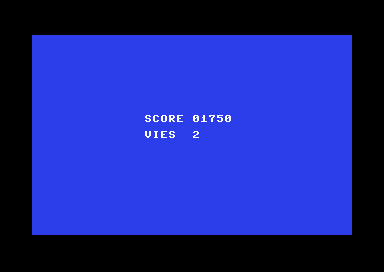
An example: the scoreboard
This program computes a score and a number of lives, then displays them. There is no function yet to write a number: we write it digit by digit, using division and the remainder.
// Types and variables: a scoreboard (Commodore 64)
architecture commodore.c64;

addlib vic.base;
addlib vic.screentext;

unit {
    const uint POINTS_PAR_GEMME = 250;  // a constant, in ROM
    ubyte vies = 3;                     // a unit variable, with its initial value
    uint score;                         // a unit variable, 0 at startup

    main() {
        ubyte gemmes = 7;               // a local variable of main()

        // the computations
        .score = .POINTS_PAR_GEMME * gemmes;    // 1750
        .vies--;                                // 2

        // the screen
        vic.setBorderColor(0);
        vic.setBackgroundColor(6);
        vic.initScreen();
        vic.clearScreen();
        vic.setFontColor(1);

        // the score, digit by digit
        vic.setCursor(14, 10);
        vic.print("SCORE ");
        vic.putChar((ubyte)('0' + .score / 10000));
        vic.putChar((ubyte)('0' + (.score / 1000) % 10));
        vic.putChar((ubyte)('0' + (.score / 100) % 10));
        vic.putChar((ubyte)('0' + (.score / 10) % 10));
        vic.putChar((ubyte)('0' + .score % 10));

        // the lives
        vic.setCursor(14, 12);
        vic.print("VIES  ");
        vic.putChar((ubyte)('0' + .vies));
    }
}
.score / 1000gives 1 for 1750, and% 10keeps the last digit of that result. This way you get each digit, from left to right.'0'is 48, the code of the zero character. So'0' + 7gives the code of the character7.- The computation is done in
int: the(ubyte)cast brings it back to the type thatputCharexpects.
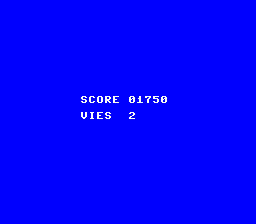
The PC Engine version
The computations are identical. Only the library (vdc. instead
of vic.) and the screen setup, seen in chapter 2, change.
// Types and variables: a scoreboard (PC Engine)
architecture nec.pce;

addlib sys.resource;
addlib vce.base;
addlib vdc.base;
addlib vdc.screentext;

unit {
    const int font = addResource("font.bin");
    const uint POINTS_PAR_GEMME = 250;  // a constant, in ROM
    ubyte vies = 3;                     // a unit variable, with its initial value
    uint score;                         // a unit variable, 0 at startup

    main() {
        ubyte gemmes = 7;               // a local variable of main()
        int source;
        int length;

        // the computations
        .score = .POINTS_PAR_GEMME * gemmes;    // 1750
        .vies--;                                // 2

        // the screen, the font and the colors, as in chapter 2
        vdc.setBATSize(vdc.BAT_32x32);
        vdc.initScreen();
        resource.mapToMPR2(.font);
        source = 0x4000 + resource.getOffset(.font);
        length = resource.getLength(.font);
        vdc.writeToVRAM(source, 0x1000, length);
        vce.setPalette(0, 0, RGB(0, 0, 7));
        vce.setPalette(0, 1, RGB(7, 7, 7));
        vdc.clearScreen();
        vdc.setFontColor(0);

        // the score, digit by digit
        vdc.setCursor(10, 12);
        vdc.print("SCORE ");
        vdc.putChar((ubyte)('0' + .score / 10000));
        vdc.putChar((ubyte)('0' + (.score / 1000) % 10));
        vdc.putChar((ubyte)('0' + (.score / 100) % 10));
        vdc.putChar((ubyte)('0' + (.score / 10) % 10));
        vdc.putChar((ubyte)('0' + .score % 10));

        // the lives
        vdc.setCursor(10, 14);
        vdc.print("VIES  ");
        vdc.putChar((ubyte)('0' + .vies));
    }
}
Key points
- Six number types:
ubyte,byte,uint,int,ulong,long. On an 8-bit machine, the smallest one that is big enough is the fastest. - A unit variable is written
.nominside a function; a local variable is written without a dot. - Without an initial value, a variable is 0.
constfor a value that does not change;fast, sparingly, for a heavily used variable.- A computation that exceeds the type wraps around to the other end.
- To go to a smaller type, you need a cast:
(ubyte),(int)…
Your turn
- Change to 300 gems: what does the compiler say, and why? Then try 200, then 255.
Show solutionHide solution
gemmes(gems) is aubyte: it goes from 0 to 255. The value 300 does not fit in it, and the compiler rejects the program right at the declaration:ubyte gemmes = 300; // a local variable of main()Value out of range for gemmes (0..255) -> 300It does not silently truncate the value: it stops, and tells you which type accepts which values. To count 300 gems, you would need a
uint; but the score, 250 × 300 = 75,000, would no longer fit in auinteither.With 200, the program compiles and displays
SCORE 50000. With 255, the largest value of aubyte, it displaysSCORE 63750(250 × 255). The score is auint, which goes up to 65,535: it has enough room. With 263 gems or more, the score would exceed 65,535 and overflow; but aubytecannot be 263, so here the choice of types protects the computation.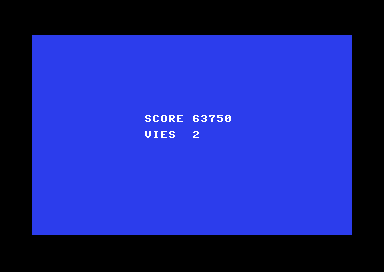
With 255 gems: 250 × 255 = 63750. - Add a
BONUSconstant of 500 points and add it to the score with+=.Show solutionHide solution
A constant is declared at the top of the unit, with
const. It is then written with a dot, like.POINTS_PAR_GEMME. The+=operator adds a value to a variable without repeating its name.const uint POINTS_PAR_GEMME = 250; // a constant, in ROM const uint BONUS = 500; // the bonus, another constant ubyte vies = 3; // a unit variable, with its initial value uint score; // a unit variable, 0 at startup// the computations .score = .POINTS_PAR_GEMME * gemmes; // 1750 .score += .BONUS; // 2250The score goes from 1750 to 2250, on the C64 as on the PC Engine (the lines are the same in both programs).
.score += .BONUS;does exactly the same thing as.score = .score + .BONUS;, only shorter. SinceBONUSis a constant, the compiler puts 500 directly in the code. - Declare
vies(lives) as abyteand take 5 lives away from it: what is displayed?Show solutionHide solution
A
byteaccepts negative numbers, from -128 to 127. Change the type ofvies, then subtract 5 with-=. After the example's.vies--, it was 2: it is now -3.byte vies = 3; // a byte: it can become negative// the computations .score = .POINTS_PAR_GEMME * gemmes; // 1750 .vies--; // 2 .vies -= 5; // -3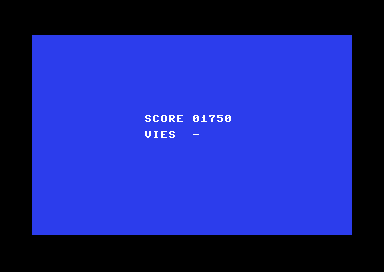
With -3 lives, the screen shows a dash. The screen shows
VIES -. The computation'0' + .viesgives 48 - 3 = 45, and 45 is the code of the-character. The program has no error, but the digit-by-digit display only handles numbers from 0 to 9. To display a negative number, you would need to test whether it is less than 0, write a minus sign, then write its opposite: this is what the conditions in the next chapter will let you do. - Replace
uint scorewithubyte score: what error does the compiler give, and how do you fix it?Show solutionHide solution
1750 does not fit in a
ubyte, which stops at 255. The computation.POINTS_PAR_GEMME * gemmesgives auint, and the compiler refuses to store it in a smaller type:ubyte score; // a ubyte: 0 to 255 onlyCannot assign uint to ubyte without explicit cast. Use: score = (ubyte)expression;The message suggests a cast. It silences the error, but the result is wrong: the cast keeps the low byte of 1750 (
0x06D6), which is0xD6, that is, 214..score = (ubyte)(.POINTS_PAR_GEMME * gemmes); // 1750 does not fit: 214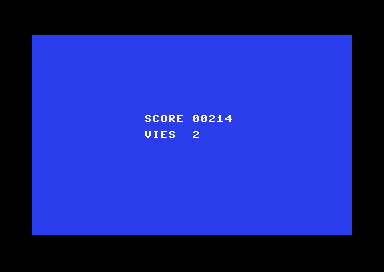
With the cast, the displayed score is 214 instead of 1750. The right fix is to go back to
uint score. A cast is justified when you know the value fits in the small type, like(ubyte)('0' + .vies); it must not be used to hide a value that is too large. Here, the compiler's error was pointing to a real problem.