
Functions
A function groups instructions under a name. You write it once, and you call it as many times as you need. It is the tool that lets a program grow without becoming unreadable.
Why functions?
In chapter 3, the scoreboard printed a number with five almost identical lines:
vic.putChar((ubyte)('0' + .score / 10000));
vic.putChar((ubyte)('0' + (.score / 1000) % 10));
vic.putChar((ubyte)('0' + (.score / 100) % 10));
vic.putChar((ubyte)('0' + (.score / 10) % 10));
vic.putChar((ubyte)('0' + .score % 10));
To also print the lives and the level, you would have to copy this block, and fix every copy at the slightest mistake. With a function, you write it only once, and you call it by its name:
ecrireNombre(.score, 5);
ecrireNombre(.vies, 1);
Functions have three advantages:
- no repetition: a fix is made in one place only;
- a name for what a group of instructions does:
preparerEcran()reads better than the lines it contains; - breaking a problem down into small pieces, each one simple.
You already use some: vic.print and vdc.setCursor are
functions, written in the libraries.
Declaring a function
uint addition(uint a, uint b) {
    return a + b;
}| Part | Here | Role |
|---|---|---|
| the result type | uint | the type of the value the function returns; void if it returns nothing |
| the name | addition | to call it |
| the parameters | (uint a, uint b) | the values it receives, each with its type; () if there are none |
| the body | { return a + b; } | the instructions run on each call |
Functions are declared in the unit, after its variables, before or after
main(). main() is itself a function, a bit special: it
has no type, and it is the one that boot.asm calls.
unit {
    uint score;                 // variables first

    main() {
        afficher();
    }

    void afficher() {           // a function that returns nothing
        // ...
    }
}
Calling a function
You call a function by its name, followed by the values of its parameters in parentheses. A function of the unit is called without a dot; a library function is called with the name of the library:
afficher();                     // a function of the unit
.total = addition(40, 2);       // its result in a variable: 42
vic.setCursor(10, 5);           // a library function
A function can be called before the place where it is written: main(),
at the top of the unit, happily calls functions written further down.
A typo in a function name is only caught at the end of the
compilation, by the assembler: Undefined symbol: Main_inconnue. The
name of the function appears after Main_, the name of the unit.
Parameters
A copy of the value
A parameter receives a copy of the value given in the call. The function can change it: the caller's variable does not change.
main() {
    ubyte x = 5;
    doubler(x);
    // x is still 5
}

void doubler(ubyte v) {
    v = v * 2;                  // v is 10, but only inside doubler()
}
To pass a result back, a function returns it with return,
or writes it to a variable of the unit.
How many parameters?
The number of arguments must match the declaration:
Function 'addition' takes 2 parameter(s), called with 1 argument(s)8-bit machines pass parameters in a small, fixed memory area. On the C64 and the PC Engine, it holds 4 at most:
Function Main_c has too many parameters (5 > 4): the parameter zone holds 4 of them
(maxParams in config.json or in simple8-config.json).
A function that needs more values can read them from variables of
the unit. You can also raise the limit, with the maxParams key, in two
places:
- in
simple8-config.json, at the root of the project: the setting only applies to this project (this is the safest); - in the architecture's
config.json(libs8/commodore/c64/config.json,libs8/nec/pce/config.json…): it then applies to every project for that machine.
{ "maxParams": 6 }Each extra parameter takes 2 bytes of RAM in the parameter area
(the paramWidth key sets this width, 16 bits by default). The compiler
shifts whatever comes after the area by itself.
Text as a parameter
Text in quotes given to a function is stored in the program, and the
function receives its address, a 16-bit number. So the parameter is
a uint, which you pass as is to print:
void titre(uint texte) {
    vic.setCursor(0, 0);
    vic.print(texte);
}

titre("BONJOUR");
Returning a value: return
return ends the function and returns a value, of the type given in its
declaration. It can appear several times: the first one reached wins.
ubyte plusGrand(ubyte a, ubyte b) {
    if (a > b) {
        return a;               // stop here if a is the larger one
    }
    return b;
}

.max = plusGrand(3, 9);         // 9
In a void function, return; with no value is used to leave
early:
void retirerVie() {
    if (.vies == 0) {
        return;                 // no lives left: nothing to do
    }
    .vies--;
}
Local variables
Variables declared in a function, like its parameters, belong to it
alone. Two functions can each have an i: they are two different
variables. A function cannot read another function's local variables:
main() {
    ubyte secret = 3;
    lire();
}

void lire() {
    .valeur = secret;           // error: secret belongs to main()
}
Variable 'secret' not found !To share a value between functions, pass it as a parameter, or store it in a variable of the unit.
A function that calls itself
A recursive function calls itself. The factorial is the classic example: 5! = 5 × 4 × 3 × 2 × 1 = 120.
uint factorielle(uint n) {
    if (n <= 1) {
        return 1;
    }
    return n * factorielle(n - 1);
}
By default, Simple8 rejects this program:
Direct recursion: Main_factorielle -> Main_factorielle. Recursion needs a stack:
set "parameterStack" to "software" or "hardware" in config.json (or in simple8-config.json).
For speed, each parameter and each local variable has a fixed address in
memory. But factorielle(5) calls factorielle(4) before it has
finished: both calls would want the same n. You then need a
stack, which keeps the n of each call in progress. You set it up in a
simple8-config.json file, at the root of the project:
{ "parameterStack": { "mode": "software", "frameSize": 4, "maxDepth": 8 } }The program then compiles, and factorielle(5) gives 120. Simple8 IDE can
also set up this stack, in Configuration → Simple8.
Keep it for real needs. The stack costs memory and time
on each recursive call, and 8-bit machines have little of either. A loop often does the
same job: the factorial can also be computed with a simple for.
Several functions with the same name
Two functions can have the same name if their parameters differ: this is overloading. The compiler picks the right one from the arguments of the call:
uint aire(uint c) {                    // a square
    return c * c;
}

uint aire(uint l, uint h) {             // a rectangle
    return l * h;
}

main() {
    .carre = aire(4);                   // 16: the first one
    .rectangle = aire(4, 6);            // 24: the second one
}- The versions must differ in the number of parameters, or in
their kind.
byte,ubyte,intanduintconvert into one another:f(byte x)andf(int x)cannot be told apart. - For now, write the overloaded versions before the place where
they are called, as here before
main(). If they are written after, only the first one is recognized in the call.
An example: the scoreboard as functions
The scoreboard from chapter 3, broken down into functions. main() now reads
like a summary of the program; each function does one thing only.
// Functions: the scoreboard, broken down into functions (Commodore 64)
architecture commodore.c64;

addlib vic.base;
addlib vic.screentext;

unit {
    const uint POINTS_PAR_GEMME = 250;
    ubyte vies = 3;
    uint score;

    main() {
        ubyte gemmes = 7;

        .score = points(gemmes);
        .vies--;

        preparerEcran();
        ecrireLigne(10, "SCORE  ", .score, 5);
        ecrireLigne(12, "VIES   ", .vies, 1);
        ecrireLigne(14, "GEMMES ", gemmes, 2);
    }

    // The points earned by gems
    uint points(ubyte gemmes) {
        return .POINTS_PAR_GEMME * gemmes;
    }

    // The screen: blue background, white text
    void preparerEcran() {
        vic.setBorderColor(0);
        vic.setBackgroundColor(6);
        vic.initScreen();
        vic.clearScreen();
        vic.setFontColor(1);
    }

    // A number, on a given number of digits (with leading zeros)
    void ecrireNombre(uint valeur, ubyte chiffres) {
        uint diviseur = 1;
        for (ubyte i = 1; i < chiffres; i++) {
            diviseur = diviseur * 10;       // 10, 100, 1000...
        }
        while (diviseur > 0) {
            vic.putChar((ubyte)('0' + (valeur / diviseur) % 10));
            diviseur = diviseur / 10;
        }
    }

    // A text then a number, on row y
    void ecrireLigne(ubyte y, uint texte, uint valeur, ubyte chiffres) {
        vic.setCursor(13, y);
        vic.print(texte);
        ecrireNombre(valeur, chiffres);
    }
}points()computes and returns a value.preparerEcran()(prepare the screen) groups the screen settings.ecrireNombre()(write a number) replaces the five repeated lines with a loop: theforcomputes the first divisor (10,000 for 5 digits), then thewhilewrites a digit and divides by 10, down to 1.ecrireLigne()(write a line) itself calls other functions. With its four parameters, it is at the C64's limit.
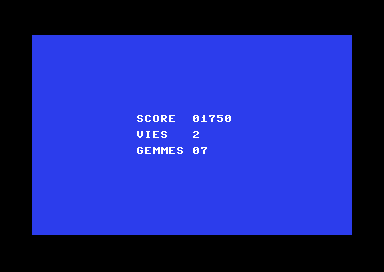
The PC Engine version
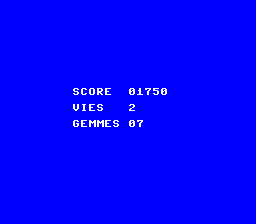
Only preparerEcran(), the library name and the text position
change. main(), points() and the logic of
ecrireNombre() are identical: that is the benefit of breaking things down well.
// Functions: the scoreboard, broken down into functions (PC Engine)
architecture nec.pce;

addlib sys.resource;
addlib vce.base;
addlib vdc.base;
addlib vdc.screentext;

unit {
    const int font = addResource("font.bin");
    const uint POINTS_PAR_GEMME = 250;
    ubyte vies = 3;
    uint score;

    main() {
        ubyte gemmes = 7;

        .score = points(gemmes);
        .vies--;

        preparerEcran();
        ecrireLigne(11, "SCORE  ", .score, 5);
        ecrireLigne(13, "VIES   ", .vies, 1);
        ecrireLigne(15, "GEMMES ", gemmes, 2);
    }

    // The points earned by gems
    uint points(ubyte gemmes) {
        return .POINTS_PAR_GEMME * gemmes;
    }

    // The screen, the font and the colors: blue background, white text
    void preparerEcran() {
        int source;
        int length;
        vdc.setBATSize(vdc.BAT_32x32);
        vdc.initScreen();
        resource.mapToMPR2(.font);
        source = 0x4000 + resource.getOffset(.font);
        length = resource.getLength(.font);
        vdc.writeToVRAM(source, 0x1000, length);
        vce.setPalette(0, 0, RGB(0, 0, 7));
        vce.setPalette(0, 1, RGB(7, 7, 7));
        vdc.clearScreen();
        vdc.setFontColor(0);
    }

    // A number, on a given number of digits (with leading zeros)
    void ecrireNombre(uint valeur, ubyte chiffres) {
        uint diviseur = 1;
        for (ubyte i = 1; i < chiffres; i++) {
            diviseur = diviseur * 10;       // 10, 100, 1000...
        }
        while (diviseur > 0) {
            vdc.putChar((ubyte)('0' + (valeur / diviseur) % 10));
            diviseur = diviseur / 10;
        }
    }

    // A text then a number, on row y
    void ecrireLigne(ubyte y, uint texte, uint valeur, ubyte chiffres) {
        vdc.setCursor(9, y);
        vdc.print(texte);
        ecrireNombre(valeur, chiffres);
    }
}
Key points
- A function has a result type (
voidif there is none), a name, parameters and a body. - A function of the unit is called without a dot:
afficher(); a library function with the name of the library:vic.print(). - Parameters are copies;
returnreturns the result. - Local variables belong to their function only.
- On the C64 and the PC Engine, 4 parameters at most.
- Recursion needs a stack, set up in
simple8-config.json.
Your turn
- Add a
NIVEAU(level) row to the scoreboard, with a single call toecrireLigne().Show solutionHide solution
ecrireLigne()already knows how to write a text followed by a number, on a given row. For the level, all you need is one unit variable and one more call, two rows below the gems:uint score; ubyte niveau = 4;main() { ubyte gemmes = 7; .score = points(gemmes); .vies--; preparerEcran(); ecrireLigne(10, "SCORE ", .score, 5); ecrireLigne(12, "VIES ", .vies, 1); ecrireLigne(14, "GEMMES ", gemmes, 2); ecrireLigne(16, "NIVEAU ", .niveau, 2); }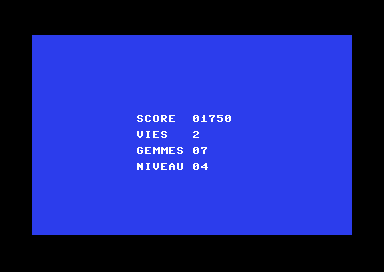
The NIVEAU row, added with a single call. On the PC Engine, the line is the same, on row 17:
ecrireLigne(17, "NIVEAU ", .niveau, 2);. No function had to be changed: that is the advantage of having writtenecrireLigne()once and for all. - Write a function
uint bonus(ubyte vies)that returns 1,000 points per remaining life, and add its result to the score.Show solutionHide solution
The function receives a number of lives and returns the bonus with
return. Its result is auint, large enough for several thousand points. Inmain(), you call it after removing a life, and add its result to the score with+=.// The end-of-level bonus: 1000 points per remaining life uint bonus(ubyte vies) { return 1000 * vies; }main() { ubyte gemmes = 7; .score = points(gemmes); .vies--; .score += bonus(.vies); // 1750 + 2 x 1000 = 3750 preparerEcran(); ecrireLigne(10, "SCORE ", .score, 5); ecrireLigne(12, "VIES ", .vies, 1); ecrireLigne(14, "GEMMES ", gemmes, 2); }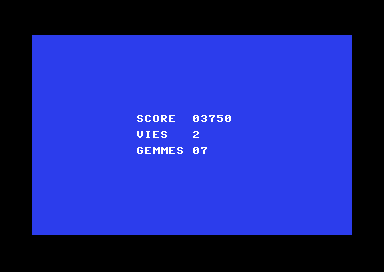
1750 points of gems and 2 × 1000 bonus points: 3750. The parameter is called
vies(lives), like the unit variable: that is not a problem. Inside the function,vieswithout a dot is the parameter, and.vieswould be the unit variable. You could have writtenbonus()without a parameter, reading.vies; with a parameter, the function depends only on what you give it, and it works for any number of lives. - Change
ecrireNombre()so it does not write leading zeros:01750becomes1750. Hint: a local variable that remembers whether a non-zero digit has already been written.Show solutionHide solution
You still go through the digits from left to right, but you only write a digit in three cases: it is not zero, or a digit has already been written (zeros in the middle, as in 1050, must stay), or it is the last digit (so that the value 0 is written as
0and not as nothing). The local variablecommence(started) remembers whether writing has begun: it starts at 0 and becomes 1 at the first digit written.// A number, without leading zeros (at most "chiffres" digits) void ecrireNombre(uint valeur, ubyte chiffres) { uint diviseur = 1; ubyte chiffre; ubyte commence = 0; // 1 as soon as a digit has been written for (ubyte i = 1; i < chiffres; i++) { diviseur = diviseur * 10; // 10, 100, 1000... } while (diviseur > 0) { chiffre = (ubyte)((valeur / diviseur) % 10); // write if the digit is not zero, if we have already started, // or if it is the last one (so that 0 is written as 0) if (chiffre != 0 || commence || diviseur == 1) { vic.putChar((ubyte)('0' + chiffre)); commence = 1; } diviseur = diviseur / 10; } }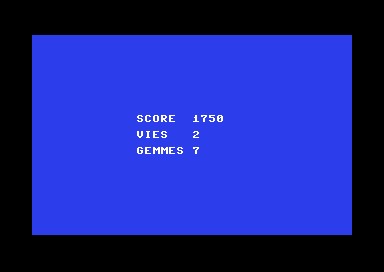
The numbers without their leading zeros. The digit is stored in a variable,
chiffre(digit), because it is used twice: for the test and to write it. The condition usescommenceon its own: 0 is false, 1 is true. We also checked the case of the value 0: with a single life at the start, theVIESrow does show0. On the PC Engine, the function is the same withvdc.putChar.The numbers are now left-aligned:
1750takes 4 cells instead of 5. To keep them right-aligned, as in a real scoreboard, you would write a space (putChar(' ')) in place of each leading zero. - Add the column
xas a parameter ofecrireLigne(). What does the compiler say? How do you get around it?Show solutionHide solution
With the column
x,ecrireLigne()has five parameters:// A text then a number, at column x and row y void ecrireLigne(ubyte x, ubyte y, uint texte, uint valeur, ubyte chiffres) { vic.setCursor(x, y); vic.print(texte); ecrireNombre(valeur, chiffres); }The compiler refuses, because the C64's parameter area only holds 4:
Function Main_ecrireLigne has too many parameters (5 > 4): the parameter zone holds 4 of them (maxParams in config.json or in simple8-config.json).First solution: raise the limit. The message says how: a
simple8-config.jsonfile, at the root of the project, with themaxParamskey. The setting only applies to this project. The program then compiles as is, and the screen is the same as before. The cost: 2 more bytes of RAM for the parameter area.{ "maxParams": 5 }Second solution: one parameter fewer. Take the position out of the function: the caller places the cursor with
vic.setCursor(x, y), andecrireLigne()writes wherever the cursor is. It now has only three parameters, and the column can be chosen freely on each call.main() { ubyte gemmes = 7; .score = points(gemmes); .vies--; preparerEcran(); vic.setCursor(13, 10); ecrireLigne("SCORE ", .score, 5); vic.setCursor(13, 12); ecrireLigne("VIES ", .vies, 1); vic.setCursor(13, 14); ecrireLigne("GEMMES ", gemmes, 2); }// A text then a number, at the cursor position void ecrireLigne(uint texte, uint valeur, ubyte chiffres) { vic.print(texte); ecrireNombre(valeur, chiffres); }Both versions compile and show the same scoreboard. The second one needs no setting and no extra memory; the first one keeps the calls shorter. A third way would be to read the column from a unit variable, but a function that receives everything it needs as parameters is easier to understand.