
Arrays, Strings and Pointers
A variable holds one value. A game handles dozens of the same kind: the positions of the enemies, the cells of a level, the lines of a menu. This chapter shows how to store them side by side in arrays, how to write text, and how to refer to a piece of data by its address.
Arrays
An array is a sequence of cells of the same type, stored one after the other in memory, under a single name.
Declaring an array
You give the type of the cells, the name, then the number of cells in square brackets:
ubyte vies[4];                          // 4 cells, set to 0 at startup
ubyte pluie[5] = { 3, 7, 2, 9, 5 };     // with initial values
ubyte bonus[] = { 10, 20, 50 };         // size taken from the values: 3
ubyte niveaux[6] = { 1, 2 };            // cells 2 to 5 are 0
An array with neither a size nor values is rejected:
Array 't' must have explicit size or initializer. With too many values, the
last ones are ignored, and a warning tells you so:
Array initializer truncated from 7 to 5 elements.
Reading and writing a cell
You refer to a cell by its index in square brackets. Indexes start at 0: an array of 5 cells goes from 0 to 4.
| index | 0 | 1 | 2 | 3 | 4 |
|---|---|---|---|---|---|
| pluie | 3 | 7 | 2 | 9 | 5 |
ubyte mardi = .pluie[1];       // 7
.pluie[3] = 12;                 // Thursday: 12 instead of 9
The index can be a variable or a calculation, which makes arrays and loops inseparable:
uint total = 0;
for (ubyte i = 0; i < 5; i++) {
    total = total + .pluie[i];  // 3 + 7 + 2 + 9 + 5 = 26
}
The size of an array: sizeof
sizeof gives the size of an array, computed at compile time. Instead
of hard-coding 5, the loop then follows the array if you add cells to it:
uint mots[4];
sizeof(.mots[])     // 4: the number of cells
sizeof(.mots)       // 8: the size in bytes (4 cells of 2 bytes)
Staying inside the array
With a constant index, the compiler checks that you do not go outside the array:
ubyte a[3];
.a[3] = 99;         // error: the cells go from 0 to 2
Array index out of bounds: a[3] - array size is 3With a variable index, nothing protects you. If i is
3, .a[i] = 99; writes just past the array, into whatever variable sits there
in memory, and overwrites it without any message. Retro machines check nothing at
run time: it is up to the developer to keep indexes within bounds.
Constant arrays
A const array is stored in ROM, with the program: it takes no
RAM, but you can only read it. It is the ideal tool for fixed data:
colors, levels, or results computed in advance.
const ubyte CARRES[] = { 0, 1, 4, 9, 16, 25 };   // a ready-made table

ubyte c = .CARRES[3];       // 9, without any multiplication
Reading a result from a table is often much faster than computing it: on a
6502, which cannot multiply, it is a classic trick. Writing to a constant
array is rejected: Cannot assign to constant 'CARRES'.
Two-dimensional arrays
An array can have two dimensions, like a grid: rows and columns. The first index is the row, the second is the column.
ubyte grille[3][4];                 // 3 rows of 4 columns

.grille[2][1] = 42;                 // row 2, column 1

for (ubyte y = 0; y < 3; y++) {     // one loop per dimension
    for (ubyte x = 0; x < 4; x++) {
        .grille[y][x] = 0;
    }
}
In memory, the rows are stored one after the other: the grid takes 3 × 4 = 12 cells.
Character strings
A text is an array of bytes: one code per character, followed by a
0 byte that marks the end. This 0 is how print knows where
to stop.
A fixed text
Text in quotes, as in vic.print("BONJOUR"), is stored in
ROM. To keep several of them, you declare them in a constant array of strings,
const string. Each cell holds the address of a string,
which you get with @:
const string JOURS[] = { "LUN", "MAR", "MER", "JEU", "VEN" };

vic.print(@.JOURS[2]);      // MER
A modifiable text
A text that the program changes (a name typed in, a message built up) is stored in
an array of ubyte, without forgetting the final 0:
ubyte nom[8];

.nom[0] = 'A';
.nom[1] = 'B';
.nom[2] = 0;                // the end of the text
vic.print(@.nom);           // AB
For several modifiable texts, toBytes fills a two-dimensional
array, one row per text, each ending with 0:
ubyte menu[3][10] = toBytes({ "JOUER", "OPTIONS", "QUITTER" });

.menu[0][0] = 'X';          // XOUER
vic.print(@.menu[1]);       // OPTIONS
Two forms to avoid for now.
const string T = "AB"; is rejected: write
const string T[] = { "AB" };. And string s = "HELLO";, without
const, fails at assembly time (Undefined symbol: Main_s):
use an array of ubyte.
Addresses: @
The machine's memory is a long sequence of one-byte cells, numbered. The number of a cell is its address: on an 8-bit machine, a 16-bit number, from 0 to 65,535. Each variable takes one or more of these cells.
The @ operator gives the address of what follows it:
ubyte tab[4] = { 10, 11, 12, 13 };

uint a = @.tab;             // the address of the array, for example 41 121
uint b = @.tab[2];          // the address of cell 2: 41 123
The cells of a ubyte array follow each other one byte apart. In a
uint array, each cell takes 2 bytes: @.mots[2] is 4
bytes after @.mots. The compiler does this calculation.
Pointers
A pointer is a variable that holds an address. You declare it
with a * in front of its name, and the type of what it points to:
ubyte *p;                  // p points to ubytes
uint *q;                    // q points to uints
You make it point to an array with @, then use it like the
array itself:
ubyte tab[4] = { 10, 11, 12, 13 };

.p = @.tab;                 // p points to tab
ubyte v = .p[2];            // 12: cell 2 of tab
.p[1] = 99;                 // writes into tab: tab[1] is 99
p[i] reads or writes cell i starting from the address held
in p. The data pointed to itself is p[0]: there is no
*p operator as in C.
Moving a pointer
A pointer is a number: you can change it. Be careful, + moves it
forward by a number of bytes, not cells. To move forward by cells,
use @:
uint mots[3] = { 100, 200, 300 };

.q = @.mots;
.q = .q + 2;                // 2 bytes further: q[0] is 200
.q = @.mots;
.q = @.q[2];                // 2 cells further: q[0] is 300
A fast pointer is faster. On the 6502, reading
through a pointer goes through zero page. Declared as fast ubyte *p;, it is
already there; otherwise, it is first copied there on every use.
Passing an array to a function
This is the most common use of pointers. A function does not receive the whole array (that would take too long to copy), but its address, in a pointer parameter:
uint somme(uint *valeurs, ubyte nombre) {
    uint s = 0;
    for (ubyte k = 0; k < nombre; k++) {
        s = s + valeurs[k];
    }
    return s;
}

.total = somme(@.mots, 3);  // 600
This way, the same function works for any uint array, of
any size. Since it works on the array itself, and not on a
copy, it can also change it.
The @ is required. Without it,
somme(.mots, 3) does not pass the address of the array, but the value of its
first cell (100). The function then reads memory at address 100, and the result
is wrong, with no error message.
Function pointers
A function is also stored in memory, at an address. @ gives this
address, and a variable can keep it: this is a function pointer.
You then call it like the function itself. This way, the program can choose,
while it runs, which function to call.
Declaring, assigning, calling
The type is written function, followed by the result type and the types of the
parameters:
function uint(uint, uint) operation;     // a uint result, two uint parameters

main() {
    .operation = @addition;             // operation points to addition
    .total = .operation(40, 2);         // 42: calls addition(40, 2)

    .operation = @multiplication;       // then multiplication
    .total = .operation(6, 7);          // 42: calls multiplication(6, 7)
}

uint addition(uint a, uint b) {
    return a + b;
}

uint multiplication(uint a, uint b) {
    return a * b;
}
Like a variable, a function pointer can be local
(function ubyte(ubyte) h = @moitie;, called with h(18)), or be a
parameter.
An array of functions: the state machine
A game goes through states: the title screen, the game itself, the end. A constant
array of functions, one per state, replaces a long chain of ifs: a
single line calls the function of the current state.
const ubyte TITRE = 0;
const ubyte JEU = 1;
const ubyte FIN = 2;
const function void() ETATS[] = { @titre, @jeu, @fin };
ubyte etat = 1;

main() {
    .ETATS[.etat]();                    // etat is 1: calls jeu()
}

void titre() { }
void jeu() { }
void fin() { }
To change state, you just change the variable: .etat = .FIN;.
A function as a parameter
A function can receive another one, and call it itself. Take the rain
array from this chapter: sometimes you want to double all its values, sometimes halve
them, sometimes add 2 to them. Rather than writing three almost identical loops, you
write a single function, transformer, that walks through the
array, and you give it as a parameter the operation to perform on each cell:
// A function as a parameter: transforming every cell of an array
architecture commodore.c64;

unit {
    ubyte pluie[5] = { 3, 7, 2, 9, 5 };

    main() {
        transformer(@.pluie, 5, @doubler);      // pluie: 6, 14, 4, 18, 10
        transformer(@.pluie, 5, @moitie);       // pluie: 3, 7, 2, 9, 5
        transformer(@.pluie, 5, @plusDeux);     // pluie: 5, 9, 4, 11, 7
    }

    // Applies the function f to each cell of the array
    void transformer(ubyte *valeurs, ubyte nombre, function ubyte(ubyte) f) {
        for (ubyte i = 0; i < nombre; i++) {
            valeurs[i] = f(valeurs[i]);
        }
    }

    // Three possible transformations, of the same shape: takes a ubyte, returns a ubyte
    ubyte doubler(ubyte x) {
        return (ubyte)(x * 2);
    }

    ubyte moitie(ubyte x) {
        return (ubyte)(x / 2);
    }

    ubyte plusDeux(ubyte x) {
        return (ubyte)(x + 2);
    }
}
What happens, line by line:
function ubyte(ubyte) f: the third parameter oftransformeris a function that takes aubyteand returns aubyte.doubler(double),moitie(half) andplusDeux(plus two) all have this shape.transformer(@.pluie, 5, @doubler): you pass the address of the array (@.pluie), its number of cells, and the address of the function to apply (@doubler).- In the loop,
f(valeurs[i])calls the function it received.fis a parameter, so a local variable: it is called without a dot.
| After the call | Contents of pluie |
|---|---|
| at the start | 3, 7, 2, 9, 5 |
transformer(@.pluie, 5, @doubler) | 6, 14, 4, 18, 10 |
transformer(@.pluie, 5, @moitie) | 3, 7, 2, 9, 5 |
transformer(@.pluie, 5, @plusDeux) | 5, 9, 4, 11, 7 |
For a new transformation, you just write a small function of the same
shape: transformer does not change.
The signature must match. The function given to a pointer must
have the same number of parameters, of the same sizes, and the same kind of result.
Otherwise, the compiler refuses:
@f: int f(int) does not match function int(int, int).
For now, this check only happens if the function is written
before the assignment: if it is written after, a function with the wrong signature is
accepted without a message. And a pointer variable of the unit does not get an initial
value: you assign it in main().
An example: the week's rainfall
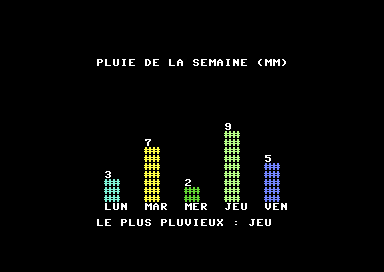
This program draws a bar chart: one bar per day, as tall as the rain that fell. It also finds the rainiest day.
// Arrays, strings and pointers: the week's rainfall (Commodore 64)
architecture commodore.c64;

addlib vic.base;
addlib vic.screentext;

unit {
    const ubyte BAS = 20;                                   // the row at the bottom of the bars
    const string JOURS[] = { "LUN", "MAR", "MER", "JEU", "VEN" };
    const ubyte COULEURS[] = { 3, 7, 5, 13, 14 };          // one color per bar
    ubyte pluie[5] = { 3, 7, 2, 9, 5 };                     // in millimeters

    main() {
        ubyte record;

        vic.setBorderColor(0);
        vic.setBackgroundColor(0);
        vic.initScreen();
        vic.clearScreen();

        vic.setFontColor(1);
        vic.setCursor(8, 3);
        vic.print("PLUIE DE LA SEMAINE (MM)");

        dessinerBarres(@.pluie, (ubyte)sizeof(.pluie[]));

        record = indiceMax(@.pluie, (ubyte)sizeof(.pluie[]));
        vic.setFontColor(1);
        vic.setCursor(8, 23);
        vic.print("LE PLUS PLUVIEUX : ");
        vic.print(@.JOURS[record]);
    }

    // One bar per value, as tall as the value
    void dessinerBarres(ubyte *valeurs, ubyte nombre) {
        for (ubyte i = 0; i < nombre; i++) {
            ubyte x = (ubyte)(9 + i * 5);
            ubyte h = valeurs[i];

            vic.setFontColor(.COULEURS[i]);
            for (ubyte y = 0; y < h; y++) {
                vic.setCursor(x, (ubyte)(.BAS - y));
                vic.print("##");
            }

            vic.setFontColor(1);
            vic.setCursor(x, (ubyte)(.BAS - h));        // the value, above the bar
            vic.putChar((ubyte)('0' + h));
            vic.setCursor(x, (ubyte)(.BAS + 1));        // the day, below
            vic.print(@.JOURS[i]);
        }
    }

    // The index of the largest value in the array
    ubyte indiceMax(ubyte *valeurs, ubyte nombre) {
        ubyte meilleur = 0;
        for (ubyte i = 1; i < nombre; i++) {
            if (valeurs[i] > valeurs[meilleur]) {
                meilleur = i;
            }
        }
        return meilleur;
    }
}pluie(rain) is an array in RAM;JOURS(days) andCOULEURS(colors) are constant arrays, in ROM.dessinerBarres(draw bars) andindiceMaxreceive the array through a pointer,@.pluie, and its size throughsizeof.- Cell
iofCOULEURSgives the color of bari, and the same cell ofJOURSgives its name. indiceMaxreturns an index, which is then used to read the name of the day:@.JOURS[record].
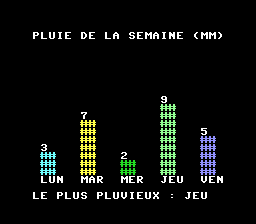
The PC Engine version
The arrays and the two drawing and search functions are identical. On the PC
Engine, COULEURS holds palette numbers, which
preparerEcran() fills in one by one.
// Arrays, strings and pointers: the week's rainfall (PC Engine)
architecture nec.pce;

addlib sys.resource;
addlib vce.base;
addlib vdc.base;
addlib vdc.screentext;

unit {
    const int font = addResource("font.bin");
    const ubyte BAS = 21;                                   // the row at the bottom of the bars
    const string JOURS[] = { "LUN", "MAR", "MER", "JEU", "VEN" };
    const ubyte COULEURS[] = { 1, 2, 3, 4, 5 };            // one palette per bar
    ubyte pluie[5] = { 3, 7, 2, 9, 5 };                     // in millimeters

    main() {
        ubyte record;

        preparerEcran();

        vdc.setFontColor(0);
        vdc.setCursor(4, 4);
        vdc.print("PLUIE DE LA SEMAINE (MM)");

        dessinerBarres(@.pluie, (ubyte)sizeof(.pluie[]));

        record = indiceMax(@.pluie, (ubyte)sizeof(.pluie[]));
        vdc.setFontColor(0);
        vdc.setCursor(4, 24);
        vdc.print("LE PLUS PLUVIEUX : ");
        vdc.print(@.JOURS[record]);
    }

    // The screen, the font, and one palette per text color
    void preparerEcran() {
        int source;
        int length;
        vdc.setBATSize(vdc.BAT_32x32);
        vdc.initScreen();
        resource.mapToMPR2(.font);
        source = 0x4000 + resource.getOffset(.font);
        length = resource.getLength(.font);
        vdc.writeToVRAM(source, 0x1000, length);
        vce.setPalette(0, 0, RGB(0, 0, 0));     // the background
        vce.setPalette(0, 1, RGB(7, 7, 7));     // palette 0: white
        vce.setPalette(1, 1, RGB(3, 7, 7));     // palette 1: cyan
        vce.setPalette(2, 1, RGB(7, 7, 2));     // palette 2: yellow
        vce.setPalette(3, 1, RGB(1, 6, 1));     // palette 3: green
        vce.setPalette(4, 1, RGB(4, 7, 4));     // palette 4: light green
        vce.setPalette(5, 1, RGB(4, 4, 7));     // palette 5: light blue
        vdc.clearScreen();
    }

    // One bar per value, as tall as the value
    void dessinerBarres(ubyte *valeurs, ubyte nombre) {
        for (ubyte i = 0; i < nombre; i++) {
            ubyte x = (ubyte)(5 + i * 5);
            ubyte h = valeurs[i];

            vdc.setFontColor(.COULEURS[i]);
            for (ubyte y = 0; y < h; y++) {
                vdc.setCursor(x, (ubyte)(.BAS - y));
                vdc.print("##");
            }

            vdc.setFontColor(0);
            vdc.setCursor(x, (ubyte)(.BAS - h));        // the value, above the bar
            vdc.putChar((ubyte)('0' + h));
            vdc.setCursor(x, (ubyte)(.BAS + 1));        // the day, below
            vdc.print(@.JOURS[i]);
        }
    }

    // The index of the largest value in the array
    ubyte indiceMax(ubyte *valeurs, ubyte nombre) {
        ubyte meilleur = 0;
        for (ubyte i = 1; i < nombre; i++) {
            if (valeurs[i] > valeurs[meilleur]) {
                meilleur = i;
            }
        }
        return meilleur;
    }
}
Key points
- An array stores cells of the same type; indexes start at 0.
sizeof(.t[])gives the number of cells,sizeof(.t)the size in bytes.- With a variable index, nothing checks that you stay inside the array.
- A
constarray is in ROM: it costs no RAM, and cannot be changed. - A text is a sequence of bytes ending with 0;
const stringfor fixed texts, an array ofubytefor a modifiable text. @gives an address; a pointer (ubyte *p) holds one, and is used like an array:p[i].- You pass an array to a function with
@. - A function pointer (
function void() f;) keeps the address of a function, given by@, and is called like it:.f().
Your turn
- Write a function
uint somme(ubyte *valeurs, ubyte nombre)and show the week's total below the bar chart.Show solutionHide solution
somme(sum) reuses the loop from this chapter: a variablesstarts at 0, and each cell is added to it. LikedessinerBarresandindiceMax, it receives the array through a pointer, and its number of cells separately: this way it works for anyubytearray.The cells are
ubytes, but the result is auint. Aubytedoes not go above 255: a very rainy week, seven days of 50 mm, would make 350 and would not fit. To write the total, we reuseecrireNombre()from chapter 5, copied as is belowsomme(withvdc.putCharon the PC Engine).main() { ubyte record; vic.setBorderColor(0); vic.setBackgroundColor(0); vic.initScreen(); vic.clearScreen(); vic.setFontColor(1); vic.setCursor(8, 3); vic.print("PLUIE DE LA SEMAINE (MM)"); dessinerBarres(@.pluie, (ubyte)sizeof(.pluie[])); record = indiceMax(@.pluie, (ubyte)sizeof(.pluie[])); vic.setFontColor(1); vic.setCursor(8, 23); vic.print("LE PLUS PLUVIEUX : "); vic.print(@.JOURS[record]); vic.setCursor(8, 24); vic.print("TOTAL : "); ecrireNombre(somme(@.pluie, (ubyte)sizeof(.pluie[])), 3); vic.print(" MM"); } // The sum of the cells of the array uint somme(ubyte *valeurs, ubyte nombre) { uint s = 0; for (ubyte i = 0; i < nombre; i++) { s = s + valeurs[i]; } return s; }The total, 3 + 7 + 2 + 9 + 5 = 26, is shown as
026: we asked for three digits. On the PC Engine, the code is the same withvdcinstead ofvic, and row 26 instead of 24 (vdc.setCursor(4, 26)), below « LE PLUS PLUVIEUX » (the rainiest).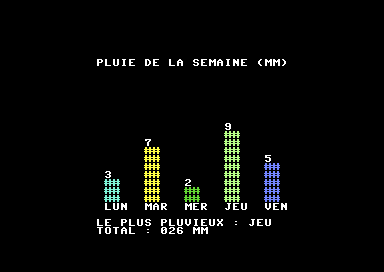
The week's total on the Commodore 64. 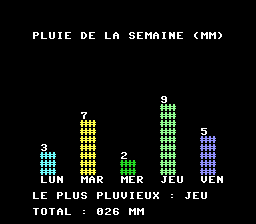
And on the PC Engine. - Before drawing, add 2 mm to each day with a loop.
Show solutionHide solution
The loop goes through all the cells of
pluieand adds 2 to each one. It goes inmain(), before the call todessinerBarres: the array itself changes, and the bars and the record follow. The compiler also accepts the line without the(ubyte)cast; we keep it as a reminder that the result is stored in a byte, which does not go above 255. Thanks tosizeof, the loop will follow the array if you add days to it.for (ubyte i = 0; i < sizeof(.pluie[]); i++) { .pluie[i] = (ubyte)(.pluie[i] + 2); // 2 mm more } dessinerBarres(@.pluie, (ubyte)sizeof(.pluie[]));When you run the program, there is a surprise: above Thursday's bar, which is now 11,
;is shown instead of11. Indeed,'0' + honly gives a digit forhfrom 0 to 9: the character that follows9in the character table is:, then;.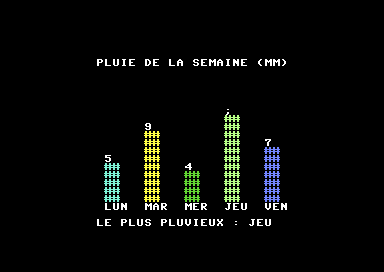
Before the fix: 11 is written as « ; ». So you need to write the value with two digits when it reaches 10: the tens (
h / 10), then the units (h % 10). IndessinerBarres:vic.setCursor(x, (ubyte)(.BAS - h)); // the value, above the bar if (h >= 10) { vic.putChar((ubyte)('0' + h / 10)); // the tens digit } vic.putChar((ubyte)('0' + h % 10)); // the units digit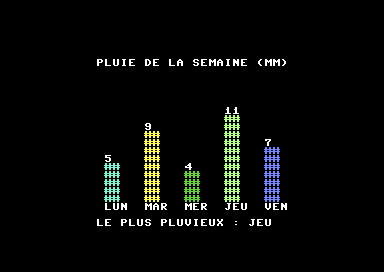
Each day has 2 mm more, and 11 is written correctly. On the PC Engine, both changes are the same, with
vdc; we checked that the bar of 11 fits below the title. You could also have writtentransformer(@.pluie, 5, @plusDeux);with the function from the section on function pointers: it is the same loop, wrapped in a function. - Write
indiceMin, and also show the driest day.Show solutionHide solution
indiceMinis a copy ofindiceMax, with a single sign changed: you keep the cell whose value is smaller than the best one found so far. The comparison is strict (<): if two days have the same rainfall, the first one is kept.// The index of the smallest value in the array ubyte indiceMin(ubyte *valeurs, ubyte nombre) { ubyte meilleur = 0; for (ubyte i = 1; i < nombre; i++) { if (valeurs[i] < valeurs[meilleur]) { meilleur = i; } } return meilleur; }In
main(), you store the index in a new local variable,sec(dry), declared next torecord, then show it below the rainiest day. The spaces in the text line up the colons:sec = indiceMin(@.pluie, (ubyte)sizeof(.pluie[])); vic.setCursor(8, 24); vic.print("LE PLUS SEC : "); vic.print(@.JOURS[sec]);On the PC Engine, the function is identical; only the display changes:
vdc, and row 26 (vdc.setCursor(4, 26)).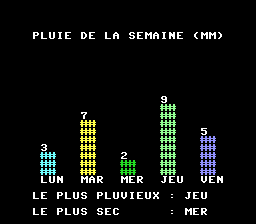
Wednesday, with 2 mm, is the driest day. - Add Saturday and Sunday. What do you need to change so that the seven bars
fit on the screen?
Show solutionHide solution
The three arrays get two more values each: the names of the days, their color, and the rainfall. Nothing else changes in the loops: they stop at
nombre, which comes fromsizeof(.pluie[]), and so they follow the array. That is the whole point of not hard-coding 5. Watch the size ofpluie: withpluie[5]and seven values, the compiler would only keep the first five, with the warningArray initializer truncated from 7 to 5 elements. Writepluie[7], orpluie[]to let the compiler count.const string JOURS[] = { "LUN", "MAR", "MER", "JEU", "VEN", "SAM", "DIM" }; const ubyte COULEURS[] = { 3, 7, 5, 13, 14, 10, 15 }; // one color per bar ubyte pluie[7] = { 3, 7, 2, 9, 5, 1, 6 }; // in millimetersIf you stop there, the drawing overflows. Each bar is 5 columns further than the previous one, starting at column 9: the seventh starts at column 39, and the C64 screen only has 40 columns (0 to 39). Sunday's bar and name continue at the start of the next row:
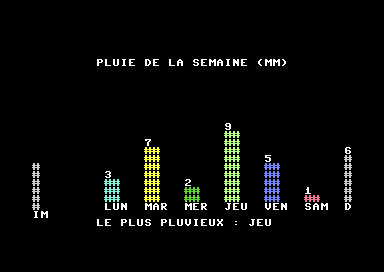
Without changing the position of the bars: Sunday overflows. So you need to recompute the position
xindessinerBarres. Seven bars 5 columns apart take 6 × 5 + 3 = 33 columns (the name of the last day takes 3): you start at column 3 to center them in the 40.ubyte x = (ubyte)(3 + i * 5); // 7 bars: from 3 to 33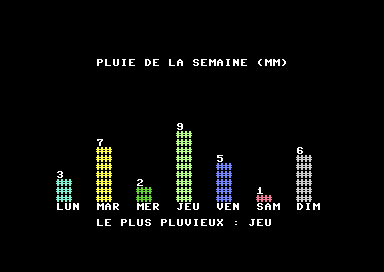
The seven days on the Commodore 64. On the PC Engine
The arrays change in the same way. On this machine,
COULEURSholds palette numbers: the two new days use palettes 6 and 7.const string JOURS[] = { "LUN", "MAR", "MER", "JEU", "VEN", "SAM", "DIM" }; const ubyte COULEURS[] = { 1, 2, 3, 4, 5, 6, 7 }; // one palette per bar ubyte pluie[7] = { 3, 7, 2, 9, 5, 1, 6 }; // in millimetersThese two palettes must be filled in, in
preparerEcran(), after the others:vce.setPalette(6, 1, RGB(7, 3, 3)); // palette 6: light red vce.setPalette(7, 1, RGB(5, 5, 5)); // palette 7: grayFinally, the screen only has 32 columns: a spacing of 5 would need 33 columns, which is too many. You bring the bars closer, 4 columns apart (6 × 4 + 3 = 27 columns), starting at column 3. There is still a space between two day names.
ubyte x = (ubyte)(3 + i * 4); // 7 bars: from 3 to 27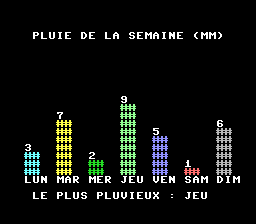
The seven days on the PC Engine, with two new palettes. To sum up: the data (the arrays) and the layout (the position
x) change; the code of the loops has not moved.