
Units and Libraries
A complete game has thousands of lines. Writing them all in a single file would quickly become unmanageable. This chapter shows how to split a program into several files, the units, and how to write your own libraries, reusable from one project to the next.
Why split into files?
So far, the whole program fit in main.s8p. Splitting it into files
lets you:
- find your way around: the player in one file, the enemies in another, the display in a third;
- separate what depends on the machine from what does not: the rules of the game stay the same on the C64 and on the PC Engine, only the display changes;
- reuse: a well-written library serves in all your projects.
Simple8 offers two kinds of files for this:
| File | Contains | Added with | Called with |
|---|---|---|---|
.s8u | a unit: a part of the program | addunit "Joueur.s8u"; | Joueur.deplacer() |
.s8l | a library: reusable functions | addlib outils.outils; | outils.carre() |
Units
The main unit
Since the first chapter, main.s8p has contained a unit: unit { … }.
Without a name, it is called Main. It is the main unit, the
only one with a main() function.
A unit in its own file
Another unit is written in its own file, with the .s8u extension. It has a
name, its variables and its functions, but no main():
Joueur.s8u
unit Joueur {
    ubyte x;

    void init() {
        .x = 10;
    }

    void deplacer(ubyte dx) {
        .x = .x + dx;
    }
}- Inside the unit, nothing changes: its variables are written
.x, its functions are called without a prefix. - A unit can load the libraries it needs by itself, with
addlibat the top of the file. A library already loaded by another file is not loaded twice. - The
architectureline is optional in a.s8u: the unit takes the program's.
Adding a unit: addunit
The main program adds its units with addunit, after the
addlib lines. The path is relative to the file that contains the addunit,
and can point to a subfolder:
main.s8p
architecture commodore.c64;

addunit "Joueur.s8u";
addunit "jeu/Ennemis.s8u";          // a unit stored in a subfolder

unit {
    main() {
        Joueur.init();
        Joueur.deplacer(3);         // Joueur.x is 13
    }
}
Both forms, addunit "Joueur.s8u"; and
addunit("Joueur.s8u");, are accepted.
The naming rule
As in Java, the name of the unit is the name of its file, without the extension:
| File | Expected declaration |
|---|---|
main.s8p | unit { or unit Main { |
Joueur.s8u | unit Joueur { |
jeu/Ennemis.s8u | unit Ennemis { (the folder does not count) |
Any other name is rejected:
Unit name mismatch: file 'Joueur.s8u' must declare 'unit Joueur {' but found 'unit Heros {'This way, when you read Joueur.deplacer() anywhere in the project, you
know right away which file to look in.
Same name, same case. The check ignores capital letters:
unit joueur is accepted in Joueur.s8u. But the unit is then
called joueur, and a call to Joueur.init() does not find it.
Write the name exactly like the file's; by convention, with a capital letter.
The other rules that are checked
| Rule | Message |
|---|---|
the extension is .s8u | a unit file must have the .s8u extension |
| the file exists | file not found (Absent.s8u) |
| a file is added only once | this unit file is already part of the program |
no main() in a .s8u | main() is not allowed in a unit file (.s8u) outside a context |
Using a unit from another one
From another unit, you write the name of the unit, a dot, then the variable or the function:
.position = Joueur.x;           // read a variable of Joueur
Joueur.deplacer(3);             // call a function of Joueur
Main.ajouter(5); // from a unit: a function of the main unit| What you refer to | In its own unit | From another unit |
|---|---|---|
| a variable | .x | Joueur.x |
| a function | deplacer(3) | Joueur.deplacer(3) |
| a constant | .MAX | Joueur.MAX |
Two units can have functions with the same name: Joueur.init() and
Ennemis.init() do not get mixed up.
Changing another unit: through its functions
Reading a variable of another unit and calling its functions work in every direction. To change its variables, go through one of its functions: the unit itself changes its own data.
// in Joueur.s8u
Ennemis.changer(9);         // rather than Ennemis.nombre = 9;

// in Ennemis.s8u
void changer(ubyte n) {
    .nombre = n;
}
A current limitation. A direct assignment
(Ennemis.nombre = 9;) is only accepted toward a unit added
before the one doing the writing. So the main unit can write to all its units,
but a unit cannot write to Main, nor to a unit added after
it: Variable 'Ennemis.nombre' not found !. Going through a function avoids
the problem, and makes the program clearer.
Libraries
A library, a .s8l file, groups reusable functions. The
libraries in libs8/ (vic.screentext, vce.base…)
are written this way. A library is declared with library("nom"):
userlibs/outils/outils.s8l
library("outils")
{
    const ubyte MAX = 200;
    ubyte compteur;

    uint carre(uint n) {
        return n * n;
    }

    void incrementer() {
        .compteur++;
    }
}
The program loads it with addlib, then uses it with the name given in
library("…"):
addlib outils.outils;          // the file outils/outils.s8l

unit {
    main() {
        .resultat = outils.carre(9);    // 81
        outils.incrementer();
        .valeur = outils.MAX;           // 200
    }
}
The prefix is the name in library("…"), not the file name.
The compiler does not check that they are identical: with
library("util") in outils.s8l, calls to
outils.carre() find nothing. Always give the same name to the file and to
the library.
Where the compiler looks
addlib dossier.fichier; refers to the file dossier/fichier.s8l.
The compiler looks for it in four places, in this order, and takes the first one
found:
libs8/constructeur/machine/: the machine's libraries;libs8/: the libraries shared by all machines;- the folder in the
S8_USER_LIBSvariable: your libraries, for all your projects; userlibs/, in the project folder: this project's libraries.
If it cannot be found, the library gives Library not found: outils/absente.s8l.
Generic or machine-specific
- A generic library has no
architectureline. It takes the program's and works on all machines, as long as it only uses Simple8: no_asm, and no machine library. - A machine-specific library starts with its
architectureline. It can use the hardware and the libraries of that machine.
A library that uses another one
A library loads the ones it needs, with addlib at the top of the
file, or with require in its block, as the ones in
libs8/ do:
architecture commodore.c64;

library("texte")
{
    require vic.screentext;     // or: addlib vic.screentext; before library

    ubyte lignes;

    void ligne(uint t) {
        vic.setCursor(2, .lignes);
        vic.print(t);
        .lignes++;
    }
}
A library on the wrong machine
What happens when the code of a library does not suit the program's machine? It all depends on the situation, and not all of them are reported clearly:
| Situation | Result |
|---|---|
Loading a library from another machine: addlib vic.screentext;
in a PC Engine program |
Rejected. It is stored in the C64's folder, and the compiler
does not look for it anywhere else: Library not found: vic/screentext.s8l. |
A generic library (without architecture) contains a 6502
_asm block, and the program is for a Z80 (Amstrad CPC) |
Rejected. The instructions are checked against the program's
processor: Unknown mnemonic 'LDA' for architecture Zilog Z80A (Amstrad
CPC). |
| The same library, in a program for another 6502 machine | Accepted without a message. The processor understands the instructions,
but the hardware is not the same: an address like $D020 (the
C64's border) does not play that role on another machine. The program compiles, and
does the wrong thing. |
| A library declares an architecture different from the program's | Just a warning,
Architecture declaration is different from project, then, depending on the
case: obscure assembly errors
(Symbol '_context_ram_start' already defined,
Unknown instruction: .IMPORTZP), or an error-free compilation of
code written for another machine. |
Do not ignore this warning. « Architecture declaration is different from project » means that a library was written for another machine. The errors that follow, if any, do not point to the real cause: it is the library that needs to change.
Hence three simple rules:
- A library that touches the hardware (an
_asmblock, a machine address, a library likevicorvdc) declares its architecture, and is only used by programs for that machine. - A library for all machines has no
architectureline, and contains only Simple8: no_asm, and no machine library. This is the case ofnombresin the example below. - For the same library on several machines, you write one
version per machine, stored under the same path in each machine's folder:
addlibfinds the one for the program's machine first. For example,libs8/math/bcd.s8lis the generic version ofmath.bcd, andlibs8/nintendo/dmg/math/bcd.s8lis the Game Boy version, which is faster.
addlib rather than require, for now.
If a library called with require cannot be found, the compiler
shows a Java exception, but reports 0 error(s), without producing a
program. With addlib, the error is reported normally:
Library not found.
An example: the scoreboard in files
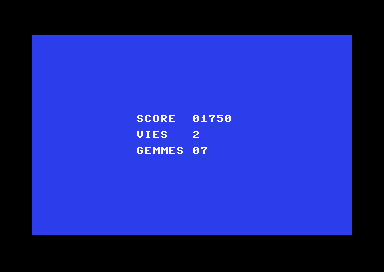
The scoreboard from chapter 5, split into four files according to their role:
Score/
├── main.s8p                    the main program: it runs the steps in order
├── Partie.s8u                  the rules of the game: score, lives, gems
├── Ecran.s8u                   the display, specific to the machine
└── userlibs/
    └── nombres/
        └── nombres.s8l         a generic library: a number as digits
main.s8p
// Units and libraries: the scoreboard, split into files (Commodore 64)
architecture commodore.c64;

addunit "Partie.s8u";
addunit "Ecran.s8u";

unit {
    main() {
        Partie.nouvelle();
        Partie.ramasser(7);
        Partie.perdreVie();

        Ecran.preparer();
        Ecran.ligne(10, "SCORE  ", Partie.score, 5);
        Ecran.ligne(12, "VIES   ", Partie.vies, 1);
        Ecran.ligne(14, "GEMMES ", Partie.gemmes, 2);
    }
}
Partie.s8u
// Partie.s8u: the rules of the game (nothing specific to a machine)
unit Partie {
    const uint POINTS_PAR_GEMME = 250;
    uint score;
    ubyte vies;
    ubyte gemmes;

    // A new game
    void nouvelle() {
        .score = 0;
        .vies = 3;
        .gemmes = 0;
    }

    // The player picks up gems
    void ramasser(ubyte n) {
        .gemmes = .gemmes + n;
        .score = .score + .POINTS_PAR_GEMME * n;
    }

    // The player loses a life
    void perdreVie() {
        if (.vies > 0) {
            .vies--;
        }
    }
}
Ecran.s8u
// Ecran.s8u: the display, specific to the Commodore 64
addlib vic.base;
addlib vic.screentext;
addlib nombres.nombres;

unit Ecran {
    ubyte tampon[6];                    // the digits of a number, and the final 0

    // Blue background, white text
    void preparer() {
        vic.setBorderColor(0);
        vic.setBackgroundColor(6);
        vic.initScreen();
        vic.clearScreen();
        vic.setFontColor(1);
    }

    // A text then a number, on row y
    void ligne(ubyte y, uint texte, uint valeur, ubyte chiffres) {
        vic.setCursor(13, y);
        vic.print(texte);
        nombres.enChiffres(valeur, @.tampon, chiffres);
        vic.print(@.tampon);
    }
}
userlibs/nombres/nombres.s8l
// nombres.s8l: a generic library (no architecture line), for all machines
library("nombres")
{
    // Writes the digits of valeur into dest, with leading zeros, then the final 0
    void enChiffres(uint valeur, ubyte *dest, ubyte chiffres) {
        uint diviseur = 1;
        ubyte k = 0;
        for (ubyte i = 1; i < chiffres; i++) {
            diviseur = diviseur * 10;
        }
        while (diviseur > 0) {
            dest[k] = (ubyte)('0' + (valeur / diviseur) % 10);
            k++;
            diviseur = diviseur / 10;
        }
        dest[k] = 0;
    }
}main.s8pnow only runs the steps in order: it reads like a summary.Partie(game) contains only rules, with nothing that depends on the machine.Ecran(screen) is the only unit that talks to the hardware. It loads its libraries by itself.nombres(numbers) does no display at all: it stores the digits in an array, whichEcranthen displays. That is what makes it generic.
The PC Engine version
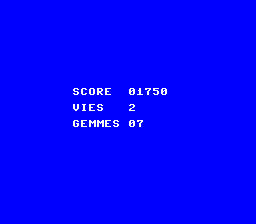
This is where splitting pays off: Partie.s8u and
nombres.s8l are exactly the same files. The only things
that change are the architecture line of main.s8p (and the position of the
rows), and Ecran.s8u:
Ecran.s8u
// Ecran.s8u: the display, specific to the PC Engine
addlib sys.resource;
addlib vce.base;
addlib vdc.base;
addlib vdc.screentext;
addlib nombres.nombres;

unit Ecran {
    const int font = addResource("font.bin");
    ubyte tampon[6];                    // the digits of a number, and the final 0

    // The font, blue background, white text
    void preparer() {
        int source;
        int length;
        vdc.setBATSize(vdc.BAT_32x32);
        vdc.initScreen();
        resource.mapToMPR2(.font);
        source = 0x4000 + resource.getOffset(.font);
        length = resource.getLength(.font);
        vdc.writeToVRAM(source, 0x1000, length);
        vce.setPalette(0, 0, RGB(0, 0, 7));
        vce.setPalette(0, 1, RGB(7, 7, 7));
        vdc.clearScreen();
        vdc.setFontColor(0);
    }

    // A text then a number, on row y
    void ligne(ubyte y, uint texte, uint valeur, ubyte chiffres) {
        vdc.setCursor(9, y);
        vdc.print(texte);
        nombres.enChiffres(valeur, @.tampon, chiffres);
        vdc.print(@.tampon);
    }
}
Key points
- A unit is written in a
.s8ufile, added withaddunit, and has the name of its file, capital letters included. - From another unit:
Unit.variable,Unit.fonction(). To change a unit, call its functions. - A library is written in a
.s8lfile, declared withlibrary("nom"), loaded withaddlib dossier.fichier;, and called by the name given inlibrary. - Your libraries go in
userlibs/(one project) or in the folder ofS8_USER_LIBS(all your projects). - A library that touches the hardware declares its architecture; a generic library has none, and contains only Simple8. Never ignore the warning « Architecture declaration is different from project ».
- Separating what depends on the machine from what does not makes a program portable.
Your turn
- Add a level to
Partie(aniveauvariable and aniveauSuivant()function), and display it.Show solutionHide solution
The level is part of the rules of the game: its variable and its function go in
Partie, next to the score and the lives.nouvelle()sets it to 1 at the start of the game, andniveauSuivant()(next level) moves it forward. Like the rest ofPartie, this code does not depend on any machine: the same file serves the C64 and the PC Engine.Partie.s8u// Partie.s8u: the rules of the game (nothing specific to a machine) unit Partie { const uint POINTS_PAR_GEMME = 250; uint score; ubyte vies; ubyte gemmes; ubyte niveau; // A new game void nouvelle() { .score = 0; .vies = 3; .gemmes = 0; .niveau = 1; } // The player picks up gems void ramasser(ubyte n) { .gemmes = .gemmes + n; .score = .score + .POINTS_PAR_GEMME * n; } // The player loses a life void perdreVie() { if (.vies > 0) { .vies--; } } // The player moves on to the next level void niveauSuivant() { .niveau++; } }In
main.s8p, you complete one level, then display one more row. The main program readsPartie.niveaudirectly: reading another unit's variable is allowed. To change it, it goes throughPartie.niveauSuivant(), as the chapter recommends.main.s8pmain() { Partie.nouvelle(); Partie.ramasser(7); Partie.perdreVie(); Partie.niveauSuivant(); Ecran.preparer(); Ecran.ligne(10, "SCORE ", Partie.score, 5); Ecran.ligne(12, "VIES ", Partie.vies, 1); Ecran.ligne(14, "GEMMES ", Partie.gemmes, 2); Ecran.ligne(16, "NIVEAU ", Partie.niveau, 2); }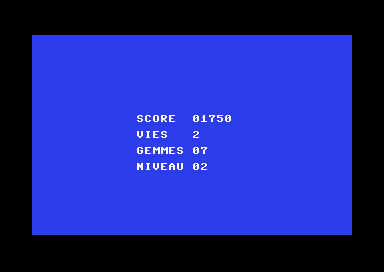
Level 2, after one call to niveauSuivant(). On the PC Engine, only the row changes:
Ecran.ligne(17, "NIVEAU ", Partie.niveau, 2);, below the gems (row 15).Ecran.s8uis not touched on either machine: itsligne()function already knows how to display a text and a number. - Create a unit
Bonus.s8uwith a function that gives 1,000 points per remaining life, by callingPartie.ajouter(), which you will write.Show solutionHide solution
The new unit contains only rules, with nothing specific to a machine: the same
Bonus.s8ufile serves the C64 and the PC Engine. It reads the number of lives fromPartie, but does not touch the score itself: it asksPartieto increase it, through theajouter()(add) function.Partieis the one that changes its own data.Bonus.s8u// Bonus.s8u: the end-of-game bonus (nothing specific to a machine) unit Bonus { const uint POINTS_PAR_VIE = 1000; // 1,000 points per remaining life, added to the game's score void compter() { Partie.ajouter(.POINTS_PAR_VIE * Partie.vies); } }In
Partie.s8u, you add theajouter()function. It can be used on other occasions: a treasure, a defeated enemy…Partie.s8u// Extra points void ajouter(uint points) { .score = .score + points; }Finally,
main.s8padds the unit and counts the bonus at the end of the game (here the C64 version; on the PC Engine, only the display row numbers differ):main.s8paddunit "Partie.s8u"; addunit "Bonus.s8u"; addunit "Ecran.s8u"; unit { main() { Partie.nouvelle(); Partie.ramasser(7); Partie.perdreVie(); Bonus.compter(); // 2 lives: 2,000 more points Ecran.preparer(); Ecran.ligne(10, "SCORE ", Partie.score, 5); Ecran.ligne(12, "VIES ", Partie.vies, 1); Ecran.ligne(14, "GEMMES ", Partie.gemmes, 2); } }The score goes from 1,750 (7 gems at 250 points) to 3,750: 2 lives left, 2,000 more points.
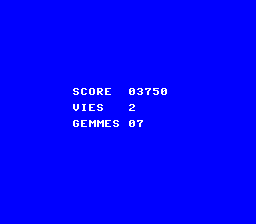
The bonus counted, on the PC Engine. Why go through
ajouter()rather than writingPartie.score = Partie.score + …inBonus? We tried both. The direct assignment compiles as long asBonusis added afterPartie; if you swap the twoaddunitlines, the compiler refuses:Variable 'Partie.score' not found !. Withajouter(), the order of theaddunitlines no longer matters: the program gives 3,750 in both cases. - Add a function to the
nombreslibrary that does not write leading zeros.Show solutionHide solution
The new function follows the same idea as exercise 3 of chapter 5: you go through the digits from left to right, and only write a digit if it is not zero, or if a digit has already been written (zeros in the middle, as in 1050, must stay), or if it is the last one (so that 0 is written as
0). Here, there is no need for an extra variable to know whether writing has started:k, the number of digits already stored, is enough. As long as it is 0, nothing has been written.Like
enChiffres, the function displays nothing: it stores the digits in an array, and the library stays generic. You start directly from 10,000, because auinthas at most 5 digits (65,535); thechiffresparameter is no longer needed.userlibs/nombres/nombres.s8l// Writes the digits of valeur into dest, without leading zeros, then the final 0 void enChiffresCourt(uint valeur, ubyte *dest) { uint diviseur = 10000; // a uint has at most 5 digits (65 535) ubyte k = 0; // the number of digits already written while (diviseur > 0) { ubyte chiffre = (ubyte)((valeur / diviseur) % 10); // write from the first non-zero digit on, and always the last one (for 0) if (chiffre != 0 || k > 0 || diviseur == 1) { dest[k] = (ubyte)('0' + chiffre); k++; } diviseur = diviseur / 10; } dest[k] = 0; }To use it,
Ecran.s8ugets a display function with three parameters. Thetampon(buffer) array, with 6 cells, has room for 5 digits and the final 0.Ecran.s8u// A text then a number without leading zeros, on row y void ligneCourte(ubyte y, uint texte, uint valeur) { vic.setCursor(13, y); vic.print(texte); nombres.enChiffresCourt(valeur, @.tampon); vic.print(@.tampon); }main.s8pEcran.preparer(); Ecran.ligneCourte(10, "SCORE ", Partie.score); Ecran.ligneCourte(12, "VIES ", Partie.vies); Ecran.ligneCourte(14, "GEMMES ", Partie.gemmes);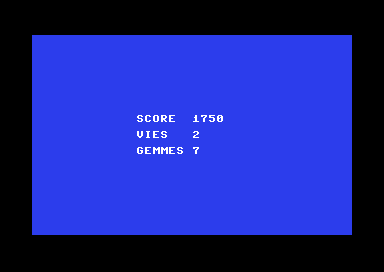
The numbers without their leading zeros. We also checked the edge cases, by displaying a few more values: 0 is written as
0, 40 as40, 10005 keeps its middle zeros, and 65535 is written in full. On the PC Engine,nombres.s8lis the same file; inEcran.s8u, the function is the same withvdcand column 9. - Rename
Ecran.s8utoAffichage.s8u: what else do you need to change?Show solutionHide solution
The name of a unit is the name of its file: renaming the file renames the unit. So, in addition to the file name, you need to change:
- the line
addunit "Ecran.s8u";inmain.s8p, which becomesaddunit "Affichage.s8u";; - the declaration in the file:
unit Ecran {becomesunit Affichage {; - every call to
Ecran.preparer()andEcran.ligne(…), which becomeAffichage.preparer()andAffichage.ligne(…), everywhere in the project (here, only inmain.s8p).
The compiler guides you step by step. We renamed the file alone, then fixed one thing at a time:
What was changed Compiler message the file name alone addunit "Ecran.s8u": file not found (…)plus the addunitlineUnit name mismatch: file 'Affichage.s8u' must declare 'unit Affichage {' but found 'unit Ecran {'plus the unitdeclarationFunction 'preparer' not found !, then three timesFunction 'ligne' not found !plus the calls none: 0 error(s) The main program becomes:
main.s8paddunit "Partie.s8u"; addunit "Affichage.s8u"; unit { main() { Partie.nouvelle(); Partie.ramasser(7); Partie.perdreVie(); Affichage.preparer(); Affichage.ligne(10, "SCORE ", Partie.score, 5); Affichage.ligne(12, "VIES ", Partie.vies, 1); Affichage.ligne(14, "GEMMES ", Partie.gemmes, 2); } }Nothing else changes:
Partie.s8uandnombres.s8ldo not know aboutEcran, andfont.bin, on the PC Engine, stays next to the file. The resulting screen is exactly the same as before, on both machines. Also remember the comment at the top of the file, which mentioned the old name: the compiler does not check it. - the line