
Contexts
A game moves through clearly separate parts: the title screen, the levels,
the end screen. This chapter shows how to split a game into contexts,
that is, into pieces loaded into memory only when they are needed. We
will build, step by step, a program that goes from a title screen to a game. Along the way, we
will meet two essential tools: initContext() and
interrupts.
The problem: a game too big for memory
Retro machines have very little memory. The PC Engine, for example, only sees 64 KB at a time, 40 KB of which are for the program. Yet a cartridge can hold up to 1 MB: much more than the processor can see at once.
Fortunately, a game never needs everything at the same time. During the title screen, the code for level 3 is of no use. During level 3, it is the title screen that is of no use. Hence the idea of contexts:
A context is a part of the game (the title, a level, the end), stored separately and loaded into memory only when it is needed. Only one context is loaded at a time. The code that is used everywhere always stays in memory.
Depending on the machine
Contexts were designed for machines with banked memory, like the PC Engine. Its cartridge is divided into 8 KB banks, and the program chooses which ones are visible. Managing these banks by hand would be tedious. So Simple8 treats the cartridge as if it were a file system: each context is a set of banks, laid out by the compiler.
On home computers, like the Commodore 64 or the Amstrad CPC, a context is simply an auxiliary file on the floppy disk, which the main program loads into memory. The program is written the same way everywhere. Only what the machine does behind the scenes changes.
| Machine | Where a context is stored | Loading it takes… |
|---|---|---|
| PC Engine | 8 KB banks on the cartridge | an instant: the banks are made visible |
| NES | 8 KB banks on the cartridge | an instant |
| Game Boy | a 16 KB bank on the cartridge | an instant |
| Commodore 64 | a .dat file on the floppy disk | the time to read the file |
| Amstrad CPC | a file on the floppy disk | the time to read the file |
Step 1: a first context
Let's start with a single context: the title screen. You need to do two things: declare it, then write its unit.
Declaring the context
In main.s8p, right after the addlib lines, you declare the context.
You give it a name and the file of its unit:
main.s8p
// Step 1: a single context, the title screen (Commodore 64)
architecture commodore.c64;

addlib vic.base;
addlib vic.screentext;

context Titre {
    addunit("Titre.s8u");
}

unit {
    main() {
        sys.loadContext(Titre);     // loads the Titre context, and never returns
    }
}
The main unit now does only one thing: load the Titre (title) context
with sys.loadContext(Titre). This call never returns.
From then on, the context is in control.
Writing the context's unit
The unit of a context looks like an ordinary unit. It just has to contain two
required functions, initContext() and main():
Titre.s8u
// Titre.s8u: the title screen context
unit Titre {

    // Called each time the context is loaded, before main(): set up the screen
    initContext() {
        vic.initScreen();
        vic.setBorderColor(0);
        vic.setBackgroundColor(6);
        vic.clearScreen();
        vic.setFontColor(1);
        vic.setCursor(16, 6);
        vic.print("TITRE");
    }

    // The context's program
    main() {
        while (1) {
        }
    }
}
Why initContext()?
A context can be loaded several times: you come back to the title screen after each
game. On each load, the screen must be set up again: clear it, choose the
colors, load the graphics. That is the job of initContext(). The two
functions each have a very specific job:
initContext()prepares: it is called on each load, beforemain();main()plays: it is the context's program.
You could put everything in main(). But keeping the setup separate makes the
context easier to read. And we will see further down that initContext() has one
more advantage: nothing can interrupt it.
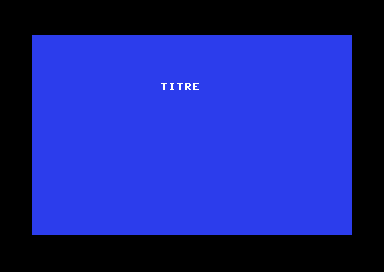
Titre context is loaded and displayed.Step 2: moving to a second context
Let's add the game. You declare a second context, and the title screen loads it in turn:
// main.s8p: one more context
context Jeu {
    addunit("Jeu.s8u");
}

// Titre.s8u: main() moves on to the game
main() {
    sys.loadContext(Jeu);
}
The program compiles, and the game does show up. But the title screen never appears: it moves on to the game the instant it starts. It needs to wait a little, two seconds for example.
How do you wait two seconds? A loop that counts up to a large number would wait a longer or shorter time depending on the machine. We need a real clock.
Step 3: measuring time with an interrupt
What is an interrupt?
Imagine you are reading a book. A bell rings at regular intervals. At each ring, you make a mark on a sheet of paper, then go back to your reading. To know how much time has passed, you just count the marks.
An interrupt works like this. The video chip sends a signal for each frame it displays: 50 times per second on a European C64, 60 times on the PC Engine. At each signal, the processor pauses its program, runs a small piece of code (the interrupt handler), then resumes exactly where it left off.
main() runs continuously; at each frame, the interrupt
cuts in for a brief moment to count.Writing a handler
A handler is written in the unit with interrupt ->, followed by the name of
the interrupt. The frame interrupt is called irq on the C64. To enable it,
main.s8p loads its library: addlib event.irq;.
Titre.s8u
// Titre.s8u: the title screen context
unit Titre {
    ubyte images;                   // the number of frames since loading

    // Called each time the context is loaded, before main(): set up the screen
    initContext() {
        vic.initScreen();
        vic.setBorderColor(0);
        vic.setBackgroundColor(6);
        vic.clearScreen();
        vic.setFontColor(1);
        vic.setCursor(16, 6);
        vic.print("TITRE");
    }

    // The context's program: wait 100 frames (2 seconds), then move on to the game
    main() {
        while (.images < 100) {
        }
        sys.loadContext(Jeu);
    }

    // At each frame, 50 times per second, the program is interrupted just long enough to count
    interrupt -> irq {
        .images++;
    }
}
The work is split in two:
- the handler counts: at each frame,
.images(frames) goes up by 1; main()waits: its loop runs as long as.imagesis less than 100, then it loads the game.
100 frames at 50 per second makes 2 seconds. This time, the title screen stays on screen for two seconds, then the game appears.
| Machine | Frame interrupt | Library to load |
|---|---|---|
| Commodore 64 | interrupt -> irq, 50 times per second | addlib event.irq; |
| PC Engine | interrupt -> irq1, 60 times per second | addlib event.irq1; |
There are other interrupts (a timer, timer, for example), and the
other machines have their own names. Their documentation describes them.
And where does initContext() fit in?
While initContext() runs, interrupts are
masked: the handler is not hooked up yet. So the setup
happens in one go, with no risk of being cut off in the middle. This matters, for
example, when you copy a font into video memory. Interrupts only start
afterwards, just before main().
On the C64, switch contexts from main(). You could
call sys.loadContext directly in the handler. On the PC Engine,
that works. But on the C64, for now, the next context then no longer receives
interrupts, and the program gets stuck. The split above — the handler
counts, main() decides — works everywhere.
Summary: the life cycle
We can now complete the diagram from chapter 2. At startup, as on each context load, the steps are the same:
main().- the machine is prepared: by
boot.asmat startup, bysys.loadContextfor a context, which also puts the context in memory; initContext()does the setup, without being interrupted;- the interrupt handlers are hooked up: the context's, or if it has none, those of the main unit;
main()starts.
The main unit of main.s8p follows the same path: it too can have
its own initContext() and handlers. sys.loadContext(Main)
goes back to it. Nothing is loaded, since it is always in memory, but its
initContext() and its main() are called again.
What a context can see
Since only one context is loaded at a time, a context can only use what is in memory along with it:
| From… | You can use | You cannot use |
|---|---|---|
| a unit of a context | the units of its context, and all the resident code | the units of another context |
| the resident code | the resident code | the units of the contexts |
The resident code is the main unit and the units added with
addunit outside any context. So anything that must serve several
contexts — for example a text to display — goes in a resident unit.
addunit "Commun.s8u";           // outside any context: resident, visible to all

context Jeu {
    addunit("Jeu.s8u");         // the context's main unit: initContext() and main()
    addunit("Ennemis.s8u");     // another unit of the same context, with no initContext() or main()
}
Using a unit from another context is rejected. The compiler then shows a message that reminds you of the rule:
Jeu.essais: unit Jeu belongs to context Jeu, not reachable from context Titre.
Contexts are isolated: switch with sys.loadContext(Jeu)
A context's variables
On each load, a context's variables go back to their initial value: a reloaded level starts over from the beginning. Some values must still be kept, though, like the number of games played. Depending on where you declare a variable, it is reset or kept:
| Variable | Where to declare it | On each load of the context |
|---|---|---|
| context variable | in a unit of the context | reset to its initial value |
shared | in a shared { } block of a unit of the context | kept, and reserved for this context |
| resident | in the main unit, or a unit outside any context | kept, and visible to all contexts |
unit Jeu {
    ubyte essais;               // reset to zero each time the game is loaded

    shared {
        ubyte parties;          // kept from one load to the next
    }
}
The complete program
Here is the program from the three steps, finished. The title and the game hand over
to each other every two seconds. A resident unit, Commun (common), displays the screens for
both contexts. Three counters show what happens to the three kinds of variables.
main.s8p
// Contexts: a title screen and a game, loaded in turn (Commodore 64)
architecture commodore.c64;

addlib event.irq;
addlib vic.base;
addlib vic.screentext;

addunit "Commun.s8u";           // resident: always in memory

context Titre {
    addunit("Titre.s8u");       // main unit of the Titre context
}

context Jeu {
    addunit("Jeu.s8u");         // main unit of the Jeu context
}

unit {
    // At startup, before main(): the screen in text mode
    initContext() {
        vic.initScreen();
        vic.setBorderColor(0);
    }

    main() {
        sys.loadContext(Titre); // never returns
    }
}
Commun.s8u
// Commun.s8u: resident, used by all contexts
unit Commun {
    ubyte chargements;          // contexts loaded since startup: never reset

    // A screen: its background color and its title
    void ecran(ubyte fond, uint titre) {
        vic.setBackgroundColor(fond);
        vic.clearScreen();
        vic.setFontColor(1);
        vic.setCursor(16, 6);
        vic.print(titre);
        .chargements++;
    }

    // A text then a digit, on row y
    void ligne(ubyte y, uint texte, ubyte valeur) {
        vic.setCursor(10, y);
        vic.print(texte);
        vic.putChar((ubyte)('0' + valeur));
    }
}
Titre.s8u
// Titre.s8u: the title screen context
unit Titre {
    ubyte images;               // reset to zero each time the context is loaded

    initContext() {
        Commun.ecran(6, "TITRE");
        Commun.ligne(10, "CHARGEMENTS ", Commun.chargements);
    }

    // wait 100 frames (2 seconds), then move on to the game
    main() {
        while (.images < 100) {
        }
        sys.loadContext(Jeu);
    }

    // 50 times per second
    interrupt -> irq {
        .images++;
    }
}
Jeu.s8u
// Jeu.s8u: the game context
unit Jeu {
    ubyte images;               // reset to zero on each load
    ubyte essais;               // reset to zero on each load: always 1 here

    shared {
        ubyte parties;          // kept from one load to the next
    }

    initContext() {
        .essais++;
        .parties++;
        Commun.ecran(2, "JEU");
        Commun.ligne(10, "CHARGEMENTS ", Commun.chargements);
        Commun.ligne(12, "PARTIES     ", .parties);
        Commun.ligne(14, "ESSAIS      ", .essais);
    }

    // wait 100 frames, then go back to the title screen
    main() {
        while (.images < 100) {
        }
        sys.loadContext(Titre);
    }

    interrupt -> irq {
        .images++;
    }
}| Counter | Stored in | Values on each pass through the game |
|---|---|---|
CHARGEMENTS | a resident unit | 2, 4, 6, 8…: it also counts the passes through the title |
PARTIES | a shared block | 1, 2, 3, 4…: kept from one load of the game to the next |
ESSAIS | a context variable | 1, 1, 1, 1…: reset to zero on each load |
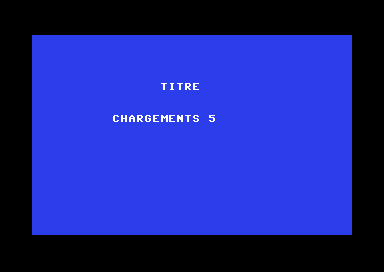
Titre context.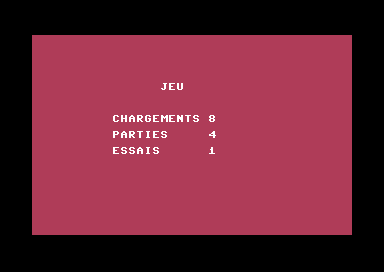
Jeu context, on the fourth pass.What the compiler produces
On the C64, compilation produces one file per context, and puts them together on a floppy disk:
context Titre: titre.dat, 175 bytes at $6000
context Jeu: jeu.dat, 229 bytes at $6000| File | Contents |
|---|---|
main.prg | the resident code: the main unit, Commun, the libraries |
titre.dat, jeu.dat | one file per context, loaded at address $6000 |
main.d64 | the floppy disk image, which contains all these files: this is the one to run |
On the PC Engine, everything is in a single ROM, main.pce: the contexts
each occupy their own banks in it.
The program as seen by Simple8 IDE
Simple8 IDE shows how a program is organized in its project diagram (Project → Project Diagram, ⌥⌘D). After compiling the example, it looks like this:
Resources 0 B · System 2,142 B ROM, 135 B RAM (startup, runtime, strings)
- At the top,
main.s8p: the main unit, and the resident base, that is, everything that stays in memory permanently. Its gauges compare the space used with the space available in its area ($0801-$5FFFon the C64). - Below, what it contains: its libraries, the resident unit
Commun, and each context. - Each context shows where it is stored (here, a file loaded at
$6000), the space it takes in its 16 KB area, and, below, its units.
Sizes are in bytes (B). They come from the asm/main_units.json file,
which the compiler writes after each successful compilation.
The PC Engine version
The structure is the same. The main unit loads the font in its
initContext(), the background changes through the palette, and the frame interrupt
is called irq1. It fires 60 times per second: so you need 120
frames for two seconds.
main.s8p
// Contexts: a title screen and a game, loaded in turn (PC Engine)
architecture nec.pce;

addlib event.irq1;
addlib sys.resource;
addlib vce.base;
addlib vdc.base;
addlib vdc.screentext;

addunit "Commun.s8u";           // resident: always in memory

context Titre {
    addunit("Titre.s8u");       // main unit of the Titre context
}

context Jeu {
    addunit("Jeu.s8u");         // main unit of the Jeu context
}

unit {
    const int font = addResource("font.bin");

    // At startup, before main(): the screen, the font, white text
    initContext() {
        int source;
        int length;
        vdc.setBATSize(vdc.BAT_32x32);
        vdc.initScreen();
        resource.mapToMPR2(.font);
        source = 0x4000 + resource.getOffset(.font);
        length = resource.getLength(.font);
        vdc.writeToVRAM(source, 0x1000, length);
        vce.setPalette(0, 1, RGB(7, 7, 7));
    }

    main() {
        sys.loadContext(Titre); // never returns
    }
}
Commun.s8u
// Commun.s8u: resident, used by all contexts
unit Commun {
    ubyte chargements;          // contexts loaded since startup: never reset

    // A screen: its background color and its title
    void ecran(uint fond, uint titre) {
        vce.setPalette(0, 0, fond);
        vdc.clearScreen();
        vdc.setFontColor(0);
        vdc.setCursor(13, 7);
        vdc.print(titre);
        .chargements++;
    }

    // A text then a digit, on row y
    void ligne(ubyte y, uint texte, ubyte valeur) {
        vdc.setCursor(8, y);
        vdc.print(texte);
        vdc.putChar((ubyte)('0' + valeur));
    }
}
Titre.s8u
// Titre.s8u: the title screen context
unit Titre {
    ubyte images;               // reset to zero each time the context is loaded

    initContext() {
        Commun.ecran(RGB(0, 0, 7), "TITRE");
        Commun.ligne(11, "CHARGEMENTS ", Commun.chargements);
    }

    // wait 120 frames (2 seconds), then move on to the game
    main() {
        while (.images < 120) {
        }
        sys.loadContext(Jeu);
    }

    // 60 times per second
    interrupt -> irq1 {
        .images++;
    }
}
Jeu.s8u
// Jeu.s8u: the game context
unit Jeu {
    ubyte images;               // reset to zero on each load
    ubyte essais;               // reset to zero on each load: always 1 here

    shared {
        ubyte parties;          // kept from one load to the next
    }

    initContext() {
        .essais++;
        .parties++;
        Commun.ecran(RGB(4, 0, 1), "JEU");
        Commun.ligne(11, "CHARGEMENTS ", Commun.chargements);
        Commun.ligne(13, "PARTIES     ", .parties);
        Commun.ligne(15, "ESSAIS      ", .essais);
    }

    // wait 120 frames, then go back to the title screen
    main() {
        while (.images < 120) {
        }
        sys.loadContext(Titre);
    }

    interrupt -> irq1 {
        .images++;
    }
}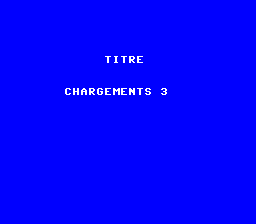
Titre context.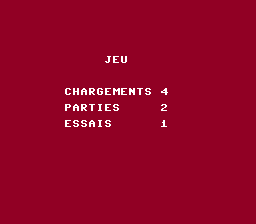
Jeu context.Key points
- A context is a part of the game loaded into memory only when it is needed: banks of the cartridge on the PC Engine, a file on the floppy disk on the C64. Only one is loaded at a time.
- You declare it in
main.s8p:context Nom { addunit(…); }, and you load it withsys.loadContext(Nom), which never returns. - Its main unit has two functions:
initContext()prepares, without being interrupted, andmain()plays. - An interrupt calls a handler at regular intervals:
the frame interrupt serves as a clock. The handler counts,
main()decides. - A context only sees its own units and the resident code.
- Its variables start over from zero on each load, except those in
shared { }; resident variables are always kept.
Your turn
- Make the title screen last five seconds instead of two.
Show solutionHide solution
Five seconds is 5 × 50 = 250 frames on the C64, and 5 × 60 = 300 frames on the PC Engine. On the C64, you just change the number in
Titre.s8u: 250 fits inimages, aubyte(255 at most).On the Commodore 64
// wait 250 frames (5 seconds), then move on to the game
main() {
    while (.images < 250) {
    }
    sys.loadContext(Jeu);
}
In the test emulator, the title appears at 0.21 s and the game at 5.16 s: five seconds, as expected.
On the PC Engine
300 does not fit in a
ubyte. The compiler notices, and rejectswhile (.images < 300):Comparison of Titre.images (ubyte, 0..255) with 300 is always true or always falseThe next idea is to declare
imagesas auint. The program compiles, but we measured that the first title screen only lasts 256 frames (4.3 s) instead of 300. The cause is a classic interrupt trap: auinttakes two bytes, and the 8-bit processor reads them one after the other. When the counter goes from 255 to 256, if the interrupt arrives between the two reads,main()reads the old low byte (255) and the new high byte (1): it thinks it sees 511, and leaves the loop too early. This does not happen every time, which makes the bug hard to spot.A simple solution: only share
ubytes between the interrupt andmain(), since they are read in one go. The handler counts the frames, and every 60 frames, adds one second;main()waits for 5 seconds.Titre.s8u// Titre.s8u: the title screen context unit Titre { ubyte images; // the frames of the current second, from 0 to 59 ubyte secondes; // the seconds elapsed since loading initContext() { Commun.ecran(RGB(0, 0, 7), "TITRE"); Commun.ligne(11, "CHARGEMENTS ", Commun.chargements); } // wait 5 seconds, then move on to the game main() { while (.secondes < 5) { } sys.loadContext(Jeu); } // 60 times per second: every 60 frames, one more second interrupt -> irq1 { .images++; if (.images == 60) { .images = 0; .secondes++; } } }Measured in the test emulator: the title screen lasts 298 frames, about 5 seconds, on every pass. The handler still counts, and
main()still decides: the split from the chapter is respected. - Move
essaisinto thesharedblock: how does it change?Show solutionHide solution
You just move the declaration into the
sharedblock, next toparties:unit Jeu { ubyte images; // reset to zero on each load shared { ubyte parties; // kept from one load to the next ubyte essais; // now kept as well }essais(tries) is no longer reset each time theJeucontext is loaded: it now changes exactly likeparties(games). We checked this on both machines, by noting the screen on each pass through the game:Pass through the game 1st 2nd 3rd 4th ESSAISbefore1 1 1 1 ESSAISinshared1 2 3 4 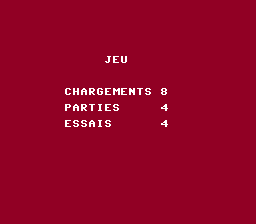
On the fourth pass, ESSAIS is 4, like PARTIES. The difference with
Commun.chargementsstays the same: asharedvariable is kept, but it belongs to theJeucontext; the title cannot read it. Notice also that on the tenth pass, the digit becomes::Commun.ligneonly writes one digit, with'0' + valeur. - Add a
Fin(end) context, loaded byJeuafter three games, that displays « FIN » (the end) and then stays put.Show solutionHide solution
Three things to do: declare the context in
main.s8p, write its unit, and decide inJeuwhen to load it. The number of games is already counted by.parties, which is in thesharedblock and so survives the loads.main.s8pcontext Fin { addunit("Fin.s8u"); // main unit of the Fin context }The
Fincontext displays its screen ininitContext(), with the resident unitCommun, then itsmain()loops forever, doing nothing. It does not need an interrupt: it is not waiting for anything.Fin.s8u// Fin.s8u: the end context, which no longer changes unit Fin { initContext() { Commun.ecran(0, "FIN"); } // nothing left to do: stay on this screen main() { while (1) { } } }In
Jeu.s8u, the decision is made inmain(), after the wait, and not in the interrupt handler (remember the chapter's warning about the C64). Sincesys.loadContextnever returns, theelseis unnecessary: if the end is loaded, the next line is never run.Jeu.s8umain() { while (.images < 100) { } if (.parties == 3) { sys.loadContext(Fin); // three games played: this is the end } sys.loadContext(Titre); }On the PC Engine, it is the same code, with
while (.images < 120)inJeuandCommun.ecran(RGB(0, 0, 0), "FIN");inFin, since the background is given there as a color.What we observed: the title and the game alternate three times, then the « FIN » screen appears at around 12 s and no longer changes. On the C64, the compiler creates one more file,
fin.dat(25 bytes), and the files read from the floppy disk are, in order:TITRE.DAT, JEU.DAT, TITRE.DAT, JEU.DAT, TITRE.DAT, JEU.DAT, FIN.DAT. We also ran the disk in VICE: the « FIN » screen is indeed shown there after the three games. - Replace the title screen's wait with a press of a joypad button
(
io.readJoysticks(),io.getButtons(0)).Show solutionHide solution
The joypad library is added in
main.s8p, with the others:addlib io.base;.io.readJoysticks()reads the state of the joypads, thenio.getButtons(0)gives the buttons of the first one: 0 if none is pressed. On the C64, it is the fire button of the joystick in port 2; on the PC Engine, any button (I, II, SELECT or RUN).The title screen no longer needs to count frames: the
imagesvariable and the interrupt handler go away.main()waits in two stages:Titre.s8u// Titre.s8u: the title screen context unit Titre { initContext() { Commun.ecran(6, "TITRE"); Commun.ligne(10, "CHARGEMENTS ", Commun.chargements); } // wait for a joypad button press, then move on to the game main() { // first, wait for the button to be released (it may still be held down) io.readJoysticks(); while (io.getButtons(0) != 0) { io.readJoysticks(); } // then, wait for it to be pressed while (io.getButtons(0) == 0) { io.readJoysticks(); } sys.loadContext(Jeu); } }Why wait first for the button to be released? Because you arrive at the title coming from the game, and the player may still have a finger on the button. We checked this by simulating presses in the test emulator. Without the first loop, a button held down skips the title screen: it is replaced by the game in the same frame. With it, the title stays on screen until the button has been released and then pressed again. With no press at all, it stays on screen indefinitely, as intended.
The code is the same on both machines (only the arguments of
Commun.ecranandCommun.ligne, ininitContext(), differ, as in the chapter's example). TheJeucontext does not change: it keeps its interrupt to go back to the title after two seconds.