
Colors and Display
Since chapter 2, our programs have been writing colored text. This chapter takes a closer look at how a retro machine builds its picture: the grid of characters, the colors it can show, and the ways to format text.
How a retro machine draws the screen
A screen is made of pixels, tiny dots. The C64 has 320 × 200 of them, or 64,000. Describing each one would take thousands of bytes, and these machines did not have that much memory to spare for the picture.
So they work differently: the screen is a mosaic of small squares
of 8 × 8 pixels. These squares are drawn once and for all (the letters of the font,
for example), and for each cell the screen only stores the number of
the square to show. This is called text mode, or tile
mode: print does not draw pixels, it stores character numbers in the
cells of this grid.
| Commodore 64 | PC Engine | |
|---|---|---|
| Pixels displayed | 320 × 200 | 256 × 224 |
| Character grid | 40 × 25 | 32 × 28 visible |
| A cell holds | the character number, and its color | the tile number, and its palette number |
| Memory for a text screen | 1,000 bytes, plus 1,000 colors | 2 bytes per cell |
On the C64, a picture drawn pixel by pixel, in bitmap mode, takes 8,000 bytes versus 1,000 in text mode. That is why text mode matters, even for games: their backgrounds are made of redrawn characters.
Colors: fixed or programmable
Each machine has its own way of handling colors. Our two machines represent the two main families.
The C64: 16 fixed colors
The C64 knows 16 colors, always the same ones, numbered 0 to 15.
You cannot change their shade: you simply pick a number. The
vic.base library gives them names:
vic.setBackgroundColor(vic.BLUE);       // rather than setBackgroundColor(6)
vic.setFontColor(vic.YELLOW);           // rather than setFontColor(7)
All sixteen appear in the color chart at the end of this chapter.
The PC Engine: palettes to fill
The PC Engine can display 512 colors: each one mixes red, green and blue, with each component going from 0 to 7 (8 × 8 × 8 = 512). But it does not show them all at once: colors are stored in palettes, which you fill yourself.
- There are 32 palettes of 16 colors: 16 for tiles (numbers 0 to 15) and 16 for sprites (16 to 31).
- Each cell of the screen picks a palette. So the same tile can appear red in one place and blue in another.
- Color 0 of palette 0 is the background color. In the other palettes, color 0 is not displayed: the background shows through.
vce.setPalette(2, 1, RGB(7, 6, 1)); // color 1 of palette 2: a yellowWriting a color: RGB() and COLOR()
Simple8 offers two ways to write a color from its red, green and blue components:
RGB(r, g, b) | COLOR(r, g, b) | |
|---|---|---|
| Components | from 0 to 7 | from 0 to 255, as in a paint program |
| On PC Engine | the exact color | converted to the closest color |
| On C64 | the number of the closest fixed color | |
COLOR() is the most portable: the same line gives, on
each machine, the color closest to the one you asked for. Values measured on both
machines:
| You write | Commodore 64 | PC Engine |
|---|---|---|
COLOR(255, 0, 0) | 2 (red) | $38 |
COLOR(0, 0, 255) | 6 (blue) | $07 |
COLOR(128, 128, 128) | 12 (gray) | $DB |
COLOR(255, 128, 0) | 8 (orange) | $F8 |
RGB(7, 0, 0) | 2 (red) | $38 |
Computed at compile time. RGB() and COLOR()
are replaced by their value when the program is compiled. So their arguments must be
numbers written in the code. With a variable, RGB(v, 0, 0) does not
work: for now, the compiler does not report it, and the color is 0, black. The PC
Engine example in this chapter shows how to compute a color while the program
runs.
Text color
setFontColor picks the color of the characters written next. Its argument
does not mean the same thing on both machines, because the screen cells do not store
the same thing:
| Commodore 64 | PC Engine | |
|---|---|---|
setFontColor(n) | n is a color, from 0 to 15 | n is a palette, from 0 to 15 |
| The letter is displayed with | color n | color 1 of palette n |
| Possible text colors | 16, with no setup | 16, by filling color 1 of 16 palettes |
// C64: a line in yellow
vic.setFontColor(vic.YELLOW);
vic.print("ATTENTION");

// PC Engine: palette 3 gets a yellow, then the text uses it
vce.setPalette(3, 1, RGB(7, 7, 2));
vdc.setFontColor(3);
vdc.print("ATTENTION");
Formatting text
On both machines, the text libraries offer the same formatting tools.
vic.setCursor(2, 2);
vic.print("NORMAL ");
vic.setInvertOn();
vic.print("INVERSE");               // background and letter swapped
vic.setInvertOff();

vic.setCursor(2, 4);
vic.print("LIGNE 1\nLIGNE 2");      // \n: new line

vic.setTextArea(20, 8, 10, 4);      // an area of 10 columns by 4 lines
vic.setFontColor(vic.YELLOW);
vic.print("UN TEXTE TROP LONG POUR LA ZONE");
vic.clearTextArea();                // text uses the whole screen again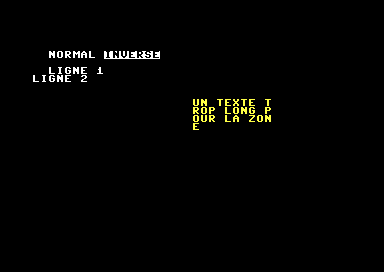
Reverse video
Between setInvertOn() and setInvertOff(), each character is
shown in negative: the letter takes the background color, and the rest of the cell
takes the text color. So a reversed space gives a solid block in the
text color: that is what draws the colors of the color chart, below.
On PC Engine, reverse video uses characters 128 to 255 of the font: the font you provide must contain them. The one in the examples does.
Starting a new line
In a string, \n moves to the next line. Be careful: the new line starts
again at column 0, not at the column chosen with
setCursor. To align several lines, place the cursor before each of
them.
A text area
setTextArea(x, y, largeur, hauteur) (width, height) limits the text to a
rectangle, a window, and places the cursor there. When it reaches the edge of
the area, the text continues on the next line of the area, in the middle of a word if
needed. clearTextArea() gives the whole screen back to the text.
Where is the cursor?
getCursorX() and getCursorY() give the cursor position:
useful to resume writing where it stopped, or to center a text.
Two examples, two approaches
The two machines handle their colors so differently that each one gets its own example here.
On Commodore 64: the color chart
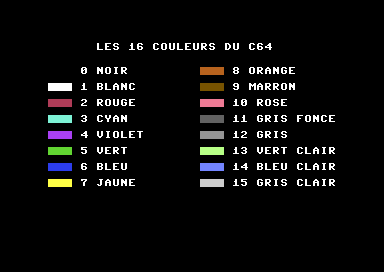
This program displays the 16 colors of the C64: for each one, a block of color, its number and its name.
// Colors and display: chart of the 16 colors (Commodore 64)
architecture commodore.c64;

addlib vic.base;
addlib vic.screentext;

unit {
    const string NOMS[] = {
        "NOIR", "BLANC", "ROUGE", "CYAN", "VIOLET", "VERT", "BLEU", "JAUNE",
        "ORANGE", "MARRON", "ROSE", "GRIS FONCE", "GRIS", "VERT CLAIR", "BLEU CLAIR", "GRIS CLAIR"
    };

    main() {
        vic.initScreen();
        vic.setBorderColor(vic.BLACK);
        vic.setBackgroundColor(vic.BLACK);
        vic.clearScreen();

        vic.setFontColor(vic.WHITE);
        vic.setCursor(8, 1);
        vic.print("LES 16 COULEURS DU C64");

        // two columns of 8 colors
        for (ubyte c = 0; c < 16; c++) {
            ubyte x = 2;
            if (c >= 8) {
                x = 21;
            }
            vic.setCursor(x, (ubyte)(4 + (c % 8) * 2));

            // a block of the color: spaces in reverse video
            vic.setFontColor(c);
            vic.setInvertOn();
            vic.print("   ");
            vic.setInvertOff();

            // its number and its name, in white
            vic.setFontColor(vic.WHITE);
            vic.putChar(' ');
            if (c >= 10) {
                vic.putChar('1');
            }
            vic.putChar((ubyte)('0' + c % 10));
            vic.putChar(' ');
            vic.print(@.NOMS[c]);
        }
    }
}- The color number,
c, serves both as the argument ofsetFontColorand as the index into the array of names. - The block is made of three spaces in reverse video.
c % 8gives the row within the column: colors 0 to 7 on the left, 8 to 15 on the right.- Black, color 0, cannot be seen: it is the same color as the background.
On PC Engine: making your own colors
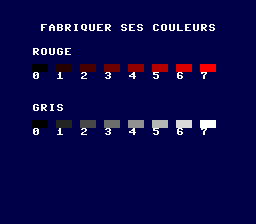
The PC Engine has no ready-made colors: this program computes them. It fills 16 palettes with two gradients of 8 shades, one red and one gray, then displays them.
// Colors and display: making your own colors (PC Engine)
architecture nec.pce;

addlib sys.resource;
addlib vce.base;
addlib vdc.base;
addlib vdc.screentext;

unit {
    const int font = addResource("font.bin");

    main() {
        int source;
        int length;

        vdc.setBATSize(vdc.BAT_32x32);
        vdc.initScreen();
        resource.mapToMPR2(.font);
        source = 0x4000 + resource.getOffset(.font);
        length = resource.getLength(.font);
        vdc.writeToVRAM(source, 0x1000, length);
        vce.setPalette(0, 0, RGB(0, 0, 2));             // the background, midnight blue

        // 16 palettes, 16 computed colors: a PC Engine color is written
        // green << 6 | red << 3 | blue, each component from 0 to 7
        for (ubyte v = 0; v < 8; v++) {
            vce.setPalette(v, 1, (uint)(v << 3));                           // red v
            vce.setPalette((ubyte)(8 + v), 1, (uint)((v << 6) | (v << 3) | v));  // gray v
        }
        vdc.clearScreen();

        vdc.setFontColor(15);                           // palette 15: gray 7, white
        vdc.setCursor(5, 3);
        vdc.print("FABRIQUER SES COULEURS");

        dessinerDegrade(0, 8, "ROUGE");
        dessinerDegrade(8, 15, "GRIS");
    }

    // 8 blocks, palettes premiere to premiere + 7, on line y
    void dessinerDegrade(ubyte premiere, ubyte y, uint nom) {
        vdc.setFontColor(15);
        vdc.setCursor(4, (ubyte)(y - 2));
        vdc.print(nom);
        for (ubyte v = 0; v < 8; v++) {
            vdc.setCursor((ubyte)(4 + v * 3), y);
            vdc.setFontColor((ubyte)(premiere + v));
            vdc.setInvertOn();
            vdc.print("  ");
            vdc.setInvertOff();
            vdc.setFontColor(15);
            vdc.setCursor((ubyte)(4 + v * 3), (ubyte)(y + 1));
            vdc.putChar((ubyte)('0' + v));
        }
    }
}
A PC Engine color is a 9-bit number: 3 bits of green, 3 of red, 3 of blue. You build it with the bitwise operations from chapter 3:
| bits | 8 | 7 | 6 | 5 | 4 | 3 | 2 | 1 | 0 |
|---|---|---|---|---|---|---|---|---|---|
| role | green | red | blue | ||||||
| gray 5 | 1 | 0 | 1 | 1 | 0 | 1 | 1 | 0 | 1 |
v << 3putsvinto the red bits: a red of intensityv.(v << 6) | (v << 3) | vputs the same value in all three components: a gray. Forv= 7, it is white.- Computed this way, the color can depend on a variable, which
RGB()does not allow.
Key points
- A retro screen is a grid of 8 × 8 pixel characters: each cell stores a character number, and its color or its palette.
- The C64 has 16 fixed colors; the PC Engine has 512, stored in palettes of 16 that you fill.
RGB()writes a color with components from 0 to 7,COLOR()from 0 to 255, and works on every machine; both are computed at compile time.setFontColor(n): a color on C64, a palette on PC Engine.- Reverse video, line breaks and text areas exist on both machines.
Your turn
- In the color chart, change the background so that black can be seen. Which color
disappears then?
Show solutionHide solution
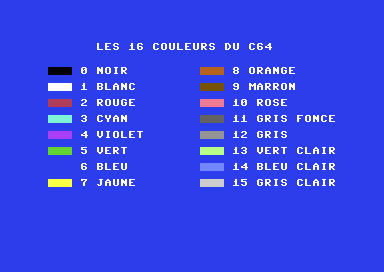
You just change the background color (and, to match, the border color). Let's pick blue,
vic.BLUE: the black block of color 0 now appears.main() { vic.initScreen(); vic.setBorderColor(vic.BLUE); vic.setBackgroundColor(vic.BLUE); // blue background: black is visible vic.clearScreen();But now it is blue, color 6, that disappears: its block is exactly the background color. Only its number and name, written in white, remain visible. Whatever background you choose, one color always disappears: the background is necessarily one of the 16 colors, and the block with the same number blends into it. To see all 16 blocks at once, you would have to surround each one with a frame of another color.
On a blue background, black appears and blue disappears. - On PC Engine, replace the gray gradient with a blue gradient, then a yellow one
(red and green together). Why can't you display a third gradient of 8
shades?
Show solutionHide solution
It all happens in the line that computes the second gradient. A PC Engine color stores green in bits 6 to 8, red in bits 3 to 5 and blue in bits 0 to 2. So a blue of intensity
vis simplyv, with no shift. A yellow is an equal mix of red and green:(v << 6) | (v << 3).The blue gradient
        vce.setPalette(0, 0, RGB(0, 0, 0));             // the background, black: a blue background would hide blue 2

        // 16 palettes, 16 computed colors: a PC Engine color is written
        // green << 6 | red << 3 | blue, each component from 0 to 7
        for (ubyte v = 0; v < 8; v++) {
            vce.setPalette(v, 1, (uint)(v << 3));                           // red v
            vce.setPalette((ubyte)(8 + v), 1, (uint)v);                       // blue v
        }
The background had to change too: the midnight blue of the example,
RGB(0, 0, 2), is exactly blue 2 of the gradient, whose block would have disappeared (that is the previous exercise, PC Engine version). On a black background, you see shades 1 to 7; shade 0, which is black, blends into the background, like red 0.The yellow gradient
        for (ubyte v = 0; v < 8; v++) {
            vce.setPalette(v, 1, (uint)(v << 3));                           // red v
            vce.setPalette((ubyte)(8 + v), 1, (uint)((v << 6) | (v << 3)));   // yellow v: green v + red v
        }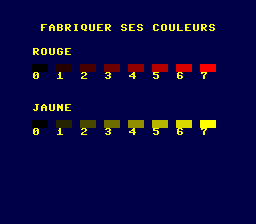
The gray replaced by a yellow gradient. Why not a third gradient? The font only uses color 1 of its palette: so each palette gives only one text color, and each block costs a whole palette. Tiles only have 16 palettes (0 to 15), and the two gradients of 8 shades take all of them. Palettes 16 to 31 exist, but they are reserved for sprites: a screen cell cannot pick them. Notice, by the way, that the title, written with palette 15, is no longer white: it takes the color of the last shade (blue 7 or yellow 7), because no palette is left for a real white. In the chapter's example, gray 7 happened to be white.
- Write a three-line message aligned at column 10, placing the cursor before
each line.
Show solutionHide solution
A
\nwould bring the second line back to column 0. To align the three lines, you callsetCursorbefore each of them, with the same column, 10, and one more line each time.On Commodore 64
// Three lines aligned at column 10 (Commodore 64)
architecture commodore.c64;

addlib vic.base;
addlib vic.screentext;

unit {
    main() {
        vic.initScreen();
        vic.setBorderColor(vic.BLACK);
        vic.setBackgroundColor(vic.BLACK);
        vic.clearScreen();
        vic.setFontColor(vic.WHITE);

        // a \n would restart at column 0: place the cursor before each line
        vic.setCursor(10, 5);
        vic.print("PREMIERE LIGNE");
        vic.setCursor(10, 6);
        vic.print("DEUXIEME LIGNE");
        vic.setCursor(10, 7);
        vic.print("TROISIEME LIGNE");
    }
}
On PC Engine
After the usual setup (font copied to video memory, palette 0 in white), the message is written the same way:
        vdc.clearScreen();
        vdc.setFontColor(0);

        // a \n would restart at column 0: place the cursor before each line
        vdc.setCursor(10, 5);
        vdc.print("PREMIERE LIGNE");
        vdc.setCursor(10, 6);
        vdc.print("DEUXIEME LIGNE");
        vdc.setCursor(10, 7);
        vdc.print("TROISIEME LIGNE");
    }
}
The three lines do start at column 10 on both machines. On PC Engine, the screen only has 32 columns: the longest line, “TROISIEME LIGNE” (third line), reaches column 24, so it still fits.
- Place a text area in the center of the screen, surrounded by a frame of stars.
Show solutionHide solution
First you choose the area. On C64, the screen is 40 × 25 cells: an area of 20 columns by 6 lines is centered if it starts at column (40 − 20) / 2 = 10, and around line 9. On PC Engine (32 × 28 visible cells), an area of 16 columns starts at column 8, and an area of 6 lines around line 11.
The frame is drawn around the area, one cell further out on each side: otherwise the text would write over the stars. A function
cadre(frame) draws it: two lines of stars at the top and bottom, then one star to the left and one to the right of each line of the area. It receives the area itself, which saves you from recomputing the positions by hand.On Commodore 64
// A text area in the center, inside a frame of stars (Commodore 64)
architecture commodore.c64;

addlib vic.base;
addlib vic.screentext;

unit {
    main() {
        vic.initScreen();
        vic.setBorderColor(vic.BLACK);
        vic.setBackgroundColor(vic.BLACK);
        vic.clearScreen();

        // the area: 20 columns by 6 lines, centered in 40 x 25
        vic.setFontColor(vic.LIGHT_BLUE);
        cadre(10, 9, 20, 6);

        vic.setTextArea(10, 9, 20, 6);
        vic.setFontColor(vic.WHITE);
        vic.print("CE TEXTE RESTE DANS SA ZONE, AU CENTRE DE L'ECRAN.");
        vic.clearTextArea();
    }

    // a frame of stars around the area (x, y, width, height)
    void cadre(ubyte x, ubyte y, ubyte largeur, ubyte hauteur) {
        // top and bottom, one cell wider on each side
        vic.setCursor((ubyte)(x - 1), (ubyte)(y - 1));
        for (ubyte i = 0; i < largeur + 2; i++) {
            vic.putChar('*');
        }
        vic.setCursor((ubyte)(x - 1), (ubyte)(y + hauteur));
        for (ubyte i = 0; i < largeur + 2; i++) {
            vic.putChar('*');
        }
        // the sides: one star on the left and one on the right of each line
        for (ubyte j = 0; j < hauteur; j++) {
            vic.setCursor((ubyte)(x - 1), (ubyte)(y + j));
            vic.putChar('*');
            vic.setCursor((ubyte)(x + largeur), (ubyte)(y + j));
            vic.putChar('*');
        }
    }
}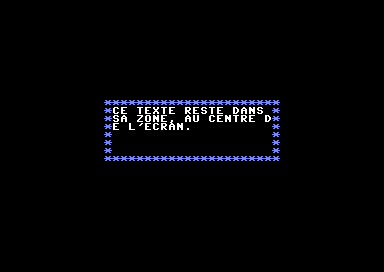
The text wraps at the edge of the area, in the middle of a word if needed. On PC Engine
The
cadrefunction is the same, withvdcinstead ofvic. Only the colors, prepared in two palettes, and the position of the area change:vce.setPalette(0, 0, RGB(0, 0, 0)); vce.setPalette(0, 1, RGB(7, 7, 7)); // palette 0: the text, white vce.setPalette(1, 1, RGB(3, 5, 7)); // palette 1: the frame, light blue vdc.clearScreen(); // the area: 16 columns by 6 lines, centered in 32 x 28 vdc.setFontColor(1); cadre(8, 11, 16, 6); vdc.setTextArea(8, 11, 16, 6); vdc.setFontColor(0); vdc.print("CE TEXTE RESTE DANS SA ZONE, AU CENTRE DE L'ECRAN."); vdc.clearTextArea(); }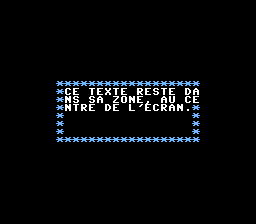
The same area on PC Engine, 16 columns wide. The text never spills out of the frame: when it reaches the edge of the area, it continues on the next line of the area. It splits words (“D” and “E” on C64, “DA” and “NS” on PC Engine), as the chapter warned. To avoid this, you would have to split the text into lines yourself.