
Inline Assembly and Memory
Until now, libraries have been the link to the hardware. This chapter opens the hood: how the machine's memory is organized, how you control the hardware by writing to specific addresses, and how to slip assembly into a Simple8 program when you need more speed.
The machine's memory
In chapter 6, we saw that memory is a sequence of numbered one-byte cells: each cell
has an address. On an 8-bit machine, addresses go from
$0000 to $FFFF, or 65,536 cells.
These cells are not all of the same kind. Depending on the address, you find working memory (RAM), program memory (ROM), or… the hardware itself. The layout of these areas is called the memory map. Here are the maps of the 8-bit machines Simple8 can program, as Simple8 organizes them:
| Commodore 64 · 6510 | |
|---|---|
$0000-$00FF | zero page: fast access, fast variables |
$0801-$5FFF | the resident program |
$6000-$9FFF | the loaded context |
$A000-$BFFF | variables |
$C000-$C3E7 | the text screen: one byte per cell |
$D000-$DFFF | hardware: video ($D000), sound ($D400), screen colors ($D800) |
| PC Engine · HuC6280 | |
|---|---|
$0000-$1FFF | hardware: video processor ($0000), colors ($0400), sound ($0800) |
$2000-$3FFF | RAM: zero page, stack, variables |
$4000-$DFFF | cartridge banks: resources, contexts |
$E000-$FFFF | the resident program |
| NES · 2A03 | |
|---|---|
$0000-$07FF | RAM, 2 KB: zero page, stack, sprites ($0200), variables |
$2000-$2007 | the video processor (PPU) registers |
$4000-$4017 | sound, and the joypads ($4016) |
$6000-$7FFF | cartridge RAM: extra variables |
$8000-$BFFF | the loaded context |
$C000-$FFFF | the resident program |
| Game Boy · SM83 | |
|---|---|
$0000-$3FFF | cartridge bank 0: the resident program |
$4000-$7FFF | the bank of the loaded context |
$8000-$9FFF | video memory: tiles, and screen maps ($9800) |
$C000-$DFFF | RAM: variables, stack |
$FF00-$FF7F | hardware registers |
$FF80-$FFFE | high RAM: fast variables |
| Amstrad CPC · Z80 | |
|---|---|
$0040-$3DFF | variables |
$3E00-$3FFF | the stack |
$4100-$6FFF | the resident program |
$7000-$9CFF | the loaded context |
$A600-$BFFF | the machine's system, which reads the disk |
$C000-$FFFF | the screen: 16 KB of pixels |
From one machine to another, you find the same areas: RAM for variables, the resident program, room for the loaded context, and the hardware. Only their addresses change. Two differences are worth remembering:
- on the PC Engine and the NES, the picture is not in the processor's memory: it is in a separate video memory, reached through the video processor's registers;
- on the Amstrad CPC, the hardware has no address at all: the Z80 talks to it through ports, with special instructions (see below).
These maps are simplified: each machine's documentation will give the details.
Hardware is controlled through memory
On these machines, you do not talk to the hardware through functions: you write
numbers to certain addresses. These special cells are called
registers. On C64, cell $D020 is not ordinary memory: the
number you write there becomes the color of the screen border.
That is exactly what vic.setBorderColor, seen in chapter 2, does. Here is
its code, in the vic.base library:
void setBorderColor(byte color) {
    _asm {
        LDA _params;        // the color parameter
        STA $D020;          // writes to the border register
    }
}
Libraries do nothing more than this: they give readable names to the hardware registers.
The Amstrad CPC case. The Z80 has two separate spaces: memory, and
input/output ports, reserved for hardware. The CPC chips (video, colors,
sound) sit on ports, which you reach with the Z80's IN and
OUT instructions, in an _asm block or through its libraries.
readMem and writeMem only reach memory.
Reading and writing memory: readMem and writeMem
Without leaving Simple8, two functions read and write a byte at any address:
writeMem(0xD020, 2);                    // C64: red border
ubyte b = readMem(0xD020) & 0x0F;       // read its color back: 2
Some registers need several writes. On PC Engine, to change a color, you first give
its number to the color chip (addresses $0402 and $0403), then
its value ($0404 and $0405):
uint bleu = RGB(0, 0, 7);
writeMem(0x0402, 0);                    // color number 0...
writeMem(0x0403, 0);
writeMem(0x0404, (ubyte)(bleu & 0xFF)); // ... gets the low byte
writeMem(0x0405, (ubyte)(bleu >> 8));   // ... then the high byte: the background turns blue
Use with care. writeMem writes wherever you tell it to,
without checking: a wrong address can overwrite a variable or the program, or put the
hardware in a bad state. Use it for a specific register, knowing the memory map.
Simple8 versus assembly
Simple8 frees the programmer from machine language: you write loops, variables and functions, and the compiler picks the instructions. Its optimizers then rework the result: they put counters in processor registers, avoid repeated calculations, and combine instructions.
But 8-bit machines are full of constraints: few registers, no multiplication, calculations done 8 bits at a time. Simple8 does its best with them. Depending on the case, its code is as fast as assembly, faster than simply written assembly, or much slower than assembly written by someone who knows the machine inside out. Here are examples of each case, all measured on C64.
What works well
Simple cases. Writing a color to the border register, in Simple8 or in assembly, produces exactly the same instructions:
writeMem(0xD020, 2); in Simple8
LDA #2
STA $D020
_asm { LDA #2; STA $D020; } in assembly
LDA #2
STA $D020
A well-written loop. Filling the 1,000 cells of the screen with a
ubyte counter and fast pointers:
fast ubyte *p0;                     // four pointers in zero page,
fast ubyte *p1;                     // one per quarter of the screen
fast ubyte *p2;
fast ubyte *p3;

.p0 = 0xC000;
.p1 = 0xC0FA;
.p2 = 0xC1F4;
.p3 = 0xC2EE;
for (ubyte i = 0; i < 250; i++) {
    .p0[i] = 0x66;
    .p1[i] = 0x66;
    .p2[i] = 0x66;
    .p3[i] = 0x66;
}
The optimizer turns it into a loop an assembly programmer would be happy with: the
counter i becomes register Y, the value is loaded only once per pass, and
the four writes go straight through the pointers:
boucle:
    LDA #102
    STA (Main_p0),Y
    STA (Main_p1),Y
    STA (Main_p2),Y
    STA (Main_p3),Y
    INY
    CPY #250
BCC boucle| Filling the screen | Cycles | Time |
|---|---|---|
| simply written assembly: one pointer moved cell by cell | 25,663 | 26 ms |
Simple8, four fast pointers | 8,309 | 8.4 ms |
| hand-optimized assembly: four strips, indexed addressing | 6,412 | 6.5 ms |
Here, Simple8 is three times faster than assembly written without tricks, and 1.3 times slower than the best assembly, which uses the indexed addressing described below.
What works less well
The same loop, written without thinking about the machine, is much slower:
| Filling the screen | Cycles | Compared to the best assembly |
|---|---|---|
ubyte counter, writeMem(0xC000 + i, …) | 28,767 | 4.5 times slower |
uint counter, writeMem(0xC000 + i, …) | 49,369 | 7.7 times slower |
Nothing is wrong here: the compiler simply recomputes the 16-bit address on every pass, because that is what the program asks for. Other situations are expensive on an 8-bit machine, whatever the compiler:
- 16- or 32-bit calculations: each operation is done 2 or 4 times (chapter 3);
- multiplications and divisions: the 6502 cannot do them, so they become small programs of dozens of instructions;
- a function call in a tight loop: each call copies its parameters, jumps to the function and returns;
- code whose timing must be exact, down to the cycle: Simple8 does not guarantee the cycle count of what it produces.
The algorithm first
The choice of language is often not the most important thing: the way you
compute matters more. Example: the address of line y of the
screen, $C000 + y × 40.
// with a multiplication: the 6502 cannot multiply, so it must be computed
.adresse = 0xC000 + y * 40;

// with a table: the 25 results, computed once and for all
const uint LIGNES[] = { 0, 40, 80, 120, 160, 200, 240, 280, 320, 360, 400, 440, 480,
                        520, 560, 600, 640, 680, 720, 760, 800, 840, 880, 920, 960 };
.adresse = 0xC000 + .LIGNES[y];
Computing y × 40 | Cycles per calculation |
|---|---|
with a multiplication, y * 40 | 82 |
with a table, .LIGNES[y] | 10 |
with shifts, ((uint)y << 5) + ((uint)y << 3) | 112 |
- The table is 8 times faster than the multiplication: a better algorithm gains more than any optimizer. It costs 50 bytes of ROM.
- Shifts, a classic assembly trick (
40 = 32 + 8), are slower than the multiplication here: in Simple8, they work on 16 bits and are done one bit at a time. A trick from one language does not always carry over to another.
Knowing the machine
Simple8 spares you from writing machine language, not from understanding the machine. Knowing what it does fast (8 bits, zero page, indexed addressing, tables) and what it does poorly (16 and 32 bits, multiplications) helps you write efficient Simple8. A few rules:
- a
ubyteloop counter, when it does not go past 255: it fits in a processor register; - a
fastpointer to walk through memory, rather than an address recomputed on every pass; - a constant table rather than a repeated calculation, especially a multiplication;
- measure, and read the generated code in
asm/main.asm: it is the only way to know what is really fast.
When should you write assembly?
For most of a program, Simple8 is enough, and its flexibility saves far more time than it costs. Assembly becomes useful in a few cases:
- to use an instruction specific to the processor, like
ST0orTIAon the PC Engine; - for code whose timing must be exact, for example an effect synchronized with the screen scan;
- for the loop that, measurements in hand, takes the most time.
That is what the libraries in libs8/ do: they keep assembly where it
matters, and the program stays in Simple8.
First steps in 6502 assembly
The C64 has a 6502 processor (its variant, the 6510); the PC Engine has a HuC6280, which is an extended version of it. Their assembly language is the same at its core.
The processor registers
The processor does not compute directly in memory: it works in a few internal cells, its registers, of 8 bits each.
- A, the accumulator: this is where calculations happen;
- X and Y: counters, and offsets to walk through memory.
A few instructions
| Instruction | Effect | Example |
|---|---|---|
LDA, LDX, LDY | load a value into A, X or Y | LDA #2: A is 2 |
STA, STX, STY | store A, X or Y in memory | STA $D020: the border takes color A |
INX, DEX | add 1 to X or subtract 1 from X | |
CLC then ADC | add to A | CLC ADC #3: A = A + 3 |
AND | bitwise “and” with A | AND #$0F: keep the low 4 bits |
TXA | copy X into A | |
CPX | compare X with a value | CPX #4 |
BNE | branch if the previous result is not zero | BNE boucle |
Value or address?
#in front of a number makes it a value:LDA #2puts 2 in A.- Without
#, it is an address:LDA $D020reads cell$D020. $writes a number in hexadecimal. In an_asmblock, you write$D020; in the rest of the Simple8 code,0xD020.$C000,Xis indexed addressing: address$C000plus the value of X. By varying X, a single instruction covers 256 cells.
The _asm block
Inside a function, an _asm { … } block contains processor instructions,
inserted as is into the program:
void bordureRouge() {
    _asm {
        LDA #2;             // A = 2, red
        STA $D020;          // the border
    }
}- Each instruction ends with a semicolon. Without it, compilation stops.
- Comments are written with
//, as elsewhere. - A line ending with
:is a label, a name given to a place in the code, so you can jump there. It belongs to its function: two functions can each have their ownboucle(loop) label.
_asm {
    LDX #0;
    LDA #0;
boucle:                     // a label
    CLC;
    ADC #3;                 // A = A + 3
    INX;
    CPX #4;
    BNE boucle;             // repeat while X is not 4: A is 12
}
Variables in an _asm block
An _asm block can read and write the program's variables. Each kind of
variable is written its own way:
| Variable | In _asm | Example |
|---|---|---|
| local, or function parameter | \nom | LDA \code; |
| of the unit | its label: Unit_nom | LDA Main_score; |
| of another unit | Unit.nom | LDA Joueur.x; |
high byte of a uint | +1 | LDA Main_grand+1; |
| low byte, high byte of its address | #<, #> | LDA #<Main_score; |
unit {
    ubyte score = 5;
    ubyte a;
    ubyte b;

    main() {
        ubyte locale = 9;
        _asm {
            LDA Main_score;         // the score variable of the Main unit...
            STA Main_a;             // ... copied into a: 5
            LDA \locale;            // the local variable...
            STA Main_b;             // ... copied into b: 9
        }
    }
}
In a unit, the name alone is not enough. LDA score; is
left as is, and the assembler finds nothing: Undefined symbol: score.
Write the full label: the unit name, an underscore, then the variable name:
Main_score. These are also the names you see in the generated assembly
and in the .sym file.
One assembly language per processor
Each processor has its own instruction set, and Simple8 checks each
_asm block against the processor of the chosen machine:
- The PC Engine's HuC6280 adds instructions to the 6502, like
STZ(store a zero) orST0,ST1,ST2(write to the video processor). On C64, they are rejected:Unknown mnemonic 'STZ' for architecture MOS 6510 (Commodore 64). - The Z80 (Amstrad CPC), the SM83 (Game Boy) and the 68000 (Mega Drive, Amiga) have
completely different assembly languages. So an
_asmblock is never portable: that is why a library that contains one declares its architecture (chapter 7).
The compiler's work cells. For its calculations, Simple8 uses zero
page cells named t0 to t7. An _asm block must
not modify them, unless you know exactly what you are doing.
An example: a checkerboard screen
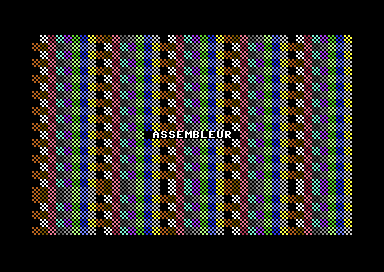
This program fills the whole C64 screen with a checkerboard character, then gives each cell a color, all with two assembly functions. Simple8 sets up the screen and writes the title.
// Inline assembly and memory: a checkerboard screen (Commodore 64)
architecture commodore.c64;

addlib vic.base;
addlib vic.screentext;

unit {
    const ubyte DAMIER = 0x66;          // the screen code of the checkerboard character

    main() {
        vic.initScreen();
        vic.setBorderColor(vic.BLACK);
        vic.setBackgroundColor(vic.BLACK);

        remplirEcran(.DAMIER);
        colorierEcran();

        vic.setFontColor(vic.WHITE);
        vic.setCursor(14, 12);
        vic.print(" ASSEMBLEUR ");
    }

    // Writes the same character to the 1,000 screen cells ($C000 to $C3E7)
    void remplirEcran(ubyte code) {
        _asm {
            LDA \code;                  // the code parameter
            LDX #0;
        boucle:
            STA $C000,X;                // 4 strips of 256 cells, overlapping
            STA $C100,X;                // a little to end exactly at $C3E7
            STA $C200,X;
            STA $C2E8,X;
            INX;
            BNE boucle;                 // 256 passes: X wraps back to 0
        }
    }

    // Gives each cell a color from 0 to 15 ($D800, the color memory)
    void colorierEcran() {
        _asm {
            LDX #0;
        boucle:
            TXA;
            AND #$0F;                   // the color: X modulo 16
            STA $D800,X;
            STA $D900,X;
            STA $DA00,X;
            STA $DAE8,X;
            INX;
            BNE boucle;
        }
    }
}remplirEcran(fill screen) receives the character in its parametercode, and reads it with\code.- The screen has 1,000 cells, from
$C000to$C3E7. X goes from 0 to 255: four strips of 256 cells cover the screen, the last one starting at$C2E8to end exactly at$C3E7. BNE bouclerepeats until X has wrapped back to 0: after 255,INXbrings it back to 0, like the overflow in chapter 3.colorierEcran(color screen) writes to the color memory, starting at$D800: the color of each cell is X modulo 16.- The C64 screen is at
$C000in the layout Simple8 uses by default. If a program moves the screen, these addresses change.
The PC Engine version
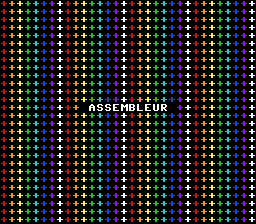
On PC Engine, the screen is not in the processor's memory, but in video memory,
reached through the registers of the video processor (VDC). The HuC6280 has
instructions made for this: ST0 selects a VDC register,
ST1 and ST2 write the low byte and the high byte to it.
// Inline assembly and memory: a checkerboard screen (PC Engine)
architecture nec.pce;

addlib sys.resource;
addlib vce.base;
addlib vdc.base;
addlib vdc.screentext;

unit {
    const int font = addResource("font.bin");
    const uint COULEURS[] = {
        RGB(7, 0, 0), RGB(7, 4, 0), RGB(7, 7, 0), RGB(0, 6, 0),
        RGB(0, 6, 6), RGB(0, 2, 7), RGB(5, 0, 7), RGB(7, 7, 7)
    };

    main() {
        int source;
        int length;

        vdc.setBATSize(vdc.BAT_32x32);
        vdc.initScreen();
        resource.mapToMPR2(.font);
        source = 0x4000 + resource.getOffset(.font);
        length = resource.getLength(.font);
        vdc.writeToVRAM(source, 0x1000, length);
        vce.setPalette(0, 0, RGB(0, 0, 0));
        for (ubyte p = 0; p < 8; p++) {
            vce.setPalette(p, 1, .COULEURS[p]);     // palettes 0 to 7: 8 colors
        }

        remplirEcran();

        vdc.setFontColor(7);
        vdc.setCursor(10, 13);
        vdc.print(" ASSEMBLEUR ");
    }

    // Fills the 1,024 cells of the screen map (BAT, in video memory at address 0)
    // with the '+' character, in palettes 0 to 7 in turn
    void remplirEcran() {
        _asm {
            ST0 #0;                     // VDC register 0: the write address...
            ST1 #0;
            ST2 #0;                     // ... 0, the start of the map
            ST0 #2;                     // register 2: the data to write
            LDY #4;                     // 4 times 256 cells
            LDX #0;
        boucle:
            ST1 #$2B;                   // low byte of the cell: the '+' tile
            TXA;
            AND #$07;                   // the palette: X modulo 8...
            ASL A;
            ASL A;
            ASL A;
            ASL A;                      // ... in the high 4 bits
            ORA #$01;                   // + the high part of the tile number ($12B)
            STA $0003;                  // high byte: the cell is written
            INX;
            BNE boucle;
            DEY;
            BNE boucle;
        }
    }
}- Each cell of the screen map is a 16-bit word: the tile number (12 bits) and the palette number (4 bits).
- VDC register 0 receives the address to write to, register 2 the data. After each word is written, the address moves forward by itself.
- Two counters, X and Y, make 4 × 256 = 1,024 passes: the 32 × 32 cells.
A special case: the Mega Drive and its two processors
The Mega Drive has two processors, working at the same time:
- a 68000, at 7.6 MHz, which computes on 16 and 32 bits: it runs the game;
- a Z80, at 3.58 MHz, with its own 8 KB of memory: it is mainly used for sound.
Their machine languages have nothing in common: MOVE.W #5, D0 for the
68000, LD A, 5 for the Z80. Yet a single Simple8 program contains code for
both. How does the compiler know which assembly language to use for an
_asm block?
The processor is chosen per unit
The answer is in main.s8p: the units of the main program run on the
68000; the ones you declare in a coprocessor block run on the Z80. So each
_asm block is written in the language of its unit's
processor.
main.s8p
// Two processors, two assembly languages (Mega Drive)
architecture sega.megadrive;

coprocessor Son : zilog.z80 {
    addunit("Son.s8u");             // this file is Z80 code
}

unit {
    uint compteur;

    main() {
        _asm {
            MOVE.W #5, D0;          // 68000 code: the main unit runs on the 68000
            ADD.W #2, D0;
            MOVE.W D0, Main_compteur;
        }
        Son.demande = 1;            // a shared variable of the Z80
        while (1) {
        }
    }
}
Son.s8u
// Son.s8u: the Z80 program
unit Son {
    shared {
        ubyte demande;              // written by the 68000
        ubyte faites;               // read by the 68000
    }

    main() {
        while (1) {
            if (.demande != 0) {
                _asm {
                    LD A, (Son_faites);     // Z80 code: this unit runs on the Z80
                    INC A;
                    LD (Son_faites), A;
                }
                .demande = 0;
            }
        }
    }
}
coprocessor Son : zilog.z80 { … }declares a program for the Z80, and its units. The compiler compiles it separately, inasm/coproc_Son/, then stores it in the cartridge; at startup, it is copied into the Z80's memory and started.- The main unit is 68000 code: its
_asmblock uses the 68000's instructions and registers (D0). Here, it computes 5 + 2 and stores 7 incompteur(counter). Son(sound) is Z80 code: its_asmblock uses the Z80'sAregister, and counts the requests received.- The two processors do not call each other. They communicate through the Z80's
sharedvariables, like a mailbox: the 68000 drops off a request (Son.demande = 1), the Z80 handles it and sets it back to 0.
The compiler checks each block with the right assembler. A Z80 instruction in the
main unit, or a 68000 instruction in Son, is rejected:
Unknown mnemonic 'LD' for architecture Motorola 68000 (Mega Drive)
coprocessor Son: Unknown mnemonic 'MOVE.W' for architecture Zilog Z80 (Mega Drive)
Which processor for which task?
| 68000 | Z80 | |
|---|---|---|
| Speed | 7.6 MHz, 16- and 32-bit calculations | 3.58 MHz, 8-bit calculations |
| Memory | the cartridge and 64 KB of RAM | 8 KB for everything: code, data, stack |
| For… | the game: rules, graphics, calculations | sound: music and sound effects, which play without taking time from the game |
| Libraries | vdp, pad… | sound.psg, sound.player, sound.mixer… |
So the choice follows how tasks are divided, more than speed: the Z80 is slower, but it works in addition to the 68000. Giving it the music frees the 68000 for the game. The Mega Drive documentation details how to start the Z80 and its libraries.
Key points
- Memory is a sequence of numbered cells; the memory map tells what is at each address: RAM, program, or hardware.
- You control the hardware by writing to its registers, at fixed addresses; libraries do it for you.
readMemandwriteMemread and write a byte at any address, with no checks at all.- Depending on the case and the algorithm, Simple8 can match assembly, beat it, or be much slower: knowing the machine and measuring help you write it well.
- An
_asmblock is for hardware, exact timing and critical loops; each instruction in it ends with a semicolon. - In
_asm:\nomfor a local variable or a parameter,Unit_nomfor a variable of the unit,Unit.nomfor another unit. - An
_asmblock is specific to one processor. On the Mega Drive, the processor is chosen per unit: 68000 for the main program, Z80 for the units of acoprocessorblock.
Your turn
- With
writeMem, cycle the C64 border through its 16 colors in a loop.Show solutionHide solution
The border register is at address
$D020: a loop from 0 to 15 writes each color number there in turn withwriteMem. But a loop alone is not enough: it would run so fast that the eye would see nothing. You need to wait a little between two colors, and chapter 8 gave us a real clock: theirqinterrupt, 50 times per second. Here we wait 25 frames, half a second, per color.// The border cycles through the 16 colors, with writeMem (Commodore 64) architecture commodore.c64; addlib event.irq; unit { ubyte images; // counted by the interrupt, 50 times per second main() { while (1) { for (ubyte c = 0; c < 16; c++) { writeMem(0xD020, c); // the border register .images = 0; while (.images < 25) { // half a second per color } } } } interrupt -> irq { .images++; } }Run in the emulator, the program does show the border in white, then red, cyan, purple… one color every half second, then the cycle starts over.
And without the wait? The result is surprising, and instructive: the loop changes the color several times while the picture is being drawn. The border then fills with thin stripes, each color lasting only a few lines of the screen.
architecture commodore.c64;
unit {
    main() {
        while (1) {
            for (ubyte c = 0; c < 16; c++) {
                writeMem(0xD020, c);
            }
        }
    }
}
Without waiting: the border changes color while the picture is being drawn. This is the principle behind the “color bar” effects of demos, which change a color at a precise line of the screen: chapter 12 will come back to it.
- Modify
colorierEcranto use only colors 8 to 15.Show solutionHide solution
Colors 8 to 15 are the ones whose bit 3 (the value 8) is 1. So you keep the low 3 bits of X with
AND #$07, which gives 0 to 7, then force bit 3 withORA #$08, the bitwise “or”: you get 8 to 15. ACLCfollowed byADC #8would give the same result, butORAdoes in one instruction what the addition does in two.// Gives each cell a color from 8 to 15 ($D800, the color memory) void colorierEcran() { _asm { LDX #0; boucle: TXA; AND #$07; // X modulo 8: from 0 to 7... ORA #$08; // ... plus 8: from 8 to 15 STA $D800,X; STA $D900,X; STA $DA00,X; STA $DAE8,X; INX; BNE boucle; } }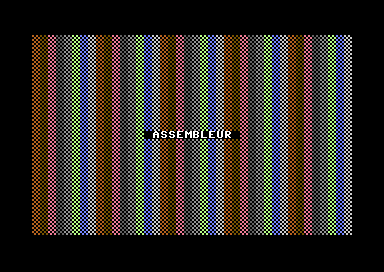
The checkerboard in colors 8 to 15: the C64's light shades. Black and white are gone, and the pattern looks different: the colors now repeat every 8 cells. A screen line has 40 cells, a multiple of 8: so each line starts with the same color, and the columns form straight stripes. In the chapter's example, the cycle of 16 colors shifted by 8 from one line to the next (40 = 2 × 16 + 8), hence its interlaced look.
- Write an assembly function
viderEcran()(clear screen) that writes spaces ($20) to the whole screen, and call it instead ofremplirEcran: only the title remains.Show solutionHide solution
viderEcranis a copy ofremplirEcran, with one difference: the character is no longer a parameter, but the fixed value#$20, the screen code for a space. The#is essential: without it,LDA $20would read memory cell$20, in zero page, instead of loading the value 32.main() { vic.initScreen(); vic.setBorderColor(vic.BLACK); vic.setBackgroundColor(vic.BLACK); viderEcran(); // instead of remplirEcran(.DAMIER) colorierEcran(); vic.setFontColor(vic.WHITE); vic.setCursor(14, 12); vic.print(" ASSEMBLEUR "); }// Writes a space ($20) to the 1,000 screen cells ($C000 to $C3E7) void viderEcran() { _asm { LDA #$20; // the screen code for a space LDX #0; boucle: STA $C000,X; // the same 4 strips as remplirEcran STA $C100,X; STA $C200,X; STA $C2E8,X; INX; BNE boucle; } }The screen stays black, with only “ASSEMBLEUR” (assembler) in the middle.
colorierEcranstill runs, but a space has no pixel lit: its color cannot be seen. You could remove this call without changing anything on screen. Notice also thatremplirEcran, which is no longer called, is not copied into the program: theasm/main.asmfile says so with the line[UNUSED] Function Main_remplirEcran - skipped. - Open
asm/main.asmand compare the code ofremplirEcranwith that of a Simple8 loop that does the same thing withwriteMem.Show solutionHide solution
To compare, add to the program a Simple8 version of
remplirEcran, the most natural one: a counter from 0 to 999 and onewriteMemper cell. Call it instead of the assembly version.// The same thing in Simple8, with writeMem void remplirEcranS8(ubyte code) { for (uint i = 0; i < 1000; i++) { writeMem(0xC000 + i, code); } }The assembly version, in the
asm/main.asmof the chapter's program, is copied as is: 6 instructions in the loop, which runs 256 times.; === Function: Main_remplirEcran === Main_remplirEcran: ; <asm> LDA _params+0 LDX #0 Main_remplirEcran_boucle_1: STA $C000,X STA $C100,X STA $C200,X STA $C2E8,X INX BNE Main_remplirEcran_boucle_1 ; </asm> RTS ; === End: Main_remplirEcran ===The Simple8 version produces this (the compiler also copied it directly into
main(), at the call site: it is the same loop):; === Function: Main_remplirEcranS8 === Main_remplirEcranS8: ; [Main:L40] Main_remplirEcranS8__FOR_1_i = #0 LDA #<0 STA Main_remplirEcranS8__FOR_1_i STA Main_remplirEcranS8__FOR_1_i+1 ; === Loop: _FOR_1 === _FOR_1_start: ; Loop condition: Main_remplirEcranS8__FOR_1_i < #1000 LDA Main_remplirEcranS8__FOR_1_i+1 CMP #>1000 BCC _FOR_1_cond_ok BEQ _FOR_1_cond_ok_skip1 JMP _FOR_1_end _FOR_1_cond_ok_skip1: LDA Main_remplirEcranS8__FOR_1_i CMP #<1000 BCC _FOR_1_cond_ok JMP _FOR_1_end _FOR_1_cond_ok: ; [Main:L41] t0 = #49152 + Main_remplirEcranS8__FOR_1_i LDA #<49152 CLC ADC Main_remplirEcranS8__FOR_1_i STA t0 LDA #>49152 ADC Main_remplirEcranS8__FOR_1_i+1 STA t0+1 ; [L41] writeMem(t0, Main_remplirEcranS8_code) LDA _params+0 LDY #0 STA (t0),Y ; Loop increment: Main_remplirEcranS8__FOR_1_i++ INC Main_remplirEcranS8__FOR_1_i BNE _FOR_1_incr_skip INC Main_remplirEcranS8__FOR_1_i+1 _FOR_1_incr_skip: ; Loop end: _FOR_1 JMP _FOR_1_start _FOR_1_end: RTS ; === End: Main_remplirEcranS8 ===Nothing is wrong here, but each pass does much more work:
iis auint: it lives in memory, on two bytes, not in register X. Comparing it with 1000 takes two comparisons and several branches, and incrementing it takes twoINC;- the address
0xC000 + iis recomputed on every pass: a 16-bit addition, stored in the work cellt0; - the write goes through this pointer,
STA (t0),Y, whereas the assembly uses indexed addressing,STA $C000,X, which does the address calculation for free; - the loop makes 1,000 passes, versus 256 for the assembly, which writes 4 cells per pass.
Measured on the C64 (subtracting the time of a program that only does
vic.initScreen()):Filling the screen Cycles Time remplirEcran, in assembly6,423 6.5 ms remplirEcranS8,writeMemand auintcounter51,375 52 ms The Simple8 version is 8 times slower: about 51 cycles per cell, versus 6.4. This is not inevitable: the chapter shows that with a
ubytecounter and fourfastpointers, Simple8 gets down to 8,309 cycles. It is the way you write the loop, more than the language, that makes the difference.