
Resources
A game is not just code: it is also images, fonts, maps, sounds, tables of values. This chapter shows how Simple8 brings them into the program, converts them to each machine's format, and stores them in memory.
What is a resource?
A resource is program data that is not code: a font, tiles, a palette, a level map, a sound, a precomputed table. It comes from a file in the project, or it is generated at compile time.
We have been using one since chapter 2: the PC Engine font.
const int POLICE = addResource("font.bin");addResource does three things:
- at compile time, it reads the file (or generates the data);
- it stores the data in the cartridge, along with the program;
- it gives an identifier, here
POLICE(font), which the program uses to find this data while it runs.
To transform the data along the way, you go through a ResourceFactory, a resource “factory”: it receives a file or parameters, and produces ready-to-use bytes.
const int VAGUE = addResource(ResourceFactory("TrigoMaker",
"function=sin&count=32&litude=10&offset=12"));The first argument is the name of the factory, the second its parameters, separated
by &, as in a web address.
Three kinds of resources
Resources differ in how they relate to the machine: some are the same everywhere, others adapt to each machine, and others exist for only one.
1. Generic resources
These are pure data, which depend on no hardware: every machine can use them as they are. A sine table is the typical example: 32 numbers between 2 and 22, whether for a C64 or a PC Engine.
| Factory | What it produces |
|---|---|
RawBinary | a file, as is. This is what addResource("fichier") does without a factory. |
TrigoMaker | a sine or cosine table, computed at compile time |
TrackerSong | a song written in a text file, in the style of a tracker |
The parameters of TrigoMaker describe the table:
| Parameter | Role | Here |
|---|---|---|
function | sin or cos | sin |
count | the number of values, for a full cycle | 32 |
amplitude | the maximum distance from the center | 10 |
offset | the center | 12: the values go from 2 to 22 |
2. Multi-architecture resources
Here, the same source is converted to each machine's format. An image
is not displayed the same way on a C64 and on a PC Engine: number of colors, pixel
encoding, palettes, everything differs. The factory detects the project's
architecture, the one on the architecture line, and runs the
matching conversion.
| Factory | Source | What it produces |
|---|---|---|
SquareDot | a project from the SquareDot editor (.sqd) | tiles, palettes and maps, in the machine's format: 4 bits per pixel on PC Engine, 2 planes on NES and Game Boy, one byte per line on C64… |
BuildPaletteFromImageFile | an image | the palette of its main colors, in the machine's format |
const int TUILES = addResource(ResourceFactory("SquareDot", "niveaux.sqd&part=tiles"));
const int COULEURS = addResource(ResourceFactory("SquareDot", "niveaux.sqd&part=palettes"));
const int CARTE = addResource(ResourceFactory("SquareDot", "niveaux.sqd&part=map&map=Carte 1"));
These three lines stay the same from one machine to another: only the result changes. A conversion that does not exist yet for a machine is reported:
ResourceFactory("SpriteMotionGenerator", …): not implemented for sega.megadrive yet (available: nec.pce)3. Machine-specific resources
Some resources only make sense for one machine, because they target a chip only that machine has:
| Factory | Machine | What it produces |
|---|---|---|
PSGSample | PC Engine | a digitized sound for the console's sound chip |
Vgm | Mega Drive | a piece of music for the Z80 player |
MixerSample | Mega Drive | a sound effect for the Z80 sound driver |
ResourceFactory("PSGSample", …): for nec.pce only, not for commodore.c64In short. Generic: the same bytes everywhere. Multi-architecture: one source, one format per machine. Specific: a single machine.
Not every machine has addResource
addResource stores its data in the cartridge of the PC
Engine and the Mega Drive, or in the Amiga
disk image. On the other machines, the compiler stops and points to the solution:
addResource: the resources are placed in the cartridge of the PC Engine (nec.pce) and of the
Mega Drive (sega.megadrive), or the Amiga image (commodore.amiga), not on commodore.c64;
put the data in a const array (generated by a script, in a unit)
So on C64, NES, Game Boy and Amstrad CPC, the data goes into constant
arrays, in a unit. The tools of the Simple8 suite write them for you: for
these machines, SquareDot exports a unit (.s8u) containing the tiles and
maps, which the program adds with addunit. 3DSpriteMaker does the same for
its sprites, on PC Engine and Game Boy.
// Carte.s8u, exported by SquareDot for the C64
unit Carte {
    const int W = 80;
    const int H = 25;
    const ubyte CHARS[56] = { … };      // the drawn characters
    …
}
The kind of the resource does not change: a sine table stays generic, whether it is
produced by TrigoMaker or written in an array.
Reading a resource
On PC Engine, the processor only sees a small part of the cartridge at a time. So a
resource cannot be read directly: you first have to make the bank that contains it
visible. The sys.resource library takes care of this:
| Function | Role |
|---|---|
resource.mapToMPR2(id) | makes the resource's bank visible, in the $4000-$5FFF window |
resource.getOffset(id) | its position in the bank |
resource.getLength(id) | its size in bytes |
resource.getBank(id) | its bank number |
resource.mapToMPR2(.VAGUE);                         // VAGUE's bank at $4000
uint debut = 0x4000 + resource.getOffset(.VAGUE);   // the address of its data
ubyte premiere = readMem(debut);                    // its first value: 12
On Mega Drive and Amiga, which are simpler, the identifier is directly the 32-bit
address of the data: you store it in a ulong, and read with
readMem.
Choose clear names. A resource's identifier becomes an assembler
name. A name like A, X or Y is mistaken for a
processor register, and assembly fails. Prefer POLICE,
TUILES_NIVEAU1…
Memory layout: the HuCard
On a cartridge machine, how do you fit hundreds of kilobytes of resources into a memory the processor only sees in small pieces? Let's take the PC Engine.
8 KB banks
The HuCard is divided into banks of 8 KB. The compiler stores the
resident code there, then the contexts, then the resources. One rule applies:
a resource of 8 KB or less never straddles two banks, so that a single
mapToMPR2 is enough to read all of it. A larger resource starts at the
beginning of a bank and continues into the following ones; it is read bank by
bank.
Index tables
To find each resource, the compiler writes three tables in ROM, indexed by the
identifier: the bank of each resource, its
position in the bank, and its size.
getBank, getOffset, getLength and
mapToMPR2 just read these tables.
This is what makes it possible to optimize space: since the program always finds a resource through its tables, the compiler is free to store it anywhere, without following the order of declarations. It takes advantage of this to fill the gaps:
- resources larger than 8 KB are stored first, each at the beginning of a bank;
- the others are taken from largest to smallest, and each one goes into the first bank with enough room left, including the end of a large resource;
- a new bank is opened only if none has room.
- Stored in declaration order, they leave gaps: C does not fit after A and B, and the end of BIG stays empty. You need 4 banks.
- By filling the gaps, C and D fit into the end of BIG: 3 banks are enough, and the cartridge is one bank smaller.
Here are the tables the compiler writes for this example, in the order of the identifiers A, B, C, D, BIG:
_resource_banks:            // the bank of each resource
    .db RESOURCE_FIRST_BANK+2, RESOURCE_FIRST_BANK+2, RESOURCE_FIRST_BANK+1,
        RESOURCE_FIRST_BANK+1, RESOURCE_FIRST_BANK+0
_resource_offsets:          // its position in the bank
    .dw $0000, $1388, $0EE0, $1A98, $0000
RESOURCE_FIRST_BANK is the first bank after the resident code and the
contexts. For C, identifier 2, the tables give bank
RESOURCE_FIRST_BANK+1 and position $0EE0 (3,808): right after
the end of BIG. The program does not need to know anything about this layout: it calls
mapToMPR2(.RES_C), as before.
Resources and contexts
On a cartridge machine
On PC Engine, a resource declared in a context unit goes into the same table as the others, after the context banks. It is read the same way, from any context.
unit Niveau {
const int VAGUE = addResource(ResourceFactory("TrigoMaker", "function=sin&count=32&litude=10&offset=12"));
initContext() {
uint debut;
resource.mapToMPR2(.VAGUE);
debut = 0x4000 + resource.getOffset(.VAGUE);
// copy to video memory, read values…
}
…
}This works because the two windows are separate: the context code is visible from
$6000, a resource's bank at $4000. So the context can read
its data without hiding itself. And nothing is copied at load time: the data stays in
ROM, where it is read when needed.
The right moment to copy a resource to video memory is
initContext(): interrupts are masked there, so the copy is not
interrupted (chapter 8).
On a disk machine
On C64 and Amstrad CPC, a context is a file loaded from disk. Its constant arrays are part of that file: they arrive in memory with it, and disappear when another context takes its place. So a level's data is best declared in that level's context: it only takes up memory while that level is being played.
| Cartridge (PC Engine) | Disk (C64, CPC) | |
|---|---|---|
| A context's data | stays in ROM, always available | is loaded with the context file |
| To read it | make its bank visible (mapToMPR2) | directly: it is in memory |
| The limit | the size of the cartridge | the room for the context in memory |
An example: a sine wave
This program draws a wave on the screen: one star per column, at the height given by a sine table. On PC Engine, the table and the font are two generic resources.
// Resources: a sine wave (PC Engine)
architecture nec.pce;
addlib sys.resource;
addlib vce.base;
addlib vdc.base;
addlib vdc.screentext;
unit {
// two generic resources: a file as is, and a table computed at compile time
const int POLICE = addResource("font.bin");
const int VAGUE = addResource(ResourceFactory("TrigoMaker",
"function=sin&count=32&litude=10&offset=12"));
main() {
int source;
int length;
uint debut;
// the font: made visible at $4000, then copied to video memory
vdc.setBATSize(vdc.BAT_32x32);
vdc.initScreen();
resource.mapToMPR2(.POLICE);
source = 0x4000 + resource.getOffset(.POLICE);
length = resource.getLength(.POLICE);
vdc.writeToVRAM(source, 0x1000, length);
vce.setPalette(0, 0, RGB(0, 0, 2));
vce.setPalette(0, 1, RGB(7, 7, 7));
vce.setPalette(1, 1, RGB(2, 6, 7));
vdc.clearScreen();
vdc.setFontColor(0);
vdc.setCursor(7, 1);
vdc.print("UNE VAGUE DE SINUS");
// the table: made visible in turn, then read entry by entry
resource.mapToMPR2(.VAGUE);
debut = 0x4000 + resource.getOffset(.VAGUE);
vdc.setFontColor(1);
for (ubyte x = 0; x < 32; x++) {
vdc.setCursor(x, (ubyte)(readMem(debut + x) + 3)); // the height: entry x, below the title
vdc.putChar('*');
}
}
}- Both resources are read the same way:
mapToMPR2, then address$4000plus the position. - The font alone fills a bank (8,192 bytes): so the sine table starts at the beginning of the next bank.
- Only one bank is visible at a time at
$4000: we finish copying the font before making the table visible.
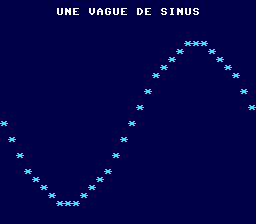
TrigoMaker table.The Commodore 64 version
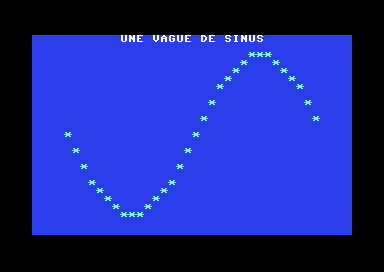
The C64 does not have addResource: the same 32 values are stored in a
constant array. The resource stays generic; only the way it enters the program
changes.
// Resources: a sine wave (Commodore 64)
architecture commodore.c64;

addlib vic.base;
addlib vic.screentext;

unit {
    // no addResource on C64: the same 32 values, in a constant array
    const ubyte VAGUE[] = {
        12, 14, 16, 18, 19, 20, 21, 22, 22, 22, 21, 20, 19, 18, 16, 14,
        12, 10,  8,  6,  5,  4,  3,  2,  2,  2,  3,  4,  5,  6,  8, 10
    };

    main() {
        vic.initScreen();
        vic.setBorderColor(vic.BLACK);
        vic.setBackgroundColor(vic.BLUE);
        vic.clearScreen();

        vic.setFontColor(vic.WHITE);
        vic.setCursor(11, 0);
        vic.print("UNE VAGUE DE SINUS");

        vic.setFontColor(vic.CYAN);
        for (ubyte x = 0; x < 32; x++) {
            vic.setCursor((ubyte)(x + 4), .VAGUE[x]);   // the height: entry x of the array
            vic.putChar('*');
        }
    }
}
Key points
- A resource is program data, read or generated at compile time by
addResource, through aResourceFactoryif needed. - Three kinds: generic (the same bytes everywhere), multi-architecture (one source, one format per machine), specific (a single machine).
addResourceexists on PC Engine, Mega Drive and Amiga; elsewhere, the data goes into constant arrays, often exported by the tools.- On PC Engine, index tables (bank, position, size) locate each resource: so the compiler can store them wherever it wants, and fills the gaps in the 8 KB banks.
- A resource is read by making its bank visible (
mapToMPR2), including from a context; the right moment to copy it isinitContext().
Your turn
- Double the amplitude of the wave. Does it still fit on the screen? If not, what is
the largest possible wave, and what else must change along with the amplitude?
Show solutionHide solution
Let's start by trying it:
amplitude=20, with nothing else changed. The values should go from 12 − 20 = −8 to 12 + 20 = 32. Two problems show up on screen:- the table is made of unsigned bytes, which cannot go below 0.
TrigoMakerreplaces negative values with 0: the top of the wave is flattened into a long plateau (you can check this inasm/resources.asm, where the table contains nine$00in a row); - the bottom, down to line 32 + 3 = 35, goes off the screen, which has only 28 visible lines.
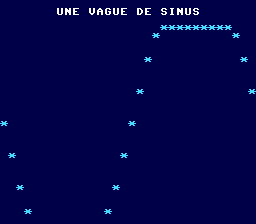
Amplitude 20: the top is flattened, the bottom is off the screen. So you also have to move the center (
offset) so that the smallest value stays positive. But that is not enough: a wave of amplitude 20 spans 2 × 20 + 1 = 41 lines, more than the 28 lines of the PC Engine and the 25 of the C64. A wave twice as tall, at one line per unit, cannot fit on the screen. What you can do is make it as large as the screen allows. The rule:offsetat least equal toamplitude(no negative values), andoffset + amplitude, plus the shift below the title, at most equal to the last line.On PC Engine, lines 3 to 27 are free below the title, which is 25 lines: an amplitude of 12 with a center at 12 gives values from 0 to 24, drawn on lines 3 to 27.
// amplitude 12, center 12: from 0 to 24, i.e. lines 3 to 27 once below the title const int VAGUE = addResource(ResourceFactory("TrigoMaker", "function=sin&count=32&litude=12&offset=12"));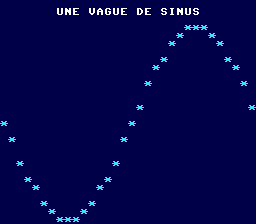
Amplitude 12: the largest wave that fits below the title. On Commodore 64, the title takes line 0 and lines 1 to 24 remain: an amplitude of 11 with a center at 12 (values from 1 to 23) fits. Without
TrigoMaker, you have to recompute the 32 values yourself, 12 + 11 × sin(2π × x / 32), rounded:// amplitude 11, center 12: from 1 to 23, every line below the title const ubyte VAGUE[] = { 12, 14, 16, 18, 20, 21, 22, 23, 23, 23, 22, 21, 20, 18, 16, 14, 12, 10, 8, 6, 4, 3, 2, 1, 1, 1, 2, 3, 4, 6, 8, 10 };This is the advantage of a table generated at compile time: on PC Engine, changing one parameter is enough; on C64, you have to redo the calculation and copy the numbers again.
- the table is made of unsigned bytes, which cannot go below 0.
- Draw a second wave, a cosine, in another color.
Show solutionHide solution
On PC Engine, you declare a second
TrigoMakerresource, withfunction=cosand the same other parameters. A new color needs a new palette: palette 2 gets an orange in its color 1. The cosine is then drawn like the sine, after making its bank visible withmapToMPR2.const int VAGUE = addResource(ResourceFactory("TrigoMaker", "function=sin&count=32&litude=10&offset=12")); const int VAGUE2 = addResource(ResourceFactory("TrigoMaker", "function=cos&count=32&litude=10&offset=12")); // the same, as a cosinevce.setPalette(1, 1, RGB(2, 6, 7)); vce.setPalette(2, 1, RGB(7, 5, 1)); // palette 2: orange, for the cosine// the cosine: its bank is made visible before reading it resource.mapToMPR2(.VAGUE2); debut = 0x4000 + resource.getOffset(.VAGUE2); vdc.setFontColor(2); for (ubyte x = 0; x < 32; x++) { vdc.setCursor(x, (ubyte)(readMem(debut + x) + 3)); vdc.putChar('*'); }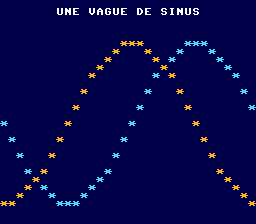
The sine in blue, the cosine in orange: the same curve, shifted by a quarter cycle. Here, the two small tables are stored in the same bank (the compiler fills the gaps), so the second
mapToMPR2changes nothing. But the program does not need to know that: callingmapToMPR2before reading a resource is the safe rule, whatever the layout.On Commodore 64, there is no need to write a second table: a cosine is a sine a quarter cycle ahead. With 32 values per cycle, you just read the same table 8 entries further on, wrapping back to the start after the end thanks to the modulo.
        for (ubyte x = 0; x < 32; x++) {
            vic.setCursor((ubyte)(x + 4), .VAGUE[x]);   // the height: entry x of the array
            vic.putChar('*');
        }

        // the cosine: the same table, read a quarter cycle (8 entries) further on
        vic.setFontColor(vic.YELLOW);
        for (ubyte x = 0; x < 32; x++) {
            vic.setCursor((ubyte)(x + 4), .VAGUE[(x + 8) % 32]);
            vic.putChar('*');
        }
    }
The two screens look alike: the
TrigoMakercosine table contains exactly the sine values shifted by 8 entries (22, 22, 21, 20…). Where the two waves cross, the second one, drawn later, covers the first. - Make the wave scroll: on each frame, shift the index read from the table by one
entry (
(x + decalage) % 32).Show solutionHide solution
To scroll the wave, you redraw it on each frame, reading the table starting one entry further. Three ingredients:
- a clock: the frame interrupt from chapter 8 (
irq1on PC Engine,irqon C64) increments.images(frames), and the main loop waits for it to change; - a
decalage(offset) that increases by 1 on each frame, brought back to 0 after 31 by the modulo; - erasing: before drawing a column's star, you erase the one from the previous frame, by writing a space at the height read with the old offset. Without this, the stars would pile up and the screen would fill up.
Each column has only one star, and it is only touched by its own pass through the loop: so erasing then drawing column by column cannot erase a star that was just placed.
On PC Engine
addlib event.irq1; unit { // two generic resources: a file as is, and a table computed at compile time const int POLICE = addResource("font.bin"); const int VAGUE = addResource(ResourceFactory("TrigoMaker", "function=sin&count=32&litude=10&offset=12")); ubyte images; // counted by the interrupt ubyte decalage; // where reading starts in the table// the table: made visible in turn, then read entry by entry resource.mapToMPR2(.VAGUE); debut = 0x4000 + resource.getOffset(.VAGUE); vdc.setFontColor(1); while (1) { .images = 0; while (.images == 0) { // wait for the next frame } for (ubyte x = 0; x < 32; x++) { // erase the star from the previous frame... vdc.setCursor(x, (ubyte)(readMem(debut + (x + .decalage) % 32) + 3)); vdc.putChar(' '); // ... and draw the new one, one entry further in the table vdc.setCursor(x, (ubyte)(readMem(debut + (x + .decalage + 1) % 32) + 3)); vdc.putChar('*'); } .decalage = (ubyte)((.decalage + 1) % 32); } } interrupt -> irq1 { .images++; } }The table is made visible only once, before the loop: nothing else changes the bank visible at
$4000after that.On Commodore 64
        vic.setFontColor(vic.CYAN);
        while (1) {
            .images = 0;
            while (.images == 0) {                      // wait for the next frame
            }
            for (ubyte x = 0; x < 32; x++) {
                // erase the star from the previous frame...
                vic.setCursor((ubyte)(x + 4), .VAGUE[(x + .decalage) % 32]);
                vic.putChar(' ');
                // ... and draw the new one, one entry further in the table
                vic.setCursor((ubyte)(x + 4), .VAGUE[(x + .decalage + 1) % 32]);
                vic.putChar('*');
            }
            .decalage = (ubyte)((.decalage + 1) % 32);
        }
    }

    interrupt -> irq {
        .images++;
    }
}
Measured in the emulator,
decalagedoes advance by one entry per frame on both machines: the wave slides to the left and makes a full cycle in 32 frames, about 0.5 seconds on PC Engine (60 frames per second) and 0.64 seconds on C64 (50 frames per second). Redrawing the 32 columns easily fits within one frame. For slower scrolling, just wait 2 or 3 frames per step, as inwhile (.images < 3). - a clock: the frame interrupt from chapter 8 (
- Add three resources of 3,000, 4,000 and 5,000 bytes, and look in
asm/main.asmfor the banks the compiler gave them.Show solutionHide solution
Create three files of 3,000, 4,000 and 5,000 bytes (their content does not matter here), and declare them in the unit of the wave program:
// two generic resources: a file as is, and a table computed at compile time const int POLICE = addResource("font.bin"); const int VAGUE = addResource(ResourceFactory("TrigoMaker", "function=sin&count=32&litude=10&offset=12")); // three files of 3,000, 4,000 and 5,000 bytes const int DONNEES3000 = addResource("donnees3000.bin"); const int DONNEES4000 = addResource("donnees4000.bin"); const int DONNEES5000 = addResource("donnees5000.bin");The program compiles without errors, and
asm/main.asmcontains the index tables. They are in identifier order:POLICE(0),VAGUE(1),DONNEES3000(2),DONNEES4000(3),DONNEES5000(4).; Resource Tables (5 resources) ; ======================================== _resource_banks: .db RESOURCE_FIRST_BANK+0, RESOURCE_FIRST_BANK+1, RESOURCE_FIRST_BANK+1, RESOURCE_FIRST_BANK+2, RESOURCE_FIRST_BANK+1 _resource_offsets: .dw $0000, $1F40, $1388, $0000, $0000 _resource_lengths: .dw $2000, $0020, $0BB8, $0FA0, $1388 _resource_count = 5The
asm/resources.asmfile, which contains the data itself, shows it more readably, bank by bank:Bank Resources (position) Used RESOURCE_FIRST_BANK+0POLICE($0000)8,192 bytes: full RESOURCE_FIRST_BANK+1DONNEES5000($0000),DONNEES3000($1388 = 5,000),VAGUE($1F40 = 8,000)8,032 bytes RESOURCE_FIRST_BANK+2DONNEES4000($0000)4,000 bytes This is exactly the rule from the chapter, from largest to smallest:
- the font, 8,192 bytes, fills the first bank;
- 5,000 bytes: the first bank is full, a second one is opened;
- 4,000 bytes: only 3,192 bytes are left in the second one, a third one is opened;
- 3,000 bytes: they fit in the remaining 3,192 bytes of the second bank, after the 5,000;
- the wave, 32 bytes, slips into the 192 bytes still left in the second bank.
The compiler did not follow the order of declarations: the second bank starts with the 5,000 bytes, declared last. With these particular sizes, filling the banks in declaration order would also have needed three banks (the wave, 3,000 and 4,000 in the second, 5,000 in the third): the gain depends on the sizes, as in the chapter's example where it saves a whole bank. The program, for its part, needs to know nothing:
mapToMPR2(.DONNEES3000)reads the tables and finds the right bank.