
Interrupts
In chapter 8, we used an interrupt as a clock. This chapter goes further: the interrupts of each machine, what you do with them in a game, and above all the mistakes that make them dangerous. Every mistake was reproduced and measured.
Reminder: what is an interrupt?
An interrupt is a hardware signal that suspends the program at any moment to run a small piece of code, the handler. The program then resumes exactly where it was, without noticing anything.
unit {
    ubyte images;

    main() {
        while (1) {
            // the main program
        }
    }

    interrupt -> irq {          // the handler: called every frame
        .images++;
    }
}
That "any moment" is where all the power of interrupts comes from, and all their
traps: the handler can strike in the middle of a line of main(), between
two processor instructions.
What interrupt -> does for you
In assembly, setting up an interrupt is careful work, and it is different on every machine. You have to:
- put the handler's address where the processor looks for it (a vector), or chain it behind the system's handler;
- save the processor registers on entry, and restore them on exit;
- tell the chip that raised the interrupt that it has been seen (acknowledge it), otherwise it fires again right away;
- enable the source in the chip (the video chip, the timer…), then in the processor;
- and do all of this in the right order: an interrupt enabled too early can land on a handler that is not ready yet.
In Simple8, you just write interrupt -> irq { … }. The compiler and the
machine's startup code (boot.asm) take care of the rest:
- they install the handler, after
initContext(), and only enable the interrupts that have one; - they save the registers, acknowledge the source, then call the handler. On the C64, for example, the startup code saves A, X and Y, reads and acknowledges the video chip and the timer, counts the frames, then calls the handler;
- they adapt to each machine: on the NES, the startup code also updates the screen (sprites,
palettes, scrolling) before calling
nmi; on the Game Boy,main()itself enables, in therIEregister, the interrupts that have a handler; with contexts, each context installs its own.
You only write what concerns you: what the handler must do. This is one of the areas where Simple8 makes programming these machines the most simple.
The interrupts of each machine
Each machine has its own interrupt sources, and Simple8 keeps their names. The most useful one, everywhere, is the frame interrupt, sent by the video chip for every frame displayed.
| Machine | The frame | Other interrupts | What you need |
|---|---|---|---|
| Commodore 64 | irq, 50 per second | timer, nmi (the RESTORE key), and irq at a chosen line (raster) | addlib event.irq; |
| PC Engine | irq1, 60 per second | timer, irq2, nmi, and irq1 at a chosen line (raster) | addlib event.irq1;, event.timer… |
| NES | nmi, 60 per second | irq from the cartridge, every n lines | nothing |
| Game Boy | vblank, about 60 per second | stat, timer, serial, joypad | the screen turned on: otherwise, no vblank |
| Amstrad CPC | int, 50 per second | nmi | nothing |
| Mega Drive | vblank, 60 per second (50 in Europe) | hblank, ext, the traps | addlib system.system; |
| Amiga 500 | vblank (level 3), 50 per second | trap0 to trap15, error | nothing |
A name that does not exist on the machine is rejected: on the Amstrad CPC, for example,
interrupt -> irq gives Valid interrupts: INT, NMI.
What are they for?
| Use | Why an interrupt? |
|---|---|
| Measuring time | the frame interrupt fires at fixed intervals: counting frames gives an exact clock, however busy the program is |
| Pacing the game | wait for the next frame before computing the one after: the game runs at the same speed everywhere |
| Changing the screen at the right time | while the beam returns to the top of the screen, nothing is displayed: you can change colors or move sprites without it showing |
| Playing music | one note per frame, at the exact rate, even when the game slows down |
| Reading the joypad | once per frame, always at the same moment |
| Raster effects | an interrupt at a precise line of the screen lets you change a color or a scroll in the middle of a frame |
A stopwatch on six machines
The first use, measuring time, is written the same way everywhere. Splitting the roles
is the key: the handler counts, main()
displays.
// Interrupts: a stopwatch (Commodore 64)
architecture commodore.c64;

addlib event.irq;               // the frame interrupt
addlib vic.base;
addlib vic.screentext;

unit {
    const ubyte IMAGES_PAR_SECONDE = 50;    // a European C64 (PAL)
    ubyte images;               // written by the interrupt
    ubyte secondes;             // written by the interrupt, read by main()

    initContext() {
        vic.initScreen();
        vic.setBorderColor(vic.BLACK);
        vic.setBackgroundColor(vic.BLUE);
        vic.clearScreen();
        vic.setFontColor(vic.WHITE);
        vic.setCursor(13, 10);
        vic.print("CHRONOMETRE");
    }

    main() {
        ubyte affichees = 255;  // the seconds already displayed
        while (1) {
            if (.secondes != affichees) {       // only when they have changed
                affichees = .secondes;
                vic.setCursor(18, 12);
                vic.putChar((ubyte)('0' + affichees / 10));
                vic.putChar((ubyte)('0' + affichees % 10));
            }
        }
    }

    // Every frame: count, and nothing else
    interrupt -> irq {
        .images++;
        if (.images == .IMAGES_PAR_SECONDE) {
            .images = 0;
            .secondes++;
        }
    }
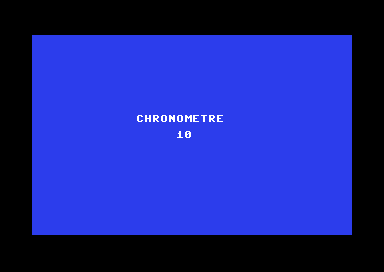
}- The handler does only two things: it counts the frames (images) and, every 50 of them, the seconds (secondes). It is very short.
main()only rewrites the seconds on screen when they have changed. The display, which is slower, stays out of the interrupt.- The two shared variables are
ubytes: we will see below why that matters.
On the other machines
Only three things change: the name of the interrupt, the number of frames per second, and what you need for it to be called:
| Machine | The handler | Frames per second | What you need |
|---|---|---|---|
| Commodore 64 | interrupt -> irq | 50 | addlib event.irq; |
| PC Engine | interrupt -> irq1 | 60 | addlib event.irq1; |
| NES | interrupt -> nmi | 60 | nothing |
| Game Boy | interrupt -> vblank | about 60 | turn the screen on: writeMem(hw.rLCDC, hw.LCDCF_ON | hw.LCDCF_BGON); |
| Amstrad CPC | interrupt -> int | 50 | nothing |
| Amiga 500 | interrupt -> vblank | 50 | nothing |
// Game Boy: the same handler, and the screen to turn on
main() {
    writeMem(hw.rLCDC, hw.LCDCF_ON | hw.LCDCF_BGON);
    while (1) {
    }
}

interrupt -> vblank {
    .images++;
    if (.images == 60) {
        .images = 0;
        .secondes++;
    }
}
All six versions were run in the emulators of the Simple8 test kit. After 5 seconds' worth of frames (250 on the C64, CPC and Amiga, 300 on the others), they all display 4: the very first frames go by during startup, before the handler is installed. On the Game Boy, without the screen turned on, the counter stays at 0.
The complete PC Engine version
// Interrupts: a stopwatch (PC Engine)
architecture nec.pce;

addlib event.irq1;              // the frame interrupt
addlib sys.resource;
addlib vce.base;
addlib vdc.base;
addlib vdc.screentext;

unit {
    const int POLICE = addResource("font.bin");
    const ubyte IMAGES_PAR_SECONDE = 60;
    ubyte images;               // written by the interrupt
    ubyte secondes;             // written by the interrupt, read by main()

    initContext() {
        int source;
        int length;
        vdc.setBATSize(vdc.BAT_32x32);
        vdc.initScreen();
        resource.mapToMPR2(.POLICE);
        source = 0x4000 + resource.getOffset(.POLICE);
        length = resource.getLength(.POLICE);
        vdc.writeToVRAM(source, 0x1000, length);
        vce.setPalette(0, 0, RGB(0, 0, 7));
        vce.setPalette(0, 1, RGB(7, 7, 7));
        vdc.clearScreen();
        vdc.setFontColor(0);
        vdc.setCursor(10, 12);
        vdc.print("CHRONOMETRE");
    }

    main() {
        ubyte affichees = 255;
        while (1) {
            if (.secondes != affichees) {
                affichees = .secondes;
                vdc.setCursor(15, 14);
                vdc.putChar((ubyte)('0' + affichees / 10));
                vdc.putChar((ubyte)('0' + affichees % 10));
            }
        }
    }

    // Every frame: count, and nothing else
    interrupt -> irq1 {
        .images++;
        if (.images == .IMAGES_PAR_SECONDE) {
            .images = 0;
            .secondes++;
        }
    }
}
A raster effect: several colors in one frame
The screen is drawn line by line, from top to bottom. An interrupt at a precise line
therefore lets you change a color in the middle of a frame: the top of
the screen keeps the old color, the bottom gets the new one. On the C64, the
vic.raster library requests an interrupt at a given line, and
irq.getType() tells the frame interrupt apart from a line interrupt.
// Interrupts: four color bands (Commodore 64)
architecture commodore.c64;

addlib event.irq;
addlib vic.base;
addlib vic.raster;
addlib vic.screentext;

unit {
    const ubyte COULEURS[] = { 6, 2, 5, 7 };       // blue, red, green, yellow
    ubyte bande;

    initContext() {
        vic.initScreen();
        vic.setBorderColor(vic.BLACK);
        vic.clearScreen();
        vic.setFontColor(vic.WHITE);
        vic.setCursor(11, 12);
        vic.print("UNE IMAGE, 4 FONDS");
        irq.setRasterInt(50);                       // the first line to watch
    }

    main() {
        while (1) {
        }
    }

    interrupt -> irq {
        if (irq.getType() == irq.VBLANK_INT) {
            // bottom of the screen: prepare the next frame
            .bande = 0;
            vic.setBackgroundColor(.COULEURS[0]);
            irq.setRasterInt(50);
        } else {
            // a screen line was reached: the next color
            .bande++;
            vic.setBackgroundColor(.COULEURS[.bande]);
            if (.bande < 3) {
                irq.setRasterInt((int)(50 + .bande * 50));     // the next line
            }
        }
    }
}- The frame interrupt (at the bottom of the screen) sets the first color back, and requests line 50.
- Each time a line is reached, the handler moves on to the next color (the next band, bande), and requests the following line.
- The C64 has only one compare line: the handler reprograms it for each band.
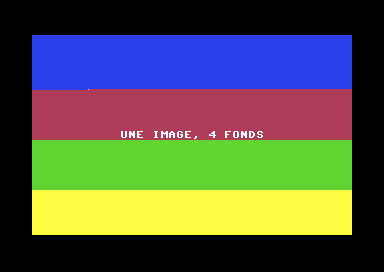
Down to the pixel. The change happens a few pixels after the start of the line: the time it takes the processor to finish its instruction and enter the handler. Raster effects are sensitive to every single cycle, and a real machine does not always behave exactly like an emulator: on the PC Engine, for example, changing a color during display can leave visible artifacts on the console, but not in emulators. So always check a raster effect on the real machine.
What not to do
Interrupt bugs are the sneakiest: the program compiles, works almost all the time, and gets it wrong now and then. Here are the main ones, reproduced on the C64.
1. A handler that is too long
If the handler takes longer than a frame, the next interrupt arrives before it has finished: that interrupt is lost. The measurement: a handler that counts its calls, with a longer and longer loop, over the same period (about 115 frames).
| Work in the handler | Calls received |
|---|---|
| a 10-iteration loop | 108 |
| a 600-iteration loop | 108 |
| a 1,200-iteration loop | 66: more than one frame in three lost |
| a 2,400-iteration loop | 35: two frames in three lost |
A stopwatch written this way would run late, and music would slow down. And while the
handler runs, main() does not: it has almost no time left. Keep the handler
short; the heavy work goes in main().
2. Waiting inside a handler
While a handler is running, interrupts are masked. Waiting for the next frame from inside the handler means waiting for an event that can no longer happen:
interrupt -> irq {
    .appels++;
    irq.waitFrame();        // never returns: the program is stuck
}
Measured: the handler is called only once, then nothing runs anymore,
neither the handler nor main(). A handler must never wait: no
waitFrame, no loop watching a variable, no disk read.
3. A function called by both main() and the handler
In chapter 5, we saw that a function's parameters and local variables have a
fixed address. If the handler calls a function while
main() is in the middle of that same function, it overwrites its
variables.
uint somme(ubyte n) {             // the sum from 1 to n
    uint s = 0;
    for (ubyte k = 1; k <= n; k++) {
        s = s + k;
    }
    return s;
}

main() {
    while (.essais < 3000) {
        if (somme(20) != 210) {     // 1 + 2 + … + 20 = 210
            .erreurs++;
        }
        .essais++;
    }
}

interrupt -> irq {
    .pourIrq = somme(5);            // the same function
}
Measured: 85 wrong results out of 3,000, without any message. Two fixes, both verified (0 errors):
- a separate function for the handler, with its own
variables:
sommeIrq(); - mask interrupts for the duration of the call in
main():
irq.disableGlobal();               // no more interrupts...
uint r = somme(20);
irq.enableGlobal();                // ... then they resume
Masking delays the interrupt for a moment: it must stay very short. Watch out for
library functions too: calling print from both the handler and
main() causes the same problem.
4. A multi-byte variable
On an 8-bit machine, a uint is read in two steps: the low byte, then the
high byte. If the interrupt changes it between the two, main() reads a mix
of the old and the new value. With a counter going from 255 to 256,
main() can read the low byte of 255 ($FF) and then the high byte
of 256 ($01): it gets 511.
This happens rarely, which makes the bug hard to find. The fixes:
- shared variables as
ubytes, which are read in one go: that is the stopwatch's choice; - otherwise, read the variable between
irq.disableGlobal()andirq.enableGlobal().
5. Changing in main() what the handler changes
.images++ is not a single operation: read, add, write. If
main() resets .images to 0 while the handler is between its
read and its write, or the other way around, one of the two changes is lost. A simple
rule: a shared variable has a single writer. In the stopwatch, only the
handler writes images and secondes; main()
only reads them.
6. Switching context from a handler on the C64
As seen in chapter 8, a sys.loadContext called from a handler currently
leaves the next context without interrupts on the C64. The handler records the request,
and main() switches the context.
Good practices
| Rule | Why |
|---|---|
| A short handler | otherwise, frames are lost and main() has no time left |
The handler records, main() decides | heavy work and context switches stay out of the interrupt |
| Never wait in a handler | interrupts are masked there: the program locks up |
| No shared function | its variables, at a fixed address, would be overwritten |
Shared variables as ubytes | they are read and written in one go |
| A single writer per shared variable | two writers step on each other's toes |
| Mask, but briefly | disableGlobal / enableGlobal protect an access, at the cost of a slight delay of the interrupt |
Key points
- An interrupt suspends the program at any moment to call a handler, then lets it resume.
- Each machine has its own interrupts:
irq(C64),irq1(PC Engine),nmi(NES),vblank(Game Boy, Mega Drive, Amiga),int(CPC). Some require a library, or the screen turned on. - They are used to measure time, pace the game, change the screen at the right time, play music, read the joypad, and create raster effects.
- A short handler that never waits and shares no function with
main(), and shared variables asubytes, with a single writer.
Your turn
- Add minutes to the stopwatch: who should count them, the handler or
main()?Show solutionHide solution
The handler must count the minutes. It is the only one that writes
secondes; to move on to the next minute, the seconds must be reset to 0. Ifmain()did it, the variable would have two writers, and a reset could be lost in the middle of a.secondes++(rule 5). Computing the minutes inmain()with.secondes / 60does not work either: aubytewraps around to 0 after 255 seconds. So the handler counts the seconds from 0 to 59, then the minutes;main()still only reads and displays.One more precaution:
main()now reads two variables. If the interrupt strikes between the two reads, when going from 0:59 to 1:00,main()can read 59 seconds and then 1 minute, and display 01:59 for one second. So we read both betweenirq.disableGlobal()andirq.enableGlobal(): two byte copies, so the masking is very brief.const ubyte IMAGES_PAR_SECONDE = 50; // a European C64 (PAL) ubyte images; // written by the interrupt ubyte secondes; // written by the interrupt, read by main() ubyte minutes; // written by the interrupt, read by main() // … main() { ubyte affichees = 255; // the seconds already displayed ubyte s; ubyte m; while (1) { irq.disableGlobal(); // read both at once s = .secondes; m = .minutes; irq.enableGlobal(); if (s != affichees) { // only when they have changed affichees = s; vic.setCursor(16, 12); vic.putChar((ubyte)('0' + m / 10)); vic.putChar((ubyte)('0' + m % 10)); vic.putChar(':'); vic.putChar((ubyte)('0' + s / 10)); vic.putChar((ubyte)('0' + s % 10)); } } } // Every frame: count, and nothing else interrupt -> irq { .images++; if (.images == .IMAGES_PAR_SECONDE) { .images = 0; .secondes++; if (.secondes == 60) { .secondes = 0; .minutes++; } } }Run in VICE for 64 million cycles (about 65 seconds), the stopwatch displays
01:01. On the PC Engine, only the constant changes: 60 frames per second.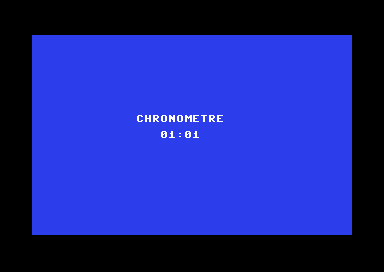
After about 65 seconds: one minute and one second. - Make the C64 border flash once per second, without changing anything in
main().Show solutionHide solution
The handler is called every frame and already knows where we are in the second: the
imagesvariable goes from 0 to 49. Just turn the border on when it is 0, and turn it off when it is 25, half a second later.main()does not change. The addition stays very short: two comparisons and, twice per second, a write to a register of the video chip.Calling
vic.setBorderColorfrom the handler is safe here:main()never calls it (onlyinitContext()uses it, before the handler is installed). So it is not a shared function.// Every frame: count, and turn the border on or off interrupt -> irq { if (.images == 0) { vic.setBorderColor(vic.RED); // start of the second: on } if (.images == 25) { vic.setBorderColor(vic.BLACK); // half a second later: off } .images++; if (.images == .IMAGES_PAR_SECONDE) { .images = 0; .secondes++; } }Verified in the test kit's emulator, by sampling the border color every five frames:
2222200000repeats, that is 25 frames in red (2), then 25 in black (0). - Go up to eight color bands in the raster effect.
Show solutionHide solution
Three things change: the color table grows to eight values, each band is now only 25 lines tall (the 200 lines of the text area divided by 8), and the handler reprograms the next line as long as it has not reached the eighth band (
.bande < 7). TheHAUTEUR(height) constant avoids repeating 25 in three places: the line of band n + 1 is(n + 1) * HAUTEUR.// blue, red, green, yellow, purple, cyan, orange, light blue const ubyte COULEURS[] = { 6, 2, 5, 7, 4, 3, 8, 14 }; const ubyte HAUTEUR = 25; // 200 lines / 8 bands ubyte bande; // … interrupt -> irq { if (irq.getType() == irq.VBLANK_INT) { // bottom of the screen: prepare the next frame .bande = 0; vic.setBackgroundColor(.COULEURS[0]); irq.setRasterInt(.HAUTEUR); } else { // a screen line was reached: the next color .bande++; vic.setBackgroundColor(.COULEURS[.bande]); if (.bande < 7) { irq.setRasterInt((int)((.bande + 1) * .HAUTEUR)); // the next line } } }Since the C64 has only one compare line, the handler is now called eight times per frame instead of four: that is still very little.
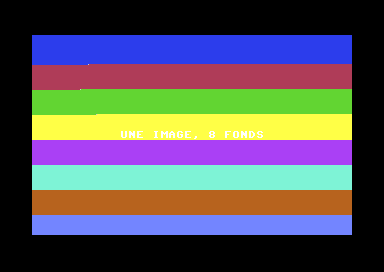
Eight backgrounds in a single frame (VICE). The small offset on the left of some bands is the time it takes to enter the handler. - Go back to the shared function example, and check that with
irq.disableGlobal()around the call, the number of errors drops to 0.Show solutionHide solution
We take the program as is, and only wrap the call in
main(): whilesomme(20)is computing, the interrupt can no longer strike, so it can no longer overwrites,korn. The result is stored in a variable,r, then tested once interrupts are back on: the test does not need to be protected. The handler does not change.main() { while (.essais < 3000) { irq.disableGlobal(); uint r = somme(20); irq.enableGlobal(); if (r != 210) { .erreurs++; } .essais++; } } interrupt -> irq { .pourIrq = somme(5); // the same function, called by the interrupt }Measured in the test kit's emulator: without masking,
erreurs(errors) is85for 3,000 tries; with it,erreursis0, andpourIrqis15(1 + 2 + … + 5). The handler did keep running: a counter added for the measurement shows 127 calls during the 3,000 tries. It was only delayed, by the duration of onesomme(20)at most.