
A Complete Project, Step by Step
This is the chapter where everything comes together. We are going to write a real game, a breakout game, and run it on seven machines. The rules of the game will be written only once. The display, on the other hand, will be written for each machine, because each one draws in its own way. Doing this work is how you understand what gives a console or a home computer its personality, and why games of that era looked so different from one machine to the next.
One game, seven machines
Here is the result. Each image is a screenshot of this chapter's program, compiled by Simple8 and run in an emulator. The rules are the same everywhere, down to the pixel: only the way of drawing changes.
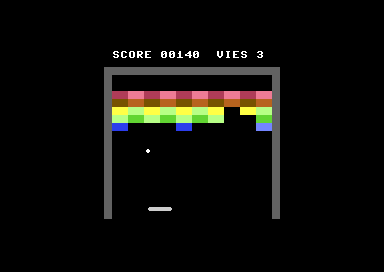
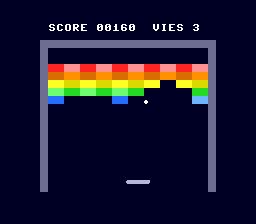
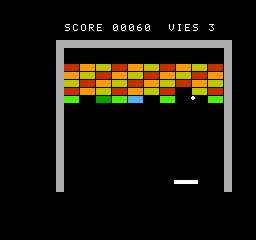
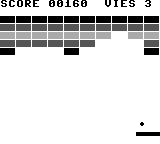
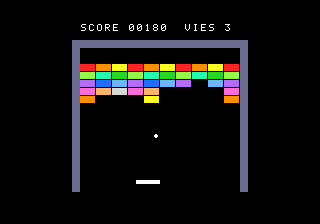
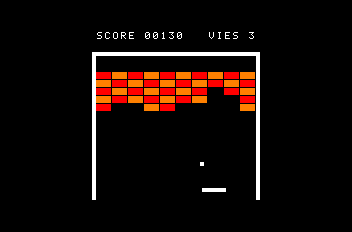
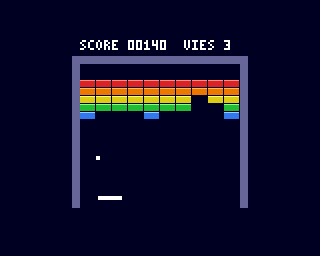
Each version has its own source page, with all its files. The projects are also in the
repository's Examples/ folder. Open one in Simple8 IDE, compile it, run it:
with no joypad input, a demo plays on its own. Touch the joypad, and you
take over.
| Machine | Folder | Sources |
|---|---|---|
| The rules, shared | Examples/common/CasseBriques/ | on every page |
| Commodore 64 | Examples/commodore/c64/CasseBriques_C64/ | view |
| PC Engine | Examples/nec/pce/CasseBriques_PCE/ | view |
| NES | Examples/nintendo/nes/CasseBriques_NES/ | view |
| Game Boy | Examples/nintendo/dmg/CasseBriques_DMG/ | view |
| Mega Drive | Examples/sega/megadrive/CasseBriques_MD/ | view |
| Amstrad CPC | Examples/amstrad/cpc/CasseBriques_CPC/ | view |
| Amiga | Examples/commodore/amiga/CasseBriques_Amiga/ | view |
An example to learn from, not an optimization reference. These seven programs are not the best way to write a breakout game on each machine. A programmer aiming for performance on just one of them would make other choices: more assembly, routines tailored to that machine's video chip, data prepared in advance. The goal here is to teach: to show how you approach the design of a game depending on the architecture, and how you build it with Simple8. These examples are obviously not perfect, but they have the advantage of being short, readable, and comparable from one machine to the next.
The rules of the game
Before writing a single line, you decide what the game must do. This is the core of an Arkanoid, without the power-ups:
- a playfield of 160 × 144 pixels, closed by walls on the left, on the right and at the top;
- 50 bricks: 10 columns, 5 rows. The top row is worth 50 points, the bottom row 10;
- a paddle 24 pixels wide, which moves 2 pixels per frame;
- a ball of 4 × 4 pixels. It waits on the paddle, and leaves when you press the button, or on its own after one second;
- the bounce angle depends on where the ball hits the paddle: that is what lets you aim;
- 3 lives. All bricks broken: “BRAVO” (well done) and a new wall. No lives left: “PERDU” (game over) and a new game;
- when nobody touches the joypad, a demo moves the paddle.
Anything you want to add later (power-ups, levels, sound) will build on this core.
The architecture: shared rules, one screen per machine
The trap would be to write seven games. Instead, you split the program into two units:
Jeu(game) holds the rules: positions, speeds, bricks, score, lives. Not a single line in it depends on the machine, not even anarchitectureline: a.s8uunit is compiled for the machine of the program that adds it;Ecran(screen) holds everything that touches the hardware: drawing, reading the joypad, waiting for the next frame. Each machine has its ownEcran.s8ufile.
The Ecran unit's contract
Jeu calls eight functions of Ecran. Every Ecran.s8u must define them, with
the same parameters. It is a contract, like an interface in Java: if one is missing, the
compiler rejects the program (“Function 'message' not found”).
| Function | Role |
|---|---|
init() | prepare the screen: colors, patterns, walls, sprites |
attendreImage() | wait for the next frame: this is what sets the pace of the game |
manette() | return the keys pressed: Jeu.GAUCHE, Jeu.DROITE, Jeu.BOUTON |
dessinerBriques() | draw the 50 bricks |
effacerBrique(c, l) | erase the brick in column c, row l |
placer(raquette, x, y) | show the paddle and the ball in their places |
afficherInfos() | write the score and the lives |
message(texte) | write “BRAVO” or “PERDU” in the middle, 0 to erase it |
The coordinates passed to Ecran are playfield coordinates, from 0 to 159
and from 0 to 143. Each machine places this playfield wherever it likes on its screen: it
simply adds an offset (X0, Y0).
The main program
Each machine's main.s8p is tiny. Here is the Commodore 64 one:
// Breakout — Commodore 64
//
// The rules are in Examples/common/CasseBriques/Jeu.s8u, the same on every machine.
// Here, the C64 display: the bricks as characters, the ball and the paddle as sprites.
// Joystick in port 2: left, right, FIRE to launch the ball. Without a joystick, the demo plays.
architecture commodore.c64;

addlib event.irq;
addlib vic.base;
addlib vic.screentext;
addlib vic.sprite;
addlib io.base;

addunit "../../../common/CasseBriques/Jeu.s8u";   // the rules, shared
addunit "Ecran.s8u";                                // the C64 display

unit {
    main() {
        Jeu.jouer();
    }

    // the frame interrupt: it sets the pace of Ecran.attendreImage()
    interrupt -> irq {
    }
}
The libraries change from one machine to the next; the rest barely changes. The path
../../../common/ fetches the rules from the shared folder: there is only one
copy of them.
Why is Jeu added before Ecran? Ecran reads variables from Jeu:
Jeu.vies (lives), and the address of the score text,
@Jeu.texteScore. With the current compiler, a unit can only take the
address of a variable in a unit added before it. Function calls, on the other hand, are
resolved in any order: Jeu can call Ecran, which is added after it.
The game loop
A video game is a loop: wait for the frame, read the joypad, move the world forward one step, show the result. Ours fits in a few lines:
// The game loop: called once by main(), never returns
void jouer() {
    Ecran.init();
    nouvellePartie();
    while (1) {
        Ecran.attendreImage();
        image(Ecran.manette());
        Ecran.placer((ubyte).raquetteX, (ubyte).balleX, (ubyte).balleY);
    }
}
And here is one frame of the game. The ball has two states: stuck to the paddle, or in play.
// One frame of the game
void image(ubyte touches) {
    bougerRaquette(touches);
    if (.collee == 1) {
        coller();
        if (.attente > 0) {
            .attente--;
        }
        if ((touches & .BOUTON) != 0 || .attente == 0) {
            .collee = 0;
            .dx = 1;
            .dy = -2;
        }
        return;
    }
    deplacerBalle();
    if (.balleY >= .HAUTEUR) {
        ballePerdue();
    }
}
All speeds are in pixels per frame: the paddle moves 2, the ball 1 or 2 in x and 2 in y. No decimals, no time calculations: the game is locked to the frame rate. A direct consequence: it runs a little faster on 60 frames per second machines (PC Engine, NES, Game Boy, Japanese or American Mega Drive) than on European 50 Hz machines (Commodore 64, Amstrad CPC, Amiga). Many games of that era had this flaw.
Waiting for the frame
attendreImage() is Ecran's most important function: it blocks until the
vertical blank, the moment when the beam goes back up to the top of the
screen (chapter 12). Each machine does it in its own way:
| Machine | attendreImage() |
|---|---|
| Commodore 64 | irq.waitFrame(), with an empty interrupt -> irq in main.s8p |
| PC Engine | wait for Main.images to change; interrupt -> irq1 increments it every frame |
| NES | ppu.waitFrame(): the tiles changed during the frame are written at that moment |
| Game Boy | wait for Main.images (interrupt -> vblank), then copy the objects by DMA |
| Mega Drive | vdp.waitVBlank() |
| Amstrad CPC | wait for Main.images (interrupt -> int, called once per frame) |
| Amiga | ocs.frame() |
The playfield and its grid
Why 160 × 144?
That is the Game Boy's screen, the smallest of the seven. A playfield of that size therefore fits everywhere, and the Game Boy shows it without cutting anything off.
The bricks are 16 × 8 pixels. That is no accident: 16 and 8 are powers of two (chapter 13). Dividing by 16 means shifting right by 4 bits; dividing by 8, shifting by 3. On a 6502 or a Z80, which have no division instruction, the difference is huge. And a brick is exactly two 8 × 8 tiles on the tile-based machines.
From pixel to brick
The bricks are stored in a 50-byte array, briques (bricks): 1 if the brick is
there, 0 if it is broken. To find out which brick lies under a point (x, y) of the
playfield, a small calculation is all it takes:
// The brick under the point (x, y), or 255 if there is none
ubyte briqueEn(int x, int y) {
    ubyte n;
    if (y < .HAUT_BRIQUES || y >= .BAS_BRIQUES || x < 0 || x >= .LARGEUR) {
        return 255;
    }
    .colonneTouchee = (ubyte)(x >> 4);                     // x / 16
    .ligneTouchee = (ubyte)((y - .HAUT_BRIQUES) >> 3);     // (y - 16) / 8
    n = (ubyte)(.DEBUT_LIGNE[.ligneTouchee] + .colonneTouchee);
    if (.briques[n] == 0) {
        return 255;
    }
    return n;
}
The multiplication row × 10 is replaced by a table,
DEBUT_LIGNE[] = { 0, 10, 20, 30, 40 }: 10 is not a power of two, and reading
a table is faster than multiplying. This is a recipe from chapter 13.
The ball
One axis at a time
The ball moves by dx in x and by dy in y. If you moved both at
once, a ball arriving at the corner of a brick would raise a hard question: did it hit
from the side (you must reverse dx) or from below (you must reverse
dy)?
You avoid the question by moving first in x, checking what you hit,
then in y, checking again. Each test concerns only one direction: a
contact in x reverses dx, a contact in y reverses dy. It is
simple, and in a breakout game you can barely tell.
The leading edge
There is no need to test all 16 pixels of the ball. When it moves to the right, only its right edge can enter a brick; when it moves up, only its top edge. You test the two corners of that edge: a brick is at least 8 pixels in size, so it cannot slip between two corners 4 pixels apart.
// The ball: move in x, then in y, and each time look at what the leading edge
// of the ball touches
void deplacerBalle() {
    int x = .balleX + .dx;
    int y;
    int bord;

    // the left and right walls
    if (x < 0) {
        x = 0;
        .dx = -.dx;
    } else if (x > .LARGEUR - .BALLE) {
        x = .LARGEUR - .BALLE;
        .dx = -.dx;
    }
    // the bricks, in x: the left or right edge of the ball, top and bottom
    bord = x;
    if (.dx > 0) {
        bord = x + .BALLE - 1;
    }
    if (toucher(bord, .balleY) != 0 || toucher(bord, .balleY + .BALLE - 1) != 0) {
        .dx = -.dx;
        x = .balleX;
    }
    .balleX = x;

    // the ceiling
    y = .balleY + .dy;
    if (y < 0) {
        y = 0;
        .dy = -.dy;
    }
    // the bricks, in y: the top or bottom edge of the ball, left and right
    bord = y;
    if (.dy > 0) {
        bord = y + .BALLE - 1;
    }
    if (toucher(.balleX, bord) != 0 || toucher(.balleX + .BALLE - 1, bord) != 0) {
        .dy = -.dy;
        y = .balleY;
    }
    .balleY = y;

    rebondRaquette();
}
Notice the order: you compute the future position, you test it, and if the ball hits something, you leave it where it was and reverse its speed. The ball never enters a brick, and never gets stuck in a wall.
toucher() (hit) does all the work of a broken brick: remove it from the
array, add the points, ask Ecran to erase it, and check whether any are left.
// Breaks the brick under the point (x, y) if there is one; returns 1 if the ball hit
ubyte toucher(int x, int y) {
    ubyte n = briqueEn(x, y);
    if (n == 255) {
        return 0;
    }
    .briques[n] = 0;
    .restantes--;
    .score = .score + .POINTS[.ligneTouchee];
    Ecran.effacerBrique(.colonneTouchee, .ligneTouchee);
    majInfos();
    if (.restantes == 0) {
        gagne();
    }
    return 1;
}
Bouncing off the paddle
If the ball always left at the same angle, the player could not aim. So the paddle is cut into four zones of 6 pixels: the closer to the edge the ball hits, the steeper the angle it leaves at.
// The paddle: the ball is moving down and overlaps the paddle
void rebondRaquette() {
    int zone;
    if (.dy < 0) {
        return;
    }
    if (.balleY + .BALLE < .RAQUETTE_Y || .balleY > .RAQUETTE_Y + .RAQUETTE_H) {
        return;
    }
    if (.balleX + .BALLE <= .raquetteX || .balleX >= .raquetteX + .RAQUETTE_L) {
        return;
    }
    // where the ball hits sets the angle: the middle of the ball on one of the paddle's
    // 4 zones of 6 pixels. Three comparisons, no division by 6
    zone = .balleX + 2 - .raquetteX;
    if (zone < 6) {
        .dx = -2;
    } else if (zone < 12) {
        .dx = -1;
    } else if (zone < 18) {
        .dx = 1;
    } else {
        .dx = 2;
    }
    .dy = -2;
    .balleY = .RAQUETTE_Y - .BALLE;
    .visee++;
    if (.visee == 6) {
        .visee = 0;
    }
}
Three comparisons are enough: no need to divide by 6. The test at the start
(.dy < 0) prevents a ball that is already going up from bouncing a second
time off the paddle.
The demo
A demo that always puts the ball at the same spot on the paddle always sends it back at the same angle. While this chapter was being developed, before the current bounce, that was enough for the ball to go around in circles in an area that was already empty: the score stopped moving. So ours aims at a different spot on the paddle at each bounce, taken from a table:
// The paddle: the keys, or the demo when nobody is playing
void bougerRaquette(ubyte touches) {
    if (touches != 0) {
        .inactif = 0;
    } else if (.inactif < 255) {
        .inactif++;
    }
    if (.inactif > 120) {
        // the demo: the paddle follows the ball
        int cible = .balleX + 2 - .VISEES[.visee];
        if (.raquetteX + 12 < cible - 1) {
            touches = .DROITE;
        } else if (.raquetteX + 12 > cible + 1) {
            touches = .GAUCHE;
        }
    }
    if ((touches & .GAUCHE) != 0 && .raquetteX > 0) {
        .raquetteX = .raquetteX - 2;
    }
    if ((touches & .DROITE) != 0 && .raquetteX < .LARGEUR - .RAQUETTE_L) {
        .raquetteX = .raquetteX + 2;
    }
}
With VISEES[] = { -9, 6, -3, 9, -6, 3 } (aim points), the paddle comes in
sometimes to the left, sometimes to the right of the ball: successive bounces go off in
different directions. A demo doesn't need to be smart, just varied.
Three ways to detect a collision
Detecting that a ball hits a brick is the central question of a breakout game. There are three main methods, and all of them were used back in the day.
1. Calculating in a grid
This is our game's method. The program knows the position of every brick in an array, and calculates what lies under a point. It never reads the screen:
- it is fast: two shifts, a table, an array cell;
- it predicts the contact before it happens, and tells you which brick is hit;
- it is the same on every machine. This is what makes a single Jeu unit possible.
Its limit: it assumes the scenery is laid out on a grid. For free-form scenery, you need something else.
2. Reading the screen
On a bitmap screen, you can look at the color of the pixel the ball is moving toward. On
the Amstrad CPC, gfx.getPixel returns the pen of a pixel:
// the pen of the pixel just above the ball: 0, nothing; otherwise, a brick or a wall
ubyte devant = gfx.getPixel(.X0 + x + 1, .Y0 + y - 1);
It is tempting, but the color does not tell you which brick is hit: to erase it, you have to calculate its column and row anyway. Each thing also needs its own color (an orange brick and orange text look the same), and reading a pixel costs more than reading an array cell.
On tile-based machines, the equivalent would be reading the tile map. But it lives in
video memory, which the processor can only read through the video chip's ports (PC Engine,
NES, Mega Drive), sometimes only during the vertical blank (NES, Game Boy). The solution
back then was to keep a copy of the map in RAM… which is exactly our
briques array.
3. Hardware collisions
Some video chips detect contacts between sprites, or between a sprite and the
background, on their own. On the Commodore 64, the VIC-II sets a bit to 1 for each sprite
in $D01E (contact with another sprite) and in $D01F (contact with
the background):
ubyte contact = readMem(0xD01F);        // one bit per sprite; reading resets it to 0
if ((contact & (1 << .spriteBalle)) != 0) {
    // the ball hit a background character
}| Machine | Hardware collisions |
|---|---|
| Commodore 64 | sprite against sprite, sprite against background, one bit per sprite |
| Amiga | sprites and screen planes, in pairs (CLXDAT register); sprite.hit() compares two bobs pixel-exact with the Blitter |
| PC Engine | sprite 0 against the other sprites, a single bit |
| Mega Drive | two overlapping sprites, a single bit, without saying which ones |
| NES, Game Boy, Amstrad CPC | nothing usable for the game |
They are pixel-exact, and free for the processor. But they arrive after the fact: the chip reports an overlap once the frame has been drawn, so when the ball is already inside the brick. They don't tell you which brick is hit either, and they don't exist on every machine.
Which one to choose?
| Method | Pros | Cons |
|---|---|---|
| The grid | fast, predicts the contact, tells which brick, the same everywhere | scenery laid out on a grid |
| Reading the screen | works for any shape | doesn't tell which object; video memory slow or out of reach |
| The hardware | pixel-exact, free for the processor | after the fact, rarely detailed, not everywhere |
In a real game, they are often combined: the grid for the scenery, overlapping rectangles between objects, and the pixel-exact test (hardware or Blitter) only when the rectangles touch.
Tiles, bitmaps and sprites
The rules are written. Now comes the drawing, and this is where the machines go their separate ways.
Tiles
On a tile-based machine (Commodore 64 in text mode, PC Engine, NES, Game Boy, Mega Drive), the screen is not a grid of pixels but a grid of 8 × 8 cells. Each cell holds the number of a pattern, drawn once and for all in video memory. To show a 16 × 8 brick, you write two numbers. To erase it, two others. The video chip does the rest every frame.
It is cheap, and perfectly suited to grid-based scenery like a wall of bricks. The constraint: everything in the background has to fall on the cell grid.
Bitmaps
On a bitmap machine (Amstrad CPC, Amiga), every pixel on the screen has its own place in memory. You can draw anything, anywhere: curves, polygons, gradients. But every pixel has a cost: a 16 × 8 brick means 128 pixels to write.
The Amiga makes up for it with its Blitter, a chip that fills and copies rectangles while the processor does something else. The Amstrad CPC only has its Z80: the processor writes every single byte.
Hardware sprites
A sprite is a small picture that the video chip overlays on the screen, at the position you give it. To move it, you change two numbers. Nothing to erase, nothing to redraw, and the background underneath stays intact. It is ideal for things that move: the ball and the paddle.
Each machine has its limits: 8 sprites of 24 × 21 on the Commodore 64, 64 sprites of 8 × 8 on the NES, 40 objects on the Game Boy, 64 sprites up to 32 × 64 on the PC Engine, 80 on the Mega Drive, 8 sprites 16 pixels wide on the Amiga. A 24-pixel paddle therefore takes one sprite on the Commodore 64, three on the NES and Game Boy, two on the Amiga.
Software sprites
The Amstrad CPC has no sprites. You have to imitate them: every frame, erase the old position, then draw the new one. This is what is called a software sprite.
On a black background, erasing means repainting in black. On a drawn background, you
would first have to save what is under the sprite, to put it back
afterward: that is what the Amiga's “bobs” do (video.sprite), with the help
of the Blitter.
Machine by machine
Each Ecran.s8u is between 87 and 161 lines long. Here is, for each machine,
what guided its choices.
Commodore 64
- Bricks
- two reverse-video spaces: two solid characters
- Colors
- one per cell (color memory): a checkerboard of two shades per row
- Ball, paddle
- two 24 × 21 hardware sprites
- Text
- the Commodore font, directly
- Sources
- all the project's files
The C64's text mode is already a tile machine: 40 × 25 cells, each with its own color. A space in reverse video is a solid square in the text color. So a brick is two reversed spaces, without drawing a single pattern:
// A brick = two reverse-video spaces, in the color of its row
void dessinerBriques() {
    for (ubyte l = 0; l < 5; l++) {
        for (ubyte c = 0; c < 10; c++) {
            if (((c + l) & 1) == 0) {
                vic.setFontColor(.COULEUR_A[l]);
            } else {
                vic.setFontColor(.COULEUR_B[l]);
            }
            vic.setCursor((ubyte)(.COL0 + c * 2), (ubyte)(.LIG0 + 2 + l));
            vic.setInvertOn();
            vic.print("  ");
            vic.setInvertOff();
        }
    }
}
The ball and the paddle are sprites: two calls to moveSprite per frame, and
that's it.
// The sprites follow the game: two calls, nothing to erase
void placer(ubyte raquette, ubyte x, ubyte y) {
    sprite.moveSprite(.spriteRaquette, .X0 + raquette, .Y0 + Jeu.RAQUETTE_Y);
    sprite.moveSprite(.spriteBalle, .X0 + x, .Y0 + y);
}
PC Engine
- Bricks
- solid tiles in the BAT
- Colors
- one tile palette per brick color (1 to 10), one for the walls
- Ball, paddle
- two sprites, 16 × 16 and 32 × 16
- Text
- a font loaded into video memory, from a resource
- Sources
- all the project's files
The PC Engine has 16 palettes of 16 colors for tiles: you can afford one palette per
brick color, and choose a brick's color by choosing its palette. It has no font in ROM:
police.bin is added by addResource and copied into video memory
at startup.
Its sprites read their patterns from video memory: you copy them there, then create the sprites by giving the pattern's address and their size.
// the sprite patterns, copied into video memory
vdc.writeToVRAM(@.MOTIF_BALLE, .VRAM_BALLE, 128);
vdc.writeToVRAM(@.MOTIF_RAQUETTE, .VRAM_RAQUETTE, 256);
sprite.initSprite();
sprite.setSpritePriority(sprite.SPRITE_PRIORITY_FG);
sprite.setSpriteSize(sprite.SPRITE_16x16);
sprite.setSpritePalette(0);
.spriteBalle = sprite.createSprite(0, -64, .VRAM_BALLE);
sprite.setSpriteSize(sprite.SPRITE_32x16);
sprite.setSpritePalette(1);
.spriteRaquette = sprite.createSprite(0, -64, .VRAM_RAQUETTE);
NES
- Bricks
- six drawn tiles: two brick halves in three colors
- Colors
- one 3-color palette per 32 × 32 pixel block
- Ball, paddle
- 4 sprites of 8 × 8: 1 for the ball, 3 for the paddle
- Text
- the font from
ppu.screentext - Sources
- all the project's files
The NES imposes the toughest constraint: the palette is not chosen per cell, but per 32 × 32 pixel block (4 × 4 cells). So four rows of bricks share the same 3-color palette. The trick: put the color in the tile itself (one tile in color 1, one in color 2, one in color 3), and align the playfield on the blocks so that the walls get their own.
// one palette per 32 x 32 pixel block: the brick blocks
for (byte bx = 2; bx < 7; bx++) {
    ppu.setAreaPalette(bx, 2, 1);
    ppu.setAreaPalette(bx, 3, 2);
}
Another constraint: you can only write to the tile map during the vertical blank. To
place the wall's 100 tiles in one go, dessinerBriques() turns the screen off
(ppu.off()); during the game, ppu.putTile queues the tiles, and
ppu.waitFrame() writes them at the vertical blank.
Game Boy
- Bricks
- six drawn tiles, one gray per row
- Colors
- 4 grays in all: the white background, the black text, two grays
- Ball, paddle
- 4 objects of 8 × 8
- Text
- a font generated by
tools/police.py(Police.s8u) - Sources
- all the project's files
The screen is exactly 160 × 144 pixels: the playfield takes up the whole screen, and the score is written on the first line. With 4 grays, the rows are told apart by their shade, nothing more.
Here, the objects (the Game Boy's sprites) are not written directly: the program fills a copy of their table in RAM, and DMA copies it over in one go during the vertical blank.
// One object in the copy of the table: y + 16, x + 8, tile, attributes
void objet(ubyte n, ubyte x, ubyte y, ubyte tuile) {
    ubyte i = (ubyte)(n * 4);
    oam.shadow[i] = (ubyte)(y + 16);
    oam.shadow[i + 1] = (ubyte)(x + 8);
    oam.shadow[i + 2] = tuile;
    oam.shadow[i + 3] = 0;
}

// Wait for the vertical blank, then copy the objects there by DMA
void attendreImage() {
    ubyte avant = Main.images;
    while (Main.images == avant) {
    }
    oam.flush();
}
Mega Drive
- Bricks
- the Game Boy's tiles, converted to 16 colors
- Colors
- 4 sets of 3 colors in palette 0
- Ball, paddle
- two sprites: 8 × 8, and 24 × 8 (three tiles)
- Text
- the font from
vdp.loadFont - Sources
- all the project's files
The Mega Drive has 16-color tiles (4 bits per pixel). Rather than redrawing the bricks,
we reuse the Game Boy's tiles (2 bits per pixel): vdp.loadTiles2bpp converts
them by shifting their colors. The same 6 tiles, loaded 4 times with an
offset of 0, 4, 8 and 12, give 4 sets of colors:
for (ubyte jeu = 0; jeu < 4; jeu++) {
    vdp.loadTiles2bpp(@.TUILES_BRIQUES, (uint)(.BRIQUES + jeu * 6), 6, (ubyte)(jeu * 4), 0);
}
Its sprites form a linked list: each one points to the next. The ball (0) leads to the paddle (1), which ends the list. A Mega Drive sprite can be up to 32 × 32 pixels: the paddle fits in a single one.
// Two linked sprites: the ball (0), then the paddle (1), the end of the list
void placer(ubyte raquette, ubyte x, ubyte y) {
    vdp.setSprite(0, .X0 + x, .Y0 + y, 0, 1, vdp.cell(.BALLE, 2, 0));
    vdp.setSprite(1, .X0 + raquette, .Y0 + Jeu.RAQUETTE_Y, 8, 0, vdp.cell(.RAQUETTE, 2, 0));
}
Amstrad CPC
- Bricks
- solid rectangles,
gfx.setFillRect - Colors
- 4 pens in mode 1: black, red, orange, white
- Ball, paddle
- software sprites: erase, then redraw
- Text
gfx.setText, on an area first repainted in black- Sources
- all the project's files
The CPC is the most bare-bones machine: a bitmap screen, and that's all. In mode 1 (320 × 200, 4 colors), once black and white are taken, two colors are left for the bricks. The ball and the paddle are software sprites, and they are redrawn only if they have moved:
// Software sprites: erase the old position, draw the new one
void placer(ubyte raquette, ubyte x, ubyte y) {
    int ry = .Y0 + Jeu.RAQUETTE_Y;
    if (raquette != .ancienneRaquette) {
        if (.ancienneRaquette >= 0) {
            gfx.setPen(.NOIR);
            gfx.setFillRect(.X0 + .ancienneRaquette, ry, .X0 + .ancienneRaquette + 23, ry + 3);
        }
        gfx.setPen(.BLANC);
        gfx.setFillRect(.X0 + raquette, ry, .X0 + raquette + 23, ry + 3);
        .ancienneRaquette = raquette;
    }
    if (x != .ancienneBalleX || y != .ancienneBalleY) {
        if (.ancienneBalleX >= 0) {
            gfx.setPen(.NOIR);
            gfx.setFillRect(.X0 + .ancienneBalleX, .Y0 + .ancienneBalleY,
                            .X0 + .ancienneBalleX + 3, .Y0 + .ancienneBalleY + 3);
        }
        if (y < Jeu.HAUTEUR) {
            gfx.setPen(.BLANC);
            gfx.setFillRect(.X0 + x, .Y0 + y, .X0 + x + 3, .Y0 + y + 3);
        }
        .ancienneBalleX = x;
        .ancienneBalleY = y;
    }
}
Even the text needs care: in bitmap mode, writing a digit over another one overlays the two. So the score area is repainted in black before it is written.
Amiga
- Bricks
- rectangles laid down by the Blitter, with a highlight line
- Colors
- 16 colors (4 planes), each chosen from 4,096
- Ball, paddle
- three hardware sprites: 1 for the ball, 2 for the paddle
- Text
- a 3 × 5 pixel font, drawn with small squares
- Sources
- all the project's files
The Amiga brings together the best of both worlds: a bitmap screen that the Blitter fills quickly, and real sprites. With 16 colors, each brick can have a lighter line at the top, a highlight. The sprites are described by a list in memory: their lines are written once, at startup, and then only their two control words (their position) change every frame.
// The sprites: only their control words
void placer(ubyte raquette, ubyte x, ubyte y) {
    int rx = .X0 + raquette;
    ocs.spritePosition(ocs.sprite(0, 0), .X0 + x, (uint)(.Y0 + y), 4, 0);
    ocs.spritePosition(ocs.sprite(0, 2), rx, (uint)(.Y0 + Jeu.RAQUETTE_Y), 4, 0);
    ocs.spritePosition(ocs.sprite(0, 3), rx + 16, (uint)(.Y0 + Jeu.RAQUETTE_Y), 4, 0);
}
Without the operating system, the Amiga has no font at hand. No matter: 5 rows of 3 pixels per character, each pixel drawn as a 2 × 2 square:
// One character of the font, in 2 x 2 squares; a space draws nothing
void lettre(int x, int y, ubyte c) {
    if (c < '0' || c > 'Z') {
        return;
    }
    uint g = (uint)(c - '0') * 5;
    for (ubyte r = 0; r < 5; r++) {
        ubyte bits = .POLICE[g + r];
        for (ubyte k = 0; k < 3; k++) {
            if ((bits & (4 >> k)) != 0) {
                bitmap.rect(x + (int)k * 2, y + (int)r * 2, 2, 2, .TEXTE);
            }
        }
    }
}
The summary
| Machine | Bricks | Ball and paddle | Ecran.s8u | Program |
|---|---|---|---|---|
| Commodore 64 | characters | 2 sprites | 102 lines | 5.4 KB (.prg) |
| PC Engine | tiles | 2 sprites | 125 lines | 16 KB HuCard |
| NES | tiles | 4 sprites | 116 lines | 32 KB cartridge |
| Game Boy | tiles | 4 objects | 87 lines | 32 KB cartridge |
| Mega Drive | tiles | 2 sprites | 115 lines | 128 KB cartridge |
| Amstrad CPC | bitmap | software sprites | 111 lines | 7.9 KB (on disk) |
| Amiga | bitmap (Blitter) | 3 sprites | 161 lines | 67 KB (ADF disk) |
The rules, for their part, take 236 lines, written only once. A cartridge has a standard size: the game itself takes up much less.
What this project shows. Simple8 doesn't hide the machines: on each one, we used what it does best: tiles where there are tiles, sprites where there are sprites, the Blitter on the Amiga. What Simple8 brings is a common language for the part that doesn't depend on the hardware. And in a game, that is often the biggest part.
Going further
The game is deliberately minimal. Here are some ideas, from the simplest to the most ambitious:
- Solid bricks: a value of 2 in
briquesfor a brick that has to be hit twice. Jeu decrements the cell, Ecran changes its color. - Levels: a 50-byte table per level, copied into
briquesat the start of the level. They can be drawn in SquareDot. - A smoother ball: positions in sixteenths of a pixel (as in the
BobsAmigaexample), for more varied angles and a speed that increases gradually. - Sound: a “beep” on each bounce, through the SID on the Commodore 64,
through
sound.paulaon the Amiga. It goes into Ecran, with a ninth function in the contract. - Power-ups: a capsule falling from a broken brick is one more sprite; catching it is a rectangle test against the paddle.
Key points
- Separate the rules (a shared unit, with no
architectureline) from the display (one unit per machine, with the same functions). - A game moves forward one step per frame:
attendreImage()sets the pace, and speeds are counted in pixels per frame. - A grid in memory and powers of two give fast collisions that predict the contact and work everywhere.
- Move one axis at a time, and only test the leading edge.
- Tiles cost a few bytes per brick, bitmaps dozens; hardware sprites move by changing two numbers, software sprites are erased and redrawn.
Your turn
- Change the values of
POINTS[]andVISEES[], and watch the demo play differently on two machines.Show solutionHide solution
Both tables are in
Jeu.s8u: a single change applies to all seven machines. We tried three settings, compiled for the Commodore 64 and the PC Engine, and let the demo play on its own for three minutes in the test kit's emulators.POINTS[]: the bottom rows are worth moreconst uint POINTS[] = { 10, 20, 30, 40, 50 }; // the bottom rows are worth moreThe demo plays exactly the same game: the first wall falls at 98.1 s on the C64 and 81.6 s on the PC Engine, just as with the original values.
POINTS[]is only used for the score. Only the running score changes (3,200 instead of 3,040 on the C64 after 3 minutes); a complete wall is still worth 1,500 points, since the sum of the five values is the same.VISEES[]: always aim at the middleconst byte VISEES[] = { 0, 0, 0, 0, 0, 0 };The paddle sits under the ball, which always leaves at the same small angle. The start is slower (830 points at 40 s on the C64, versus 1,170), but the end is much faster: the first wall falls at 69.1 s instead of 98.1 s on the C64, and at 57.5 s instead of 81.6 s on the PC Engine. With the original values, the last bricks take a long time to find; here, the ball reaches them better. So the demo is less varied, but not necessarily less effective: you have to measure it to know.
VISEES[]: aim at the ends of the paddleconst byte VISEES[] = { -11, 11, -11, 11, -11, 11 };This time, the demo keeps losing: a life every 3 to 7 seconds on both machines, and almost no points. The ball only touches the very last pixels of the paddle, and the target jumps 22 pixels from one bounce to the next; but the paddle moves 2 pixels per frame, no faster than a ball launched at an angle: it often arrives too late.
Two rules to remember. An aim point must stay within the paddle: between -11 and 11, since the paddle is 24 pixels wide. And the table must keep 6 values:
rebondRaquette()resetsviseeto 0 when it reaches 6. For another size, you have to change that 6 too.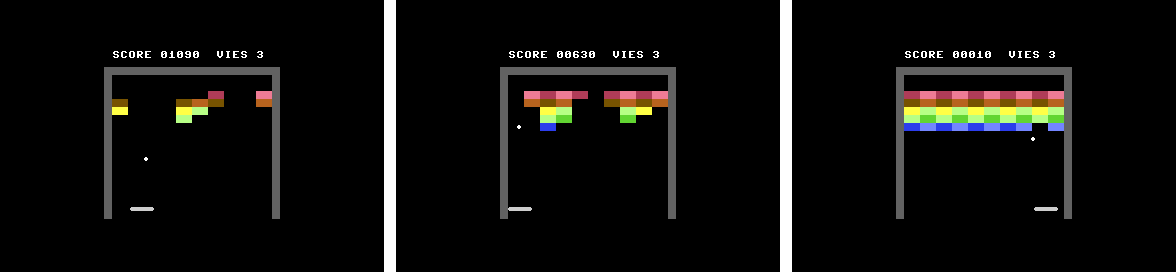
The demo on the C64 (VICE), about 40 seconds after startup: the original aim points, then all set to 0, then at the ends of the paddle. - Add solid bricks that take two hits.
Show solutionHide solution
The
briquesarray no longer just says whether a brick is there: it counts the hits still needed to break it. 0, it is broken; 1, a normal brick; 2, a solid brick. The rest ofJeukeeps working unchanged:briqueEn()still testsbriques[n] == 0, andrestantes(remaining) still counts bricks, not hits. Here, the top row is solid; a small table gives the solidity of each row.In
Jeu.s8uconst ubyte SOLIDITE[] = { 2, 1, 1, 1, 1 }; // the hits needed to break a brickThe two loops that filled the wall (in
nouvellePartie()and ingagne()) put 1 everywhere. They are replaced by a call to a new function,remplirMur():// A fresh wall: each brick gets the solidity of its row void remplirMur() { ubyte n = 0; for (ubyte l = 0; l < .LIGNES; l++) { for (ubyte c = 0; c < .COLONNES; c++) { .briques[n] = .SOLIDITE[l]; n++; } } .restantes = 50; }In
toucher(), you take away one hit. If any are left, the brick stays standing: no points, the ball bounces (we return 1), andEcranchanges its color.ubyte toucher(int x, int y) { ubyte n = briqueEn(x, y); if (n == 255) { return 0; } .briques[n]--; // one hit less if (.briques[n] != 0) { // a solid brick, still standing: it changes color, the ball bounces Ecran.fissurerBrique(.colonneTouchee, .ligneTouchee); return 1; } .restantes--; .score = .score + .POINTS[.ligneTouchee]; Ecran.effacerBrique(.colonneTouchee, .ligneTouchee); majInfos(); if (.restantes == 0) { gagne(); } return 1; }Jeunow calls a ninth function ofEcran,fissurerBrique(c, l)(crack brick). The contract grows: everyEcran.s8umust define it, otherwise that machine's program no longer compiles (Function 'fissurerBrique' not found !, checked on the Amstrad CPC version).dessinerBriques()must also draw the solid bricks in another color: it readsJeu.briques, which is allowed, sinceJeuis added beforeEcran.On the Commodore 64: a solid brick is white; once hit, it takes back the color of its row.
// A brick = two reverse-video spaces; a solid brick is white
void dessinerBriques() {
    ubyte n = 0;
    for (ubyte l = 0; l < 5; l++) {
        for (ubyte c = 0; c < 10; c++) {
            if (Jeu.briques[n] == 2) {
                brique(c, l, vic.WHITE);
            } else {
                fissurerBrique(c, l);
            }
            n++;
        }
    }
}

// A brick in the color of its row, as a checkerboard
void fissurerBrique(ubyte c, ubyte l) {
    if (((c + l) & 1) == 0) {
        brique(c, l, .COULEUR_A[l]);
    } else {
        brique(c, l, .COULEUR_B[l]);
    }
}

void brique(ubyte c, ubyte l, ubyte couleur) {
    vic.setFontColor(couleur);
    vic.setCursor((ubyte)(.COL0 + c * 2), (ubyte)(.LIG0 + 2 + l));
    vic.setInvertOn();
    vic.print("  ");
    vic.setInvertOff();
}
On the PC Engine: the same thing with one more palette, number 12 (the bricks use palettes 1 to 10, the walls palette 11), set in
init():vce.setPalette(12, 1, RGB(7, 7, 7)); // the solid bricks: white// A brick = two solid tiles (reverse-video spaces), in the palette of its color; // a solid brick uses palette 12 void dessinerBriques() { ubyte n = 0; for (ubyte l = 0; l < 5; l++) { for (ubyte c = 0; c < 10; c++) { if (Jeu.briques[n] == 2) { brique(c, l, 12); } else { fissurerBrique(c, l); } n++; } } } // A brick in the palette of its row, as a checkerboard void fissurerBrique(ubyte c, ubyte l) { brique(c, l, (ubyte)(1 + l * 2 + ((c + l) & 1))); } void brique(ubyte c, ubyte l, ubyte numero) { vdc.setFontColor(numero); vdc.setCursor((ubyte)(.COL0 + c * 2), (ubyte)(.LIG0 + 2 + l)); vdc.setInvertOn(); vdc.print(" "); vdc.setInvertOff(); }Watch out for a trap: the parameter of
brique()cannot be calledpalette. It is a reserved word in Simple8 (it is used for resources), and the compiler stops on a syntax error:Encountered " "palette" "palette "". So it is callednumero(number).Both versions compile and play. In the demo, after 40 seconds, you can see top bricks that have turned red or pink again (hit once) and others that have disappeared (hit twice). The game lasts longer: after 4 minutes, the demo has not yet finished the first wall (1,450 points on both machines; one brick is left, already hit once), whereas it finishes it in 98 s on the C64 and 82 s on the PC Engine without solid bricks.
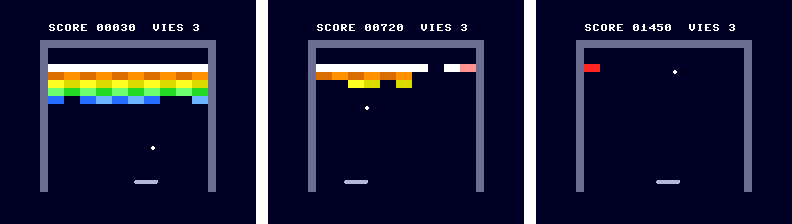
On the PC Engine, after 5 s, 40 s and 4 minutes: the white row is solid; a brick hit once takes back the color of its row. 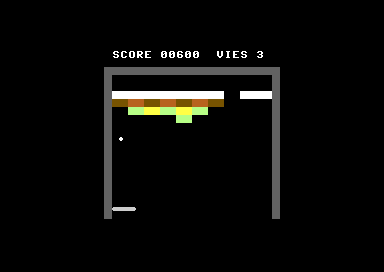
On the Commodore 64 (VICE), about 40 seconds after startup. - On the Amstrad CPC, replace the grid test with
gfx.getPixel. What do you still have to calculate to erase the right brick?Show solutionHide solution
Jeumust not know anything about the machine: it cannot callgfx.getPixelitself. So reading the screen goes into the CPC'sEcran, as a small function that says whether a point of the playfield has a brick's color. We only look at the two brick pens: the white of the walls, the paddle, the ball and the text is not a brick.// 1 if the point (x, y) of the playfield has a brick's color: we read the screen ubyte briqueVisible(int x, int y) { ubyte pen = gfx.getPixel(.X0 + x, .Y0 + y); if (pen == .BRIQUE_A || pen == .BRIQUE_B) { return 1; } return 0; }In
briqueEn(), this read replaces the test of thebriques[n]cell. The test of the brick area at the start is kept: it only costs four comparisons, and avoids reading the screen when the ball is far from the bricks, which is almost always.// The brick under the point (x, y), or 255 if there is none ubyte briqueEn(int x, int y) { ubyte n; if (y < .HAUT_BRIQUES || y >= .BAS_BRIQUES || x < 0 || x >= .LARGEUR) { return 255; } // the screen tells whether there is a brick... if (Ecran.briqueVisible(x, y) == 0) { return 255; } // ... but not which one: its column and row are still calculated .colonneTouchee = (ubyte)(x >> 4); // x / 16 .ligneTouchee = (ubyte)((y - .HAUT_BRIQUES) >> 3); // (y - 16) / 8 n = (ubyte)(.DEBUT_LIGNE[.ligneTouchee] + .colonneTouchee); return n; }Here is the answer to the question: the color says there is a brick, not which one. You still have to calculate its column (
x >> 4) and its row ((y - 16) >> 3). The column and row are used byEcran.effacerBrique(c, l), which repaints the right brick in black, and the row gives the points (POINTS[ligneTouchee]). The numbernis still used bytoucher(), which sets the cell to 0: the array is no longer read for collisions, but it stays accurate.This version modifies
Jeu.s8uand calls a function that only the CPC'sEcranhas: it would no longer compile for the other machines. That is the price of this method: it ties the rules to one machine's screen.Checked in the test kit's emulator: the demo plays normally and finishes its first wall in 108.5 s (104.3 s with the grid: the trajectory changes a little, probably because the one-pixel gap between two bricks is black, whereas the grid counts it as part of the brick). And reading costs more: a call to
briqueEn()that passes the area test takes 2,136 T-states on average instead of 1,192 with the grid, measured over the first 30 seconds.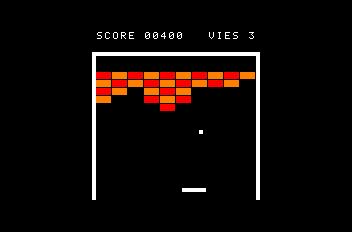
The version with gfx.getPixel, after 30 seconds of demo. - Pick a machine and add a sound on each bounce, without touching
Jeu.s8ubeyond the call itself.Show solutionHide solution
The Commodore 64 is the simplest machine for a “beep”: its sound chip, the SID, plays a note by itself once it is set up, and the
sid.baselibrary provides everything you need. You just give it a waveform, an envelope (how the sound rises, holds and fades), a note, then open and close the voice's gate.In
Jeu.s8u, only one line is added, inrebondRaquette(), when the ball bounces back:.dy = -2; .balleY = .RAQUETTE_Y - .BALLE; Ecran.bip(); // the bounce sound: each machine plays it its own way .visee++;Everything else is in the C64's
Ecran. Inmain.s8p, the SID library:addlib sid.base; // sound: the SIDIn
Ecran.s8u, one variable, the end ofinit(), and two functions:ubyte dureeBip; // frames before the beep ends, 0: silence // … void init() { // … // sound: SID voice 0, a square wave that starts right away sid.init(); sid.setWaveform(0, sid.PULSE); sid.setPulseWidth(0, 0x800); sid.setEnvelope(0, 0x00, 0xF6); // attack 0, decay 0, sustain 15, release 6 } // … void attendreImage() { irq.waitFrame(); if (.dureeBip > 0) { .dureeBip--; if (.dureeBip == 0) { sid.noteOff(0); // end of the beep: the sound fades (the release) } } } // A short beep: the note starts, attendreImage() stops it three frames later void bip() { sid.setNote(0, 60); // C-5 sid.noteOn(0); .dureeBip = 3; }Why not close the gate right away in
bip()? The SID only restarts a note when the gate goes from closed to open; the sound also has to last long enough to be heard. Sobip()opens the gate, andattendreImage(), already called every frame, closes it three frames later. The sound then fades out smoothly (the release), and the gate is closed for the next bounce.Adding a function called by
Jeumeans extending the contract: everyEcran.s8umust now have abip(), otherwise its machine no longer compiles (Function 'bip' not found !, obtained on the Amstrad CPC version). An empty function is enough on the machines that stay silent:// No sound on the CPC yet: the function exists, it does nothing void bip() { }Checked in two ways. In the test kit's emulator, which logs writes to the SID: in 60 seconds of demo, 28 bounces off the paddle and 28 openings of voice 0's gate (
$D404 = $41), each closed 3 frames later ($D404 = $40, 0.058 s later). And in VICE, by recording the sound to a WAV file: a sound of about a tenth of a second at each bounce (at 2.96 s, 4.42 s, 5.88 s, 7.32 s…), with a frequency close to 520 Hz, that of C5 (523 Hz).
You now have everything you need to write your own games. Pick a machine, open Simple8 IDE, and dive in!